Owner’s manual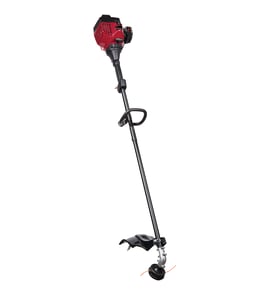




Do trimmer plus attachments work with Craftsman?
Yes, TrimmerPlus-style (coupler) attachments can work with the Craftsman line trimmer model 358791140 because this model is a convertible powerhead with a coupler for optional attachments. This specific model is a 33cc (2.0 cu. in.) 2-cycle unit; confirm the attachment is rated for coupler systems and your workload.
What we can confirm for model 358791140
From the 358791140 operator's manual, this Craftsman trimmer:
- Is a 33cc (2.0 cu. in.) 2-cycle gasoline powerhead
- Uses a coupler with a locking/release button
- Requires the button to snap into the primary hole for normal attachment use
- Lists optional attachment types (edger, cultivator, blower, brushcutter, pruner)
How to verify attachment fit before you buy
Coupler compatibility is the key; engine size matters for performance, not the lock-in connection.
- The attachment is labeled for TrimmerPlus or “universal coupler” systems
- The attachment shaft slides fully into the coupler without forcing
- The locking/release button aligns with the guide recess and clicks into the primary hole
- The coupler knob tightens securely with no wobble
- You install any required guard/handlebar for that attachment type
Quick check: connection vs. power
| What you are checking | What it affects | What to do |
|---|---|---|
| Coupler lock-in (button and primary hole) | Safety and whether it physically fits | Test-fit and confirm a solid click and tight knob |
| Engine size (33cc) | How well it performs under load | Match attachment type to the job (light vs. heavy use) |
If the attachment will not lock in
A no-click or loose fit is usually coupler wear, debris, or a mismatched shaft/button location.
- Clean the coupler and inspect for burrs or damage
- Confirm the attachment button location matches the coupler holes
- Check for a bent attachment shaft
- If the knob will not tighten or hold, replace the coupler hardware such as the knob screw kit 587119302
Why it matters
If the attachment does not fully lock into the coupler, it can vibrate excessively, slip, or pull out during use, which can damage the drive connection and create a safety hazard.
Last updated: January 2026
How to replace line on Craftsman gas trimmer?
To replace the cutting line on your Craftsman 358791140 gas line trimmer, remove the old line, reinstall the line glide plate, then feed a new length of trimmer line through the correct holes so both ends are equal. Follow the line-routing diagram in the 358791140 operator's manual.
Steps to replace the trimmer line
- Stop the engine and disconnect the spark plug boot before working near the trimmer head.
- Remove the old line and remove the line glide plate from the trimmer head.
- Clean the trimmer head so the line seats correctly.
- Reinstall the line glide plate; align the arrow for the line size you are using.
- Insert both ends of the new line through the proper holes in the side of the trimmer head.
- Pull both ends until the line is against the hub and fully seated in the positioning tunnels.
Choosing the right line (what this model calls out)
The 358791140 manual describes different line types by color; pick the one that matches what you are cutting.
| Line type (manual description) | Best for | What you will notice |
|---|---|---|
| Red line | Grass and small weeds | Smoother cutting, less load |
| Black line | Larger weeds and light brush | More durability, more drag |
Common mistakes that cause feeding problems
- Using the wrong holes for the line diameter (the line glide plate shows the correct routing).
- Not reinstalling the line glide plate before inserting new line.
- Pulling one side longer than the other; the line should be the same length on both ends.
- Letting line twist or cross inside the head; it should sit in the positioning tunnels.
Why it matters
Correctly routed, equal-length line helps the trimmer head stay balanced, reduces vibration, and lets the line limiter blade trim the line to a safe working length during use.
Last updated: January 2026
How to replace trimmer head on Craftsman Weedwacker?
On the Craftsman 358791140, you replace the trimmer head by locking the shaft (at the dust cup) so it cannot turn, then unthreading the head counterclockwise (viewed from the bottom). Thread the new head on clockwise and tighten by hand only; do not cross-thread.
Steps to replace the trimmer head (model 358791140)
- Stop the engine and let it cool.
- Disconnect the spark plug boot so the trimmer cannot start accidentally.
- Turn the trimmer upside down so you can access the head.
- Hold the dust cup with a wrench to keep the shaft from turning.
- Remove the trimmer head by turning it counterclockwise (looking from the bottom).
- Thread the replacement trimmer head on clockwise and tighten hand tight only.
For the model-specific procedure and diagrams, follow the 358791140 operator's manual.
Tips to avoid cross-threading and loosening
- Start the new head by turning it backward slightly until you feel the threads “drop” into place, then turn clockwise.
- Keep the head square to the shaft; if it binds quickly, back it off and restart.
- Tighten firmly by hand; over-tightening with tools can damage threads.
- After installation, bump-test and run briefly at low throttle to confirm the head stays secure.
Quick direction check
| Task | Direction (viewed from bottom) |
|---|---|
| Remove trimmer head | Counterclockwise |
| Install trimmer head | Clockwise |
Why it matters
A properly installed trimmer head prevents vibration, protects the drive shaft threads, and helps the line feed and cut consistently. Cross-threading can damage the shaft and make future removal difficult.
Last updated: January 2026
What size trimmer line for Craftsman?
For the Craftsman 358791140 gas line trimmer, we recommend using Craftsman replacement trimmer line and selecting the diameter that matches the trimmer head’s line glide plate and the line-routing holes shown in the manual. This model supports different line sizes depending on the job.
How to choose the right line size for model 358791140
On this trimmer, the correct line diameter is determined by the trimmer head setup (the line glide plate alignment and which holes you feed the line through), not just by brand. We follow the guidance in the 358791140 operator’s manual.
- Match the line to the job: lighter grass vs. heavier weeds and light brush
- Use the line glide plate arrows to select the correct hole set for your line diameter
- Keep both line ends the same length after installing
- Avoid oversized line; it can reduce performance and increase head wear
- Use only trimmer line (never wire, rope, or string)
Quick guide: line type vs. typical use
The manual describes color-coded line intent (commonly sold as “red” and “black”). Use this as a practical selection guide.
| Line type (as described) | Best for | What you’ll notice |
|---|---|---|
| Medium (red) | Grass and small weeds | Smoother cutting, less load |
| Large (black) | Larger weeds and light brush | More durability, more drag |
| Smaller than medium (optional) | Light trimming | Faster feed, wears quicker |
Why it matters
Using the correct line diameter helps the 358791140 cut efficiently at lower throttle, reduces vibration, and prevents premature wear on the trimmer head and line limiter blade.
Last updated: January 2026