Owner’s manual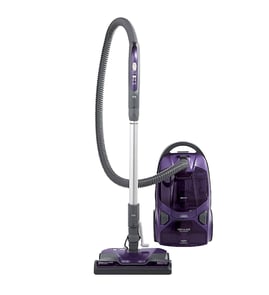




Where to find model number on Kenmore canister vacuum?
On the Kenmore canister vacuum model 11681714510, the model number is printed on the Model and Serial Number Plate. We use that plate information to match the correct Kenmore parts, accessories, and repair instructions for your exact vacuum.
Where to look on the vacuum
Check these common plate locations on canister vacuums like 11681714510:
- On the canister body near the rear or bottom (often close to the cord rewind area)
- Under a lid or cover you open for bag or dust compartment access
- Near the hose connection port on the canister
- On the underside of the canister base (flip the canister carefully to view)
- Occasionally on the back panel near the power cord exit
For the exact reference to the plate and how it is described, use the 11681714510 owner's manual.
What to write down (and why)
Record both numbers from the plate; they help ensure part compatibility and correct troubleshooting.
| Plate item | What it’s used for | Example of when you need it |
|---|---|---|
| Model number | Identifies the exact vacuum design | Ordering filters, hoses, or internal parts |
| Serial number | Identifies the production run | Warranty and service questions |
Why it matters
Kenmore canister vacuums can look similar across multiple model families. Using the model number from the plate prevents ordering the wrong vacuum exhaust filter, air guides, or other components that may not fit.
Last updated: February 2026
How long do Kenmore canister vacuums last?
Most Kenmore canister vacuums, including model 11681714510, last 8 to 12 years with normal household use and routine maintenance (bags, filters, and clearing clogs). Consistent airflow and clean filtration do the most to extend motor life; follow the care schedule in the 11681714510 owner’s manual.
Typical lifespan and what affects it
A canister vacuum’s life is mainly determined by motor load and heat. These factors make the biggest difference:
- Filter condition (a restricted exhaust filter makes the motor run hotter)
- Bag or bin airflow (full bags reduce suction and increase strain)
- Clogs in the hose, wand, or floor nozzle
- Brush roll and belt drag (more resistance equals more load)
- Storage habits (avoid kinking the hose; store loosely coiled)
Quick rule of thumb
| Usage pattern | Typical lifespan | Notes |
|---|---|---|
| Light (small areas, 1 to 2 times/week) | 10 to 12 years | Keep filters and airflow clean |
| Average (whole home weekly) | 8 to 10 years | Most common household scenario |
| Heavy (pets, daily use) | 6 to 8 years | More frequent filter and brush maintenance |
Signs it’s near end of life
Replace worn parts first, but these symptoms often indicate the vacuum is reaching the end of its service life:
- Suction stays weak after clearing clogs and changing bag/filter
- Vacuum shuts off during use (overheating or failing motor)
- Burning smell that returns after cleaning airflow paths
- Loud grinding or high-pitched motor noise
- Power head performance drops even after belt and brush checks
Maintenance that extends life (and why it matters)
Good maintenance keeps airflow high, which keeps the motor cooler and protects seals and bearings.
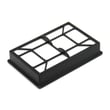
- Check and replace the exhaust filter on schedule; use the vacuum exhaust filter KC38KDWCZV07 when it fits your configuration
- Keep the hose and wand clear; remove packed lint and pet hair
- Empty or replace bags before they are completely full
- Clean hair and string from the brush roll and nozzle openings
Last updated: February 2026
Does a Kenmore canister vacuum have a fuse?
Yes. On the Kenmore canister vacuum model 11681714510, there is no user-serviceable fuse inside the vacuum; fuse checks are typically at your home’s electrical panel, as noted in the troubleshooting section of the 11681714510 owner's manual.
What to check first when the vacuum will not start
- Confirm the vacuum is fully plugged into a working outlet.
- Check for a tripped circuit breaker or a blown household fuse.
- Inspect the hose electrical connections for looseness.
- Reset the PowerMate overload protector if the power nozzle stopped.
- Unplug the vacuum before any inspection or maintenance.
Vacuum fuse vs. household fuse: quick comparison
| Item | Where it is | What it protects | What you do |
|---|---|---|---|
| Household fuse/breaker | Home service panel | The circuit feeding the outlet | Reset breaker or replace fuse (if applicable) |
| Vacuum internal fuse | Inside the vacuum (if equipped) | Vacuum wiring/motor circuit | Typically handled during service, not routine maintenance |
If you suspect an internal electrical protection issue
If the outlet and household breaker/fuse are good but the vacuum still will not run, focus on common “no start” causes for this style of Kenmore canister:
- Loose electrical connection at the hose, wand, or PowerMate
- Tripped PowerMate overload protector (power nozzle)
- Motor thermal protector tripping due to restricted airflow (clogs, full bag, dirty filters)
A clogged filter can contribute to overheating and shutdowns; replacing a dirty exhaust filter such as the vacuum exhaust filter KC38KDWCZV07 helps maintain airflow.
Why it matters
A “blown fuse” symptom is often a household power issue or a protection device reacting to a clog or overload. Checking power, connections, airflow, and reset protectors prevents unnecessary parts replacement and helps protect the suction motor.
Last updated: February 2026
Does the Kenmore vacuum 400 series bagged canister have a retractable cord?
Yes. The Kenmore canister vacuum model 11681714510 uses a retractable power cord; you pull the cord out to the length you need, then press the cord rewind button to retract it (hold the plug while rewinding for safety). See the 11681714510 owner's manual.
How the retractable cord works
- Pull the cord out of the canister to your desired length.
- The cord stays out during use and does not rewind until you press the rewind control.
- Turn the vacuum off and unplug it before rewinding.
- Hold the plug while rewinding so it does not whip and cause damage.
- Press the cord rewind button to retract the cord.
Safety and care tips for the rewind feature
- Keep kids and pets away when rewinding; the cord moves quickly.
- Keep a clear path so the cord does not strike furniture or walls.
- Do not pull the plug from the wall by the cord.
- Do not run over the power cord with the PowerMate.
Quick check: retractable cord vs. non-retractable
| Feature | What you have on 11681714510 | What you would see if it was non-retractable |
|---|---|---|
| Cord storage | Cord retracts into canister | Cord wraps on hooks or a cord wrap |
| Control | Cord rewind button | No rewind button |
| Common issue | Cord will not retract fully | Cord wrap hooks broken or missing |
Why it matters
A working cord rewind makes storage easier and helps prevent cord kinks and insulation damage. If the cord will not retract smoothly, check for twists, debris at the cord entry, or a worn rewind mechanism.
Last updated: February 2026