 Installation guide
 Owner’s manual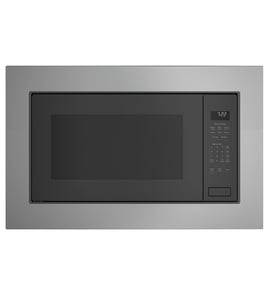



Is GE Profile considered high end?
Yes. GE Profile is GE’s premium mainstream line, positioned above standard GE models with more advanced features, upgraded styling, and higher-end finishes. For a built-in Advantium oven like model PSB9240SF3SS, “Profile” typically means more cooking modes and a more refined user experience.
What “high end” means for GE Profile
GE Profile is generally considered upper-tier in big-box retail and builder-grade kitchens. It is not the same category as ultra-luxury brands, but it is a step up in features and design compared to base GE lines.
Common GE Profile advantages include:
- More cooking technology (sensor cooking, convection or speedcook features)
- More precise controls and presets
- More premium exterior styling and trim options
- Better fit-and-finish details (handles, glass, lighting)
- More model-to-model feature consistency within the line
How to confirm what your PSB9240SF3SS includes
The fastest way to verify which features are included on your exact unit is to match the control panel functions and accessory list to the documentation.
Use these checks:
- Compare your keypad labels to the feature list in the PSB9240SF3SS owner’s manual
- Verify which trays and racks are specified for your cooking modes
- Confirm whether your unit uses halogen heat and speedcook accessories
- Check the troubleshooting section for feature-specific error behavior
GE Profile vs other tiers (quick comparison)
| GE line | Typical positioning | What you usually get |
|---|---|---|
| GE (standard) | Value to mid-range | Core features, simpler controls |
| GE Profile | Premium mainstream | More modes, upgraded design, more automation |
| GE Cafe / Monogram | Premium to luxury | More design-forward or luxury features (varies by line) |
Why it matters
Knowing the tier helps set expectations for parts cost and repair approach. Premium models often use more specialized components (controls, sensors, door assemblies), so using model-correct parts and procedures from the manual helps avoid repeat failures.
Last updated: January 2026
Is the PSB9240SF3SS easy to use?
Yes. The GE PSB9240SF3SS is designed to be straightforward for everyday cooking because it combines guided cooking modes (speedcook, convection baking, broiling/toasting, and microwaving) with a dedicated control panel and menu-style operation described in the PSB9240SF3SS owner's manual.
What “easy to use” typically means on this model
Most owners find this style of GE Advantium oven easy once they learn which mode to choose for the food.
- Multiple cooking modes in one appliance: speedcook, microwave, convection bake, broil/toast
- Menu-driven cooking for common foods (you select a category, then follow prompts)
- Power level control for speedcook and microwave cooking
- Cookware guidance so you know what is safe for each mode
- “Things that are normal” section that helps you avoid false alarms during operation
Quick start: the simplest way to get comfortable
We recommend learning the controls in this order so you build confidence fast:
- Start with microwaving for reheating.
- Try speedcook for packaged snacks and quick meals.
- Use convection baking when you want oven-style results.
- Use broil/toast for browning and crisping.
Mode selection cheat sheet
| What you want | Best mode to use | Why it feels easier |
|---|---|---|
| Fast reheating | Microwaving | Familiar timing and power levels |
| Quick cook with browning | Speedcook | Guided menus reduce guesswork |
| Baking like a small oven | Convection baking | Predictable, even cooking |
| Crisp tops and toast | Broiling/toasting | Direct browning control |
Why it matters
Using the right mode and cookware prevents poor results (undercooked centers, over-browned edges) and reduces unnecessary troubleshooting. The manual’s controls and cookware sections are the fastest way to get consistent results.
Last updated: January 2026
What replaced PSB9240SF3SS?
GE model PSB9240SF3SS is part of the Advantium 240V built-in oven family; replacement is typically based on matching the cabinet cutout and electrical requirements, not just the model number. We recommend confirming your cutout dimensions and installation limits in the PSB9240SF3SS installation guide before choosing a newer GE or Monogram unit.
How to choose a compatible replacement
To replace a built-in microwave/Advantium like PSB9240SF3SS, we match the installation specs first.
- Measure the existing cabinet cutout (width, height, depth)
- Confirm the required minimum height from the floor for the cutout
- Verify the installation type is allowed (wall cabinet installation, not island/peninsula)
- Confirm the cabinet support capacity (this unit is designed around an 80 lb oven load)
- Check for required clearances if installed over another appliance
Cutout and installation details that matter most
The installation guide for this Advantium 240V family calls out key constraints that drive replacement compatibility.
| What to match | Why it matters | What to check |
|---|---|---|
| Cutout width/height/depth | Prevents gaps and fit issues | Measure the opening and compare to the install spec diagram |
| Allowed cabinet location | Prevents unsafe installs | Not approved for island, peninsula, or below-counter installs |
| Support structure | Prevents cabinet failure | Solid bottom (plywood) and rigid support runners |
| Clearance to other appliances | Prevents trim overlap conflicts | Maintain separation when stacked with an oven or warming drawer |
Quick checks before you order anything
These steps prevent the most common “it doesn’t fit” problems.
- Pull the unit and confirm the model tag reads PSB9240SF3SS.
- Measure the cutout in three places (top, middle, bottom) for width.
- Confirm you are not using an accessory storage drawer (this setup is not supported).
- Compare your measurements to the diagrams in the PSB9240SF3SS installation guide.
Why it matters
Built-in microwaves and Advantium ovens are not universal-fit. Matching the cutout, trim overlap, and mounting requirements avoids cabinet modifications and helps ensure safe ventilation and support.
Last updated: January 2026


