Installation guide
 Owner’s manual
 Error Codes



How to reset electrolux dryer error code?
On the Electrolux EFME527UIW1 dryer, most error-code resets are done by clearing the control and then restarting the cycle. We recommend powering the dryer off, waiting briefly, then powering it back on; if the code returns, troubleshoot the cause instead of repeatedly resetting.
- Press Power/Cancel to stop the cycle.
- Wait about 10 seconds.
- Press Power to turn the dryer back on.
- Re-select the cycle and press Start.
- If the code reappears, unplug the dryer (or switch the breaker off) for 1 minute, then restore power.
For model-specific button names and the exact reset behavior for your control panel, follow the steps in the EFME527UIW1 owner’s manual.
A recurring code usually means the dryer is protecting itself (overheating, airflow restriction, sensor issue, or a control/door input problem). Focus on the most common fixes first:
- Clean the lint screen and confirm strong airflow at the outside vent hood
- Check for a crushed, kinked, or excessively long vent run
- Make sure the door closes firmly and the latch engages
- Run a timed dry cycle to see if the issue is cycle-sensor related
- If you suspect overheating, inspect the heating/airflow system before running more loads
| What you notice | Likely area | What we do first |
|---|---|---|
| Dryer stops mid-cycle, clothes still damp | Venting/airflow | Clean venting and confirm strong exhaust |
| Code appears after a few minutes of heat | Overheat protection | Check airflow; then test thermostats/limiters |
| Dryer will not start and shows a code | Door or control input | Verify door closure and switch operation |
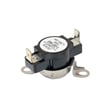
If you’re chasing a heat or overheat-related code, the inlet safety devices are common suspects after airflow is confirmed, such as the dryer inlet thermal limiter 137032600 (repeated trips often point back to restricted venting).
Resetting clears the symptom, but fixing the underlying cause prevents repeat shutdowns, long dry times, and overheating stress on components like thermostats, thermistors, and the main control.
Last updated: January 2026
What is the life expectancy of an Electrolux dryer?
Most Electrolux dryers, including model EFME527UIW1, typically last 10 to 15 years with normal household use. Consistent airflow (clean lint screen and venting) and addressing early noise or heat issues are the biggest factors that push lifespan toward the high end.
- Vent restriction (long runs, crushed flex duct, clogged exterior hood) increases heat stress.
- Lint buildup inside the cabinet or blower housing raises operating temperature.
- Overloading strains the drum belt, rollers, and motor.
- High-heat cycles for every load accelerate wear on thermostats and thermal limiters.
- Ignoring new noises often turns a small wear item into a larger repair.
| Usage pattern | Typical life expectancy | What to watch for |
|---|---|---|
| Light (1 to 3 loads/week) | 12 to 18 years | Lint and vent maintenance |
| Average (4 to 7 loads/week) | 10 to 15 years | Belt and roller wear |
| Heavy (multiple loads/day) | 7 to 12 years | Heat components and drum support |
- Clean the lint screen every load; wash and dry it monthly to remove residue.
- Inspect and clean the full vent path regularly; keep the run short and smooth.
- Keep the dryer level to reduce drum and roller wear.
- Stop using the dryer if you smell burning or notice overheating; correct airflow first.
- Follow cycle and care guidance in the EFME527UIW1 owner’s manual.
If your dryer still heats but gets noisy, thumps, or squeals, these wear items are often involved:
- White-westinghouse dryer drum belt 134719300 (drum won’t tumble, slipping, squeal)
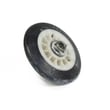
- Dryer drum support roller 5304523152 (thumping, rumbling)
- Dryer blower wheel 5304513609 (loud roaring, weak airflow)
A dryer that is slow to dry or running hot is usually fighting restricted airflow. Fixing airflow early reduces stress on the motor, drum support system, and safety thermostats, which is the most reliable way to reach the full 10 to 15 year lifespan.
Last updated: January 2026
What does E60 mean on my dryer?
On an Electrolux EFME527UIW1 dryer, the E60 error points to a heating system problem (the dryer is not heating correctly or is detecting an unsafe heating condition). We focus first on airflow and venting, then on heat-sensing and safety parts listed for this model in the EFME527UIW1 owner's manual.
- Power the dryer off, wait 1 minute, then restart the cycle.
- Clean the lint screen and confirm the lint screen housing is not packed with lint.
- Check the exhaust duct for kinks, crushing, or heavy lint buildup.
- Make sure the dryer has adequate room for ventilation (not sealed into a tight enclosure).
- Run a timed dry cycle and confirm airflow at the outside vent hood is strong.
If airflow is clear and E60 returns, the dryer may be reacting to abnormal temperature readings or overheating protection.
- Dryer inlet thermal limiter 137032600 (opens if temperatures get too high)
- Kelvinator dryer high-limit thermostat 3204267 (limits heater temperature)
- Dryer thermistor 5304513591 (reports temperature to the control)
- Unplug the dryer before inspecting internal components.
- Inspect and clean the lint chute and blower area if accessible.
- Verify the vent run is as short and straight as possible; replace plastic or foil vent with rigid or semi-rigid metal.
- If E60 persists after airflow improvements, test the thermistor and high-limit devices with a multimeter (ohms/continuity) and replace any failed component.
A heating fault can cause long dry times, overheating shutdowns, and repeated error codes. Restoring proper airflow and correct temperature sensing helps the EFME527UIW1 dry efficiently and protects the heater and control board.
| Symptom with E60 | Most common cause | Best first action |
|---|---|---|
| No heat or weak heat | Heating circuit or safety device opened | Check airflow, then test limiter/thermostat |
| Long dry times | Restricted venting | Clean/shorten vent run |
| Error returns quickly | Overheating or bad temperature sensing | Inspect venting, then test thermistor |
Last updated: January 2026
How to replace moisture sensor on electrolux dryer?
On the Electrolux dryer model EFME527UIW1, the moisture sensor is typically a pair of metal sensor bars in the front lint screen housing area. Most “moisture sensor” problems are fixed by cleaning the bars and checking the wiring connections rather than replacing a separate sensor part; use the EFME527UIW1 owner’s manual for the exact access points and panel removal steps.
- Unplug the dryer or switch off the breaker.
- Let the dryer cool completely.
- Wear cut-resistant gloves; sheet metal edges are sharp.
- Take a photo of wire routing and connector positions.
- Have rubbing alcohol and a clean cloth ready.
- Open the door and remove the lint screen.
- Locate the moisture sensor bars (usually inside the front opening near the lint screen housing).
- Clean both bars with rubbing alcohol; remove any dryer sheet residue.
- Inspect the bars for heavy pitting, cracks, or looseness.
- If access is needed, remove the appropriate panel(s) following the EFME527UIW1 installation guide.
- Reseat the wire connectors on the sensor bar terminals (two wires); make sure they fit tightly.
- Reassemble, restore power, and test an Auto Dry cycle with a medium load.
If the sensor bars are physically damaged or the terminals are broken, replacement is done by replacing the specific sensor bar/housing component shown in the model’s parts diagram (not a universal “moisture sensor”). Use the diagram for EFME527UIW1 to match the exact part.
| What you see | Most likely cause | Best fix |
|---|---|---|
| Auto Dry overdrys | Sensor bars coated | Clean bars; reduce dryer sheet use |
| Auto Dry ends early | Loose sensor wiring | Reseat connectors; secure harness |
| Long dry times | Airflow restriction | Clean lint path and venting |
The moisture sensor signal helps EFME527UIW1 end Auto Dry at the right time. A coated sensor or loose connection makes cycles run too long or stop too soon, increasing energy use and wear on airflow components like the dryer lint chute assembly 5304521401.
Last updated: January 2026