

Can you replace shredder blades?
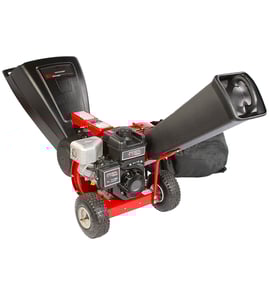
Yes, shredder blades are replaceable on most chipper/shredders, including Craftsman model 987799930. Blade replacement is a normal wear-item repair: you remove the cutting housing fasteners, swap in the correct blades, then reassemble and verify the rotor turns freely before restarting.
Safety first (before you touch the cutter)
- Shut the engine off and let it cool completely.
- Disconnect the spark plug wire so the engine cannot start.
- Wear heavy gloves and eye protection; blades stay sharp even when “dull.”
- Block the rotor so it cannot rotate while you loosen hardware.
- Work on a stable, level surface with good lighting.
What you typically replace (and what to inspect)
On a gas chipper/shredder, blade service often goes with a quick inspection of related items:
- Cutter blades and any reversible edges
- Blade bolts, washers, and locking hardware
- Anvil or bed knife (if equipped)
- Cutter housing for cracks or heavy scoring
- Engine tune-up items if performance dropped (air filter, fuel line)
| Symptom | Common cause | What to do |
|---|---|---|
| Poor chipping, stringy output | Dull or nicked blades | Replace or flip blades (if reversible) |
| Excess vibration | Uneven blade wear, loose hardware | Replace as a set; tighten evenly |
| Engine bogs easily | Dull blades or restricted airflow/fuel | Service blades; check air filter and fuel line |
Parts that often come up during blade service
If you are already opening the machine, these model-related engine parts are commonly replaced when they are brittle, clogged, or leaking:
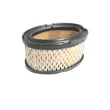
- Craftsman lawn & garden equipment engine air filter 28424
- Craftsman lawn & garden equipment engine fuel line 29774
Why it matters
Sharp, correctly installed blades reduce vibration, improve chip quality, and lower engine strain. That helps protect the crankshaft, bearings, and cutter housing on your Craftsman 987799930 chipper/shredder.
Last updated: February 2026
What is the difference between a chipper shredder and a chipper shredder?
There is no difference; the phrase “chipper shredder” means one machine that both chips woody branches and shreds lighter yard debris. For your Craftsman chipper/shredder model 987799930, the practical choice is about what you feed it most: branches (chipping) versus leaves and twigs (shredding).
What “chipping” vs “shredding” means
- Chipping: pulls in branches and cuts them into chips you can spread as mulch
- Shredding: breaks down leaves, vines, and small twigs into finer material for composting
- Chipper/shredder: combines both functions, usually with separate feed areas (a chute for branches and a hopper for lighter debris)
Quick comparison
| Task | Best output | Typical feed material | What to watch for |
|---|---|---|---|
| Chipping | Coarser wood chips | Dry branches, sticks | Dull cutters, clogged discharge |
| Shredding | Fine mulch/compost mix | Leaves, garden debris | Wet material clumping |
| Combined use | Mixed mulch | Yard cleanup mix | Sorting material improves performance |
Tips to get better results (and fewer clogs)
- Feed dry branches for more consistent chips; wet wood tends to bind.
- Alternate leafy loads with small sticks to help “push through” damp debris.
- Keep the engine running smoothly; a restricted air filter can reduce power (see Craftsman lawn & garden equipment engine air filter 28424).
- If the engine surges or stalls under load, check fuel delivery issues such as cracked or soft fuel line (see Craftsman lawn & garden equipment engine fuel line 29774).
- Use fresh fuel and correct oil level; low oil or old fuel makes starting and chipping performance worse.
Why it matters
Using the right feed type for the right function protects the cutting system, reduces jams, and keeps your Craftsman 987799930 running at full RPM so it can chip branches cleanly and shred leaves into usable mulch.
Last updated: February 2026
What not to put in a wood chipper?
For the Craftsman chipper/shredder model 987799930, never feed hard foreign objects (rocks, metal, glass), plastics/rubber, or chemically treated/painted wood. Also avoid stringy, wet, or dirt-packed yard waste that can wrap, clog, and quickly damage cutting components and the engine.
Materials to keep out of the chipper chute
- Rocks, gravel, soil, and root balls (dulls and chips cutting edges fast)
- Metal, wire, nails, screws, and fencing (can shatter parts and become projectiles)
- Plastic, rubber, and synthetic rope/twine (wraps and jams the rotor)
- Pressure-treated, painted, or chemically treated lumber (unsafe debris and residue)
- Wet, soggy leaves or mud-caked brush (clogs the discharge and bogs the engine)
- Vines, long grasses, and palm-like fronds (stringy material that wraps)
What to do if it bogs down or starts jamming
If your 987799930 begins to stall, surge, or clog, stop feeding immediately and shut the engine off before clearing debris.
- Let all moving parts come to a complete stop
- Remove packed material from the chute and discharge area
- Check the air intake area for heavy dust buildup
- Inspect fuel condition; old fuel commonly causes surging under load
- Verify throttle linkage moves freely and returns smoothly
Quick parts check (common causes of poor chipping)
| Symptom | Most common cause | What to inspect/replace |
|---|---|---|
| Bogging, black smoke | Restricted airflow | Craftsman lawn & garden equipment engine air filter 28424 |
| Surging, won’t stay running | Fuel delivery issue | Craftsman lawn & garden equipment engine fuel line 29774 |
| Throttle won’t respond smoothly | Linkage binding/bent | Craftsman lawn & garden equipment engine throttle link 33878 |
Why it matters
Chippers rely on sharp cutting edges and steady engine RPM. Foreign objects and stringy or wet material cause sudden jams, vibration, and overload that can damage the cutting system, carburetor settings, and ignition components.
Last updated: February 2026
Why has my garden shredder stopped working?
If your Craftsman 987799930 chipper/shredder stopped working, the most common causes are a fuel or airflow problem, an ignition issue, or a safety interlock that is not fully engaged. Start with quick checks (fuel, choke, throttle, air filter) before moving to spark and carburetor diagnostics.
Quick checks first (fastest fixes)
- Confirm the engine switch is in ON and the throttle is set to FAST/RUN.
- Check fuel level and fuel quality; drain and refill with fresh fuel if it is old.
- Make sure the fuel cap vent is not blocked; a plugged vent can starve the carburetor.
- Inspect the air filter; a clogged filter can cause no-start or stalling (see Craftsman lawn & garden equipment engine air filter 28424).
- Look for a pinched, cracked, or leaking fuel line (see Craftsman lawn & garden equipment engine fuel line 29774).
If it cranks but will not start
What to test
| Symptom | Most likely cause | What to do next |
|---|---|---|
| Starts briefly on starting fluid, then dies | Fuel delivery issue | Check fuel line, fuel cap vent, and carburetor |
| No change with starting fluid | Ignition issue | Check spark plug, then ignition module |
| Runs only with choke partly on | Restricted fuel or air | Clean carburetor, replace air filter |
Parts that commonly solve “no start”
- Air filter restriction: Craftsman lawn & garden equipment engine air filter 28424
- Fuel supply restriction/leak: Craftsman lawn & garden equipment engine fuel line 29774
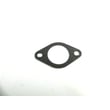
- Carburetor gasket leak (lean condition): Craftsman lawn & garden equipment engine carburetor manifold gasket 33263
- Carburetor internal clogging: Craftsman lawn and garden equipment engine carburetor 632242
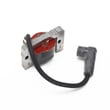
- Weak/no spark (after plug check): lamination 35135B
If it starts but stalls under load
- Check for a dirty air filter and replace if needed.
- Verify the throttle linkage moves freely and returns smoothly (see Craftsman lawn & garden equipment engine throttle link 33878).
- Inspect the muffler area for heavy carbon buildup or damage (see muffler 33756B).
- If it surges or hunts at steady throttle, clean the carburetor and confirm there are no air leaks at the intake gasket.
Why it matters
A chipper/shredder that suddenly quits is usually being starved of fuel or air, or it is losing spark. Fixing the root cause prevents repeat stalling, hard starting, and engine damage from running too lean.
Last updated: February 2026