Installation guide
 Owner’s manual
 Error Codes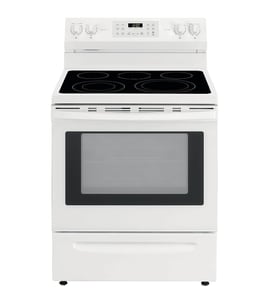









How do I reset my Kenmore Elite electric oven?
For the Kenmore Elite 79046629504 range, the most reliable “reset” is a power reset: turn the range’s breaker OFF for 1 to 5 minutes, then turn it back ON and set the clock. If the control is locked, turn off the lockout so the oven can operate normally (see the 79046629504 owner's manual).
Quick reset options (use the one that matches your symptom)
- Blank display or frozen keypad: power reset at the breaker (OFF 1 to 5 minutes).
- Display shows “LOC” or door won’t open: cancel Oven Lockout (press and hold the lockout pad for 3 seconds).
- Oven heats but temperature seems off: use the oven temperature adjustment feature (calibration).
- After a timed cooking cycle: return all controls to OFF.
Oven lockout reset (when “LOC” is on)
The Oven Lockout feature prevents the oven from being turned on and can lock the door. To restore normal operation:
- Press and hold the Oven Lockout pad for 3 seconds.
- Wait for the door to fully unlock and for “LOC” to clear.
What to check after a reset
| What you see | What it usually means | What to do next |
|---|---|---|
| No power at all | Supply issue | Check breaker, cord/terminal connections (power off first) |
| “LOC” | Control lockout active | Cancel lockout (3-second hold) |
| Oven temp inaccurate | Sensor or calibration issue | Calibrate; if still off, test/replace sensor |
Why it matters
A reset clears a temporary control glitch, but it also helps you separate a simple lockout or power interruption from a real failure such as a bad oven temperature sensor. If the oven repeatedly overheats or underheats after resets, the frigidaire range oven temperature sensor 316217002 is a common part to test.
Last updated: January 2026
Where is the model number on Kenmore Elite Stove?
On the Kenmore Elite dual-fuel range model 79046629504, the model and serial number plate is typically on the oven front frame behind the oven door; on some versions it can be on the drawer side frame. Use the exact model number when ordering parts or scheduling service. See the 79046629504 owner's manual for the serial plate illustration and details.
How to find it quickly
- Turn the range OFF and let it cool.
- Open the oven door fully.
- Look along the front frame (the metal frame around the oven opening), usually near the left or right side.
- If you do not see it, pull out the bottom drawer and check the drawer side frame.
- Write down both the model and serial numbers (and any lot number/letter shown).
What the plate tells you (and why it matters)
The serial plate is more than an ID tag; it can include key information used for correct parts and setup.
| Item on plate | What it’s used for |
|---|---|
| Model number | Matches diagrams and ensures part compatibility |
| Serial number | Helps identify production run and revisions |
| Fuel/rating info | Confirms gas type and burner ratings for the range |
Tips for using the model number when buying parts
- Match the full model number exactly: 79046629504.
- Use the model number first, then confirm the part by name and diagram location.
- If you are troubleshooting baking temperature issues, the frigidaire range oven temperature sensor 316217002 is a common part associated with oven temperature regulation on ranges like this.
Why it matters
Kenmore Elite ranges often have multiple versions that look similar. Using the correct model and serial information prevents ordering the wrong control panel, oven sensor, igniter, or gasket.
Last updated: January 2026
How to unlock oven door on Kenmore Elite gas range?
On the Kenmore Elite 79046629504 dual-fuel range, the oven door typically unlocks automatically after a Self-Clean cycle once the oven cools down. If the door is still locked, cancel the cycle, let the oven cool completely, and avoid forcing the door because that can damage the door lock system.
Quick steps to unlock the door
- Press CANCEL/OFF to stop any active Self-Clean or timed cycle.
- Wait for the oven to cool fully; the lock releases only after temperatures drop.
- Check the display for a LOCKED indicator; it should turn off when the latch retracts.
- Gently try the handle again after cooling; do not pull hard.
- If the door remains locked after cooling, cycle power at the breaker for 1 minute, then restore power.
What to do if it is stuck after Self-Clean
During Self-Clean, the range uses an automatic door locking system and the door can stay locked until the oven is safe. Forcing it can damage the latch or lock motor.
Common causes
| What you notice | Likely cause | What usually fixes it |
|---|---|---|
| Door locked right after Self-Clean ends | Oven still too hot | Wait longer for full cool-down |
| Door locked and controls act odd | Control did not reset clean cycle | Press CANCEL/OFF, then power reset |
| Door locked even when cold | Door lock mechanism issue | Inspect/replace door lock assembly |
If you suspect a failed lock mechanism on this model, the door lock motor/assembly is commonly serviced as a unit (example part listing: motor 318261230).
Why it matters
A locked door is a safety feature designed to prevent burns during high-heat cleaning. Waiting for cool-down and avoiding force protects the latch, hinges, and control system from expensive damage.
Reference for your exact button names and indicators
Use the 79046629504 owner's manual for the model-specific Self-Clean and door lock behavior, including what the display shows during lock and unlock.
Last updated: January 2026