 Installation guide
 Owner’s manual







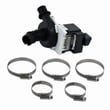
Can a clogged drain cause an FTD error?
Yes. On the GE GDF640HGM0WW dishwasher, a clogged drain path (air gap, disposer connection, or a kinked/blocked drain hose) can prevent proper draining and trigger drain-related errors such as FTD. Clearing the restriction usually restores normal draining; then rerun a cycle.
What to check first (fast drain-path checklist)
- Cancel the cycle and force a drain (press and hold Start/Reset for about 3 seconds); then confirm the tub actually empties.
- Check the sink side first: make sure the kitchen sink drains normally.
- If your setup uses a disposer, confirm the disposer inlet plug was removed.
- If you have an air gap, remove the cover and clean it.
- Inspect the drain hose for kinks or crushing behind or under the dishwasher.
- Verify the drain line is installed correctly (high loop or air gap as required).
Model-specific maintenance that helps prevent drain errors
The GDF640HGM0WW uses an Ultra-Fine Filter assembly that can clog with food soil and slow draining. Cleaning it regularly helps prevent standing water and drain faults. Steps and diagrams are in the owner's manual.
Common causes and the most likely fix
| Symptom you see | Most likely cause | What usually fixes it |
|---|---|---|
| Water standing in the bottom | Air gap clogged or drain routing issue | Clean air gap; confirm high loop/air gap per install |
| Won’t pump out | Drain line/disposer clogged | Clear disposer connection; straighten/clear hose |
| Drains during cancel but returns later | Partial restriction or backflow | Clean air gap; correct drain routing |
Parts that can be involved if clearing clogs does not solve it
If the drain path is clear and the dishwasher still will not drain, a failed drain pump or a restricted hose can be the next place to look.
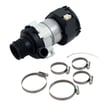
- Drain pump asm WD19X24829 (moves water out during drain)
- Dishwasher drain hose WD24X10062 (carries drain water to the sink/disposer)
Why it matters
A restricted drain can leave dirty water in the sump, reduce wash performance, and cause the control to end the cycle early or display drain-related errors. Fixing the drain path also helps prevent leaks and odors.
Last updated: February 2026
How to tell if a dishwasher control board is bad?
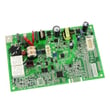
A bad control board in your GE GDF640HGM0WW dishwasher usually shows up as a dead or erratic user interface, cycles that will not start or finish, or repeated draining and beeping with no clear cause. Before replacing parts, we check for Control Lock, a solid door latch, and proper power.
Quick signs the control board is failing
- Buttons do not respond, or only respond sometimes
- Cycle starts but stops mid-cycle, or runs the wrong sequence
- Random beeping, flashing lights, or repeated cancel and drain behavior
- Dishwasher has power, but will not run a cycle when Start is pressed
- Heater, fill, or drain functions act inconsistent (not a steady, repeatable failure)
Rule out common look-alikes first (fast checks)
Use these checks from the owner's manual controls section before you assume the board is bad:
- Control Lock: If controls are locked, the dishwasher will ignore selections until unlocked.
- Start sequence: Press Start, then close the door within about 10 seconds to begin the cycle.
- Door latch: If the door is not fully latched, the dishwasher will not start. A worn latch can mimic a control problem.
- Power reset: Turn power off at the breaker for 1 minute, then restore power and try a normal cycle.
What to check next (parts that commonly mimic a bad board)
If the symptoms point to a start or interface issue, these parts are common causes on this model:
| Symptom | More likely cause | Part to consider |
|---|---|---|
| Will not start, door feels loose | Door latch not locking | GE dishwasher door latch lock WD21X10490 |
| Powers on, drains poorly or won’t drain | Drain restriction or weak drain pump | Drain pump asm WD19X24829 or dishwasher drain hose WD24X10062 |
| Poor cleaning, no strong spray | Spray arm clogged or not turning | Dishwasher spray arm, lower WD22X33499 |
| No heat, poor drying | Heating circuit issue | Dishwasher heating element WD05X35098 |
Why it matters
The control board is the “traffic controller” for fill, wash, heat, and drain. When it fails, the dishwasher can look like it has multiple unrelated problems. Confirming the basics (lock, latch, start sequence, power) helps you avoid replacing an expensive board unnecessarily.
Last updated: February 2026
How do I find the model number on my GDF640HGM0WW?
On your GE dishwasher model GDF640HGM0WW, the model number is printed on a label on the tub wall just inside the door. Open the door fully and look along the tub wall near the door opening; the label lists both the model and serial numbers.
Where to look (quick checklist)
- Open the dishwasher door and keep it fully open
- Look on the tub wall just inside the door (not on the outer door panel)
- Check the left-hand tub wall first (a common label location)
- Find the line that starts with “Model #”
- Write down the full model number and serial number for parts matching
What the label helps you do
Having the exact model number ensures we match the correct GE parts and finishes for your dishwasher, including items like racks, spray arms, and electronic controls.
| What you need | Where it’s used | Example for this dishwasher |
|---|---|---|
| Model number | Selecting correct parts diagrams and assemblies | GDF640HGM0WW |
| Serial number | Identifying production run details for service | Listed on the same label |
Why it matters
Even small model-number differences can change which parts fit (for example, door components, rack assemblies, or controls). Using the label inside the tub prevents ordering the wrong replacement part.
Helpful reference
For the exact label location and how GE formats the model and serial fields, use the GDF640HGM0WW owner's manual.
Last updated: March 2026





