 Owner’s manual
 Error Codes



How do I reset my Kenmore electric range?
To reset your Kenmore 9119348810 electric range, turn the oven control knob to OFF, then disconnect power to the range for at least 30 seconds (unplug it or switch the circuit breaker off). Restore power and retry the oven operation; this clears many control and “PF” (power failure) conditions.
Quick reset steps (recommended)
- Turn the OVEN CONTROL knob to OFF.
- Shut off power at the circuit breaker (or unplug the range if accessible).
- Wait 30 to 60 seconds.
- Restore power.
- Set the clock if the display shows PF or flashes 12:00.
- Test Bake and Broil to confirm normal heating.
If you see an “F” error code
Your manual notes that a flashing F plus a number with continuous beeping indicates a function error code. Try this reset first, then re-test.
| What you see | What it usually means | What to do next |
|---|---|---|
| Display flashes PF | Power was interrupted | Touch CLOCK SET and reset time |
| F plus a number, beeping | Function error condition | Power reset for 30 seconds, then retry |
| F during self-clean | Door latch not fully locked | Let oven cool 1 hour; confirm latch is fully to the right |
For the exact display and control-pad behavior on this model, follow the owner's manual.
Why this matters
A proper power reset forces the range control to reboot and can clear temporary faults after a power outage, a control glitch, or an interrupted self-clean cycle. It also helps you confirm whether the issue is a one-time control problem or an ongoing heating or sensor problem.
When a reset is not enough
If the oven still will not heat after resetting, common next checks include:
- House breaker or power cord connection (range may be getting partial power)
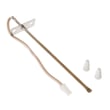
- Oven temperature sensor issues (inconsistent temps or error codes)
- Failed heating element (no bake heat)
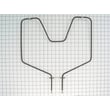
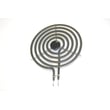
If you’re troubleshooting a no-heat bake problem, the bake element WB44K5012 is a common replacement part for this model.
Last updated: February 2026
How do I tell what model Kenmore stove I have?
Your Kenmore stove’s model number is printed on the appliance ID label; for Kenmore electric ranges like model 9119348810, the owner's manual notes the model and serial numbers are located on the front frame behind the storage drawer.
Where to look on a Kenmore range
Check these common spots in this order:
- Behind the storage drawer: pull the drawer out and look on the front frame (most common for this style)
- Oven door frame: open the oven door and look around the frame opening
- Under the cooktop: on lift-up cooktops, look under the top panel near the burners
- Back panel: near the power cord entry or rear sheet metal
- Side trim area: sometimes on the lower side panel near the front
What the model number looks like
On the label, look for wording such as Model, Model No., or MOD. Kenmore model numbers are typically numbers with no letters (for example, 9119348810).
| What you see on the label | What it means | Why you need it |
|---|---|---|
| Model number | Identifies the exact range design | Ensures parts diagrams and parts match |
| Serial number | Identifies your specific unit | Helps confirm production details for service |
Why it matters
We use the model number to match the correct parts and troubleshooting info for your exact Kenmore range. Even small model changes can affect fit for items like a bake element, oven sensor, or door gasket.
Last updated: February 2026
What causes a Kenmore oven to stop working?
If your Kenmore 9119348810 electric range oven stops working, the most common causes are a power supply problem, oven controls set incorrectly, or a failed heating or sensing component (such as the bake element or temperature sensor). Start with power and settings, then test heat-related parts.
Quick checks first (fastest fixes)
- Check the household circuit breaker or fuse box for a tripped breaker or blown fuse.
- Confirm the range is plugged in and the cord is secure.
- Verify the oven control is set correctly for Bake or Broil (a mis-set control can make the oven appear dead).
- If the cooktop works but the oven does not, focus on oven-specific parts and wiring.
- If the oven door was recently used for self-clean, allow extra cool-down time before expecting normal operation.
Likely part failures on an electric range
On model 9119348810, these parts commonly affect whether the oven heats or operates normally:
- Bake element: if it is cracked, blistered, or not heating, the oven may not bake.
- Temperature sensor: if it reads wrong, the control may prevent proper heating.
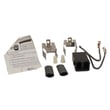
- Terminal block or wiring: a loose or burned connection can interrupt power to the range or oven circuits.
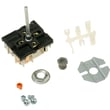
- Control/selector issues: if the control is set improperly, the oven will not operate as expected.
Helpful parts to consider for this model:
Symptoms and what they usually point to
| Symptom | Most likely causes | What to do next |
|---|---|---|
| Range totally inoperative | No power to range | Check breaker/fuse and plug connection |
| Cooktop works, oven will not | Control set improperly; failed bake element; sensor issue | Confirm settings; inspect element; consider sensor |
| Oven won’t unlock after self-clean | Clean cycle not finished; oven still above lock temperature | Turn control to OFF; wait for cool-down per owner's manual |
| Oven light doesn’t work | Switch off; bulb loose/bad | Check switch; replace bulb if needed |
Why it matters
An oven that “stops working” can be as simple as a tripped breaker, but it can also be a failed heating circuit (bake element, sensor, wiring). Checking power and settings first prevents unnecessary part replacement and gets you to the right repair faster.
Last updated: February 2026




