 Owner’s manual
 Error Codes
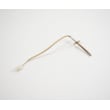




What are the parts of an electric oven?
An electric wall oven like the Fisher & Paykel OS302 is built around heating, airflow, lighting, and safety-sealing components. The core parts you will interact with most are the bake and broil heating elements, oven racks (shelves), the oven light assembly, the door gasket (seal), and the oven vent/ducting described in the owner's manual.
Main parts you will find in most electric ovens
- Bake element: primary heat source for baking and roasting (often at the bottom of the cavity, sometimes concealed).
- Broil element: high-heat element at the top for broiling and browning.
- Oven racks (shelves): support cookware; should be positioned while the oven is cool.
- Oven vent and vent ducts: routes hot air and moisture; should be kept unobstructed.
- Door gasket (seal): helps the door seal tightly for stable temperatures.
- Oven light system: lets you see food while cooking; many models use a halogen bulb.
OS302 details that matter
From the OS302 documentation, we see these model-relevant components and behaviors:
- The oven uses 12V, 20W halogen bulbs for illumination.
- The manual emphasizes keeping oven vent ducts unobstructed.
- The door seal (gasket) and cavity seal are important for maintaining a good seal and should not be damaged.
Quick “what it does” reference
| Part | What it does | Common symptom when it fails |
|---|---|---|
| Bake element | Provides steady heat for baking | Slow preheat, uneven baking, no heat in bake |
| Broil element | Provides intense top heat | No broil, poor browning |
| Convection fan (if equipped) | Circulates hot air for even cooking | Uneven cooking, weak airflow noise changes |
| Door gasket | Keeps heat in the cavity | Heat escaping, longer cook times |
| Oven light bulb/cover | Illuminates the cavity | Light out, loose or damaged lens/clip |
Why it matters
Knowing the main oven parts helps you troubleshoot safely and avoid performance issues. For example, blocked venting can affect cooking results, and a damaged door gasket can cause heat loss that increases preheat and bake times.
Safety notes we follow before checking parts
- Let the oven cool before moving racks or inspecting interior parts.
- Keep oven vent openings clear.
- Switch power off before replacing the oven light bulb.
Finding and ordering the right replacement parts
Use your model number OS302 when searching so you match the correct Fisher & Paykel wall oven configuration. If you do not see the part you need listed for this model, search by model number on Sears PartsDirect.
Last updated: February 2026
What common problems do F&P ovens have?
Fisher & Paykel wall ovens like model OS302 most often run into heating or temperature consistency issues, door seal heat loss, fan-related uneven baking, and control or power-related faults. Many symptoms trace back to calibration, airflow, or a fault code that needs to be cleared and diagnosed using the OS302 owner's manual.
Common problems we see (and what they look like)
- Inaccurate temperature: food undercooks or overbrowns even when settings seem correct.
- Uneven baking/roasting: hot spots, one rack cooks faster than another.
- Door not sealing well: heat escapes, longer cook times, exterior gets hotter than normal.
- Convection fan issues: noisy fan, weak airflow, inconsistent results in convection modes.
- Fault codes and beeping: the display shows an F code and the oven beeps.
- Oven will not heat or run: clock not set after a power interruption, or a supply issue.
Quick checks before you plan a repair
- Verify temperature with an oven thermometer; compare set temp vs. actual after preheat.
- Inspect the door gasket for gaps, tears, or areas that look flattened.
- Listen for the convection fan during convection cooking; it should run smoothly without grinding.
- Check the clock; some ovens require the time of day to be set after a power loss before cooking works.
- If an F fault code appears: note the code, turn the mode and temperature dials to OFF, then use the oven’s clear function as described in the manual. Keep power on while the oven is hot so cooling fans can run.
Symptom-to-likely-cause guide
| Symptom | Common cause | Best first step |
|---|---|---|
| Oven temp seems off | Sensor drift or calibration issue | Test with thermometer; adjust per manual guidance |
| Uneven results | Airflow or fan problem, rack placement | Try convection, reposition racks, confirm fan operation |
| Long cook times | Door seal leak | Inspect gasket and door alignment |
| Beeping with “F” code | Detected fault condition | Record code; follow manual reset steps |
Why it matters
Temperature accuracy, airflow, and a tight door seal directly affect food safety and cooking results. Fault codes also matter because the oven may be protecting itself while cooling fans run; following the correct shutdown and clear steps prevents repeat faults and overheating.
For parts research by model number, start with the OS302 parts list and, if you need to broaden your search, use Sears PartsDirect.
Last updated: February 2026
Why won't my Fisher and Paykel oven work?
If your Fisher & Paykel OS302 electric wall oven will not work, the most common causes are a power supply issue, the clock not being set after a power loss, or an active fault code. Check power first, then set the clock and clear any “F” code using the OS302 owner's manual.
Quick checks (fastest fixes first)
- Reset the circuit breaker fully OFF, then ON (wall ovens typically use a 240V circuit).
- If there was a power cut, set the clock; the oven may not operate until the clock is set.
- Turn the oven mode and temperature dials to OFF, wait for indicator lights to go out, then reselect a mode and temperature.
- If the oven is beeping and shows F + number, follow the fault-code steps below.
- If the oven was recently used, let the cooling fans run; do not shut off power while the oven is hot.
If you see a fault code (F + number)
The OS302 is designed to self-cool; the fans may run to protect the oven and cabinetry.
- Write down the fault code.
- Turn the temperature and oven mode dials to OFF.
- Press PUSH CLEAR TO (clear) to reset.
- If it does not clear, wait until the cooling fans stop, then press PUSH CLEAR TO again.
What the symptom usually points to
| Symptom | Most likely cause | What to do next |
|---|---|---|
| Display dead, no lights | No power to oven | Check breaker, wiring connection, fuse |
| Display on, won’t start after outage | Clock not set | Set the clock, then select a cooking mode |
| Beeping, “F” code shown | Fault condition | Use the reset steps above |
Why it matters
Restoring proper power and letting the oven self-cool prevents overheating and helps the control accept settings normally.
For replacement parts for your Fisher & Paykel OS302, use the parts list for this model or search by model number on Sears PartsDirect.
Last updated: February 2026
Why is my Fisher and Paykel oven not heating up?
If your Fisher & Paykel OS302 electric wall oven is not heating, the most common causes are a power supply issue (tripped breaker/RCD or blown fuse), the clock not being set after a power interruption, or the mode and temperature not fully selected.
Quick checks first (no tools)
- Confirm the display is on and the oven has power.
- Check the home breaker/fuse and any RCD/GFCI that may have tripped.
- Set the clock; this model requires the clock to be set after a power cut before cooking.
- Select a cooking mode and a temperature (not OFF).
- If you changed settings mid-cook, turn mode and temperature to OFF, wait for the lights to go out, then reselect.
If an “F” fault code appears
The OS302 is designed to self-cool; keep main power on so the cooling fans can run.
- Write down the fault code (F plus a number).
- Turn the temperature and oven mode dials to OFF.
- Use the clear/reset step shown in the owner's manual.
- Wait for the cooling fans to stop, then try heating again.
When it still will not heat
If the display works but there is no heat, the problem is usually in the heating circuit (heating element, temperature sensor/thermostat, wiring, or control).
| What you see | Likely cause | What we recommend |
|---|---|---|
| No display, no heat | No power to oven | Reset breaker/RCD; verify supply |
| Display on, no heat | Clock or settings not set | Set clock; reselect mode/temp |
| Beeping with F code | Fault detected | Follow manual reset steps |
Why it matters
Many “no heat” calls are caused by power loss or control setup, not a failed part. Restoring correct power and settings also prevents interrupting the oven’s cooling cycle.
For parts lookup by model number, use the OS302 parts diagrams, or search by model on Sears PartsDirect.
Last updated: February 2026





