Owner’s manual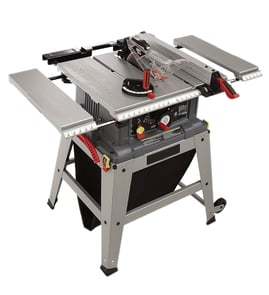

What are the common table saw mistakes?
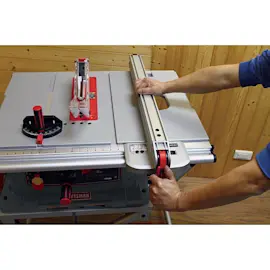
The most common mistakes on a Craftsman table saw model 137248840 are skipping basic safety checks, using the wrong setup for the cut (especially mixing the miter gauge and rip fence), and feeding stock in a way that increases kickback risk. Our 137248840 owner's manual lays out the safe setup steps we follow.
- Operating without the blade guard, splitter, and proper throat insert installed
- Ripping while using the miter gauge (the manual warns against this)
- Setting the blade too high (we set it about 1/8 inch above the workpiece for many cuts)
- Ripping warped, twisted, bowed, or edge-not-straight lumber
- Not using a push stick, especially when ripping narrow stock
- Forgetting to tighten key locks and knobs (blade, bevel lock, fence knob)
Before each use, we check these items because they prevent sudden movement, binding, and loss of control:
- Blade is tight on the arbor
- Bevel angle lock knob is tight
- Rip fence is locked and parallel to the miter gauge grooves (when ripping)
- Blade guard is installed and working properly
- Safety glasses are on
- Remove the miter gauge before ripping
- Keep the workpiece flat to the table and tight to the fence
- Feed forward only; do not push sideways into the blade
- Use a push stick and keep hands out of the blade path
- Remove the rip fence and use the miter gauge in a table groove
- Hold the workpiece firmly against the miter gauge
| Cut type | Use this guide | Avoid this mistake |
|---|---|---|
| Rip cut (with the grain) | Rip fence | Using the miter gauge while ripping |
| Crosscut (across the grain) | Miter gauge | Leaving the rip fence in place |
Most table saw injuries and ruined workpieces come from the same root causes: poor guarding, incorrect guidance (fence vs. miter gauge), and kickback-prone feeding. Following the manual’s setup steps and using the right guide for the cut keeps the stock controlled and the blade path clear.
For parts and diagrams for your Craftsman 137248840, start with the model parts list, or search by model on Sears PartsDirect.
Last updated: February 2026
What are the parts of a table saw?
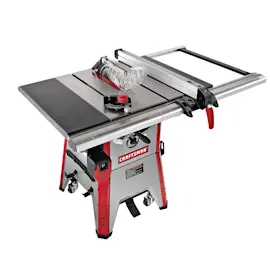
On the Craftsman table saw model 137248840, the main parts include the table and extensions, rip fence, miter gauge, blade and arbor hardware, blade insert (including a dado insert), and key safety and dust-collection components like the blade guard/splitter and dust chute/bag. See the owner's manual for the complete loose-parts list and diagrams.
These are the most common assemblies and accessories called out for this saw:
- Table saw assembly (main table/top and base)
- Table extensions and rear table extension (wings)
- Rip fence (with a fence lock/lever)
- Miter gauge (for crosscuts and angle cuts)
- Blade and arbor hardware (arbor nut, washers, wrenches)
- Blade insert (throat plate) plus dado table insert
- Blade guard and splitter (guard mounting hardware)
- Hand wheels (blade height and bevel/tilt adjustment)
- Dust chute and dust bag
| Part | What it’s for | Common symptom when it’s off/missing |
|---|---|---|
| Rip fence | Guides rip cuts parallel to the blade | Burning, wandering cuts, bad rip accuracy |
| Miter gauge | Guides crosscuts and miters | Bad angle cuts, out-of-square ends |
| Blade insert (throat plate) | Supports the workpiece around the blade opening | Tear-out, unsafe gap, workpiece snagging |
| Blade guard and splitter | Helps reduce blade contact and kickback risk | Unsafe operation, higher kickback risk |
| Hand wheels | Raise/lower blade; set bevel angle | Can’t adjust blade height or bevel |
Using the correct insert matters for both cut quality and safety.
- Use the standard insert for normal through-cuts.
- Install the dado insert when using a dado blade set.
- Never run the saw without the proper insert installed.
- Follow the saw’s dado limits (for example, the manual notes a maximum dado width of 1/2 inch and not using dado sets larger than 6 inches in diameter).
For step-by-step blade removal and installation, use how to replace a table saw blade.
Knowing the names and functions of table saw parts helps you troubleshoot faster (bad cuts, bad angle cuts, slow blade speed, height adjustment problems) and helps you order the correct replacement components by matching the part description in the diagrams.
To look up replacement parts by model number and shop more broadly, use Sears PartsDirect.
Last updated: February 2026
Does Craftsman make a good table saw?
Yes; Craftsman table saws are a good choice for many DIYers because they deliver solid cutting power and practical features at a reasonable price. For Craftsman model 137248840 (10-inch), “good” results come from correct setup, a sharp blade, and keeping the fence and miter gauge accurately adjusted (see the 137248840 owner's manual).
- Accuracy: fence parallelism, miter gauge squareness, bevel stops at 45° and 90°
- Power: steady blade speed under load and correct electrical supply
- Durability: smooth height and tilt mechanisms with minimal play
- Safety: stable stand, proper guarding, and safe operating habits
- Maintenance: keeping sawdust out of moving parts
The operator’s manual for model 137248840 calls out several basics that directly affect performance:
- 10-inch table saw
- 110-120V, 15A circuit (time-delay fuse or circuit breaker)
- Motor bearings are permanently lubricated
- Use graphite or silicone dry lubricant on pivots and threaded rods (oil and grease hold sawdust)
| What you notice | Most common cause | Best first step |
|---|---|---|
| Bad angle cuts | Miter gauge or bevel stop out of adjustment | Use how to adjust a table saw blade |
| Unsatisfactory cuts | Dull blade, pitch buildup, alignment | Use table saw bad cuts |
| Blade slows down | Dull blade, feed rate, power supply | Use table saw blade spins too slow |
| Won’t start | Power, switch, cord | Use table saw won't start |
Most table saw complaints trace back to alignment, blade condition, or a stand that is not level. When those are dialed in, a Craftsman saw like the 137248840 cuts cleaner, more repeatably, and more safely.
For replacement parts and diagrams, use the model-based lookup on Sears PartsDirect.
Last updated: February 2026
Where is the reset button on a Craftsman table saw?
On the Craftsman table saw model 137248840, the reset button is the overload reset switch for the motor. The operator manual identifies it as the “Overload Reset Switch” on the saw’s control/switch area; it resets the motor after an overload or low voltage shutdown. See the owner's manual for the labeled diagram and reset procedure.
- Turn the ON/OFF switch to OFF.
- Unplug the saw.
- Wait about 5 minutes for the motor to cool.
- Plug the saw back in.
- Press the overload reset button.
- Turn the switch ON and test.
- Dull blade or pitch buildup increasing cutting load
- Stock binding from fence, miter gauge, or blade misalignment
- Undersized or overly long extension cord causing voltage drop
- Feeding material too fast, especially in thick hardwood
- Sawdust buildup restricting motor cooling airflow
| What you notice | Most likely cause | What we recommend |
|---|---|---|
| Trips during normal ripping | Dull blade, aggressive feed | Clean/replace blade; slow feed rate |
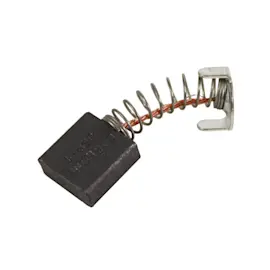
| Trips on startup | Low voltage, worn motor brushes | Use a proper outlet; inspect brushes |
| Trips on thicker stock only | Alignment or blade choice | Verify alignment; use the right blade |
For alignment-related cut issues, use table saw bad angle cuts.
The overload reset protects the motor from overheating and damage. Resetting without correcting the underlying load or voltage issue leads to repeated shutdowns and premature motor wear.
If you need to look up diagrams or order replacement parts by model number, start with the model parts list, or search by model on Sears PartsDirect.
Last updated: February 2026