Owner’s manual
 Error Codes




What is the lifespan of a Samsung front load washer?
A Samsung front-load washer like model WF45N5300AF typically lasts 10 to 15 years with normal household use and basic maintenance. Consistent cleaning, correct detergent use, and avoiding chronic overloading are the biggest factors that keep the tub, drain system, and motor running longer.
Typical lifespan and what affects it
Most front-load washers reach the 10 to 15 year range when they are installed correctly, kept level, and maintained.
Common lifespan drivers:
- Loads per week (heavy daily use shortens life)
- Overloading (stresses bearings, suspension, and motor)
- Detergent choice and amount (too much HE detergent causes residue and odors)
- Moisture control (leaving the door closed traps humidity and promotes buildup)
- Water quality (hard water increases scale and valve wear)
Maintenance that extends washer life
We recommend following the care and cleaning guidance in the WF45N5300AF owner's manual.
Best practices:
- Run the washer’s Self Clean+ cycle on a regular schedule
- Wipe the door boot and glass dry after laundry day
- Leave the door slightly open between loads
- Use HE detergent and measure carefully
- Check pockets to reduce coins, pins, and debris entering the drain system
Quick reference: lifespan vs. usage
| Usage pattern | What we typically see | What helps most |
|---|---|---|
| Light (1 to 3 loads/week) | Often closer to 15 years | Keep it dry and clean |
| Average (4 to 7 loads/week) | Commonly 10 to 15 years | Self Clean+, correct detergent |
| Heavy (8+ loads/week) | Often closer to 8 to 12 years | Avoid overloads, reduce vibration |
Why it matters
Washer longevity is mostly about preventing the problems that end a machine early: chronic vibration (suspension wear), standing water (drain issues), and residue buildup (odor and leaks). Good habits reduce stress on key systems like the drain pump, water inlet valves, and door seal.
Last updated: February 2026
How do I clear the error code on my Samsung washer?
To clear an information (error) code on your Samsung WF45N5300AF washer, we recommend a power reset: press POWER to turn the washer off, wait 2 to 3 minutes, then turn it back on and restart the cycle. If the code returns, correct the underlying issue because the washer will display the code again.
Quick reset steps (works for most temporary glitches)
- Press POWER to turn the washer off.
- Wait 2 to 3 minutes (this is the reset window Samsung commonly recommends).
- Turn the washer back on.
- Press START/PAUSE to resume, or reselect the cycle and start.
- If the washer is draining automatically, let it finish; buttons may be temporarily disabled.
What to do when the code comes back
Some codes clear only after you fix the condition that triggered them. Common examples from Samsung troubleshooting:
| Code | What it usually means | What clears it |
|---|---|---|
| DC | Door is open | Close door, press START/PAUSE |
| UB | Unbalanced load during spin | Rebalance load, then START/PAUSE or power reset |
| 5C | Drain problem | Clean drain filter, then restart |
| LC | Leak detected | Fix leak source, then restart |
Use Smart Care to identify the exact issue
If your washer supports Smart Care, we use it to translate the code into a specific symptom and next steps. Follow the steps in the WF45N5300AF manual and scan the display with the Samsung Smart Washer app.
Why it matters
Clearing the code without fixing the cause can lead to repeat stoppages (for example, repeated UB during spin or 5C drain errors). Addressing the root issue protects the drain pump, door lock, and electronic control.
Last updated: February 2026
Does a Samsung washer have a filter that needs to be cleaned?
Yes. Your Samsung WF45N5300AF front-load washer has filters that need periodic cleaning, including the drain pump filter behind the lower front filter cover and the small mesh screens in the water inlet valve. Keeping them clean helps prevent slow draining, fill errors, and odors (see the WF45N5300AF owner's manual).
What filters this washer has
On this model, you will typically maintain these items:
- Pump filter (drain filter): catches lint, hair, and small objects before they reach the drain pump
- Emergency drain tube: used to safely drain water before opening the pump filter
- Mesh filter (inlet screen): small screen at the water inlet valve that traps sediment from the supply hoses
How often to clean (typical schedule)
Cleaning frequency depends on usage, pet hair, and pocket debris. A practical schedule is:
| Filter | Typical cleaning interval | What you’ll notice if it’s dirty |
|---|---|---|
| Pump filter | Every 1 to 3 months | Slow drain, standing water, drain-related codes, odors |
| Inlet mesh filter | 1 to 2 times per year | Long fill times, weak fill, water-related codes |
Basic pump filter cleaning steps (safe approach)
We recommend this routine to avoid spills and protect the door lock area:
- Unplug the washer.
- Place a shallow pan and towels under the lower front filter area.
- Open the filter cover; drain water first using the emergency drain tube.
- Remove and rinse the pump filter; clear coins, lint, and debris.
- Reinstall the filter fully and close the cover securely.
Why it matters
A clogged pump filter can restrict draining and strain the drain pump; a clogged inlet mesh filter can restrict filling and trigger water supply problems. Regular cleaning helps your Samsung washer run quieter, drain faster, and stay fresher.
Last updated: February 2026
What does NF stand for on a Samsung washer?
On the Samsung WF45N5300AF washer, NF means No Fill. The washer is not detecting enough water entering the tub within the allowed time, so it stops or won’t start the cycle until the fill problem is corrected.
What to check first (fast fixes)
- Confirm both hot and cold supply faucets are fully open.
- Make sure the inlet hoses are not kinked, pinched, or frozen.
- Verify household water pressure is strong at the washer hookups.
- Check that the hose screens (mesh filters) at the washer inlet are not clogged with sediment.
- Reseat the hose connections; cross-threaded or loose fittings can restrict flow.
- Power reset: unplug the washer for 2 to 3 minutes, then retry.
Most common causes and what they mean
| What you notice | Likely cause | What to do |
|---|---|---|
| Little or no water enters | Closed faucet, kinked hose | Open valves, straighten hoses |
| Slow fill on one temperature | Clogged inlet screen | Clean the mesh filter at the inlet |
| Intermittent fill, then NF | Weak water pressure | Improve supply, avoid running other water-heavy fixtures |
| No fill even with good supply | Inlet valve not opening | Consider replacing the inlet valve |
When a part is usually involved
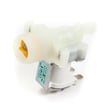
If water supply and screens are good but the washer still shows NF, the inlet valve can be sticking or failing electrically. For this model, the fill valve is commonly serviced as the washer water inlet valve DC62-30314K.
Why it matters
A no-fill condition prevents proper wash action and can leave detergent undissolved. Fixing the water supply issue quickly helps protect the electronic control from repeated cycle interruptions and keeps wash performance consistent.
For model-specific operating details and maintenance steps (including cleaning inlet screens), use the WF45N5300AF owner's manual.
Last updated: February 2026