 Installation guide
 Owner’s manual



How to reset a Bosch SHP68T55UC?
To reset (terminate) a wash cycle on your Bosch SHP68T55UC dishwasher, press and hold the Start button for about 3 seconds until the display changes, wait about 1 minute for it to drain, then press On/Off to finish the reset. See the steps in the owner's manual.
Reset steps (cycle termination)
- Press and hold Start for approximately 3 seconds.
- Confirm the display changes (this indicates the reset is active).
- Wait about 1 minute while the dishwasher drains.
- Press On/Off.
- Power it back on and select a new cycle if needed.
If the dishwasher pauses instead of resetting
Bosch dishwashers can pause for safety if the door is left open after you press Start. Check these common causes:
- Close the door fully and press Start again.
- Make sure the door is not being held open by a rack or tall item.
- Wait for hot steam to subside before fully closing the door if you just opened it mid-cycle.
- If you opened the door during a hot cycle, leave it ajar briefly, then close it.
What “reset” does (and does not do)
A reset is mainly for stopping a running cycle so you can start over.
| Action | What it does | When to use it |
|---|---|---|
| Cycle reset (hold Start) | Cancels the current cycle and drains | Wrong cycle selected, need to restart |
| Power off/on | Saves the cycle state and can resume | You paused the cycle by opening the door |
Why it matters
Resetting correctly prevents water from sitting in the sump and lets you safely change cycles (Bosch notes you cannot change a cycle after Start unless you terminate the cycle).
For display messages after a reset, use the Bosch dishwasher error codes guide.
Last updated: February 2026
What is the average life of a Bosch dishwasher?
Bosch dishwashers typically last 10 to 15 years. For your Bosch SHP68T55UC, the biggest lifespan drivers are consistent cleaning and maintenance (especially filters and door seals), correct installation, and avoiding chronic drain or wash-performance issues; see the owner's manual for the care routine.
Typical lifespan and what affects it
Most dishwashers wear out from heat, moisture, and pump or control stress over time. These factors have the biggest impact:
- Maintenance habits: cleaning filters, spray arms, and door seals
- Water quality: hard water can increase mineral buildup and reduce cleaning efficiency
- Usage: multiple loads per day shortens life compared to light weekly use
- Installation quality: stable leveling, secure mounting, and correct drain routing
- Early symptom repairs: fixing poor draining or weak washing before it strains pumps
Maintenance that helps SHP68T55UC reach the high end of the range
Your manual emphasizes routine cleaning to prevent odors, leaks, and performance problems.
- Clean the door seal with a damp cloth to remove trapped food particles
- Keep the rinse agent filled to help prevent spotting on stainless surfaces
- Clean the filter system regularly so water entering the spray arms stays clean
- Remove debris from the large object trap to protect the pump system
- Avoid harsh cleaners on exterior surfaces; use appropriate stainless-safe products
Quick reference: what “normal” looks like
| Item | Typical expectation | Why it matters |
|---|---|---|
| Service life | 10 to 15 years | Helps plan repair vs. replace decisions |
| Maintenance frequency | Monthly checks, deeper cleaning as needed | Prevents clogs, odors, and wash issues |
| Common wear areas | Pumps, valves, racks, seals, controls | These parts see the most stress |
When repairs start to make sense
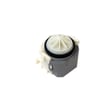
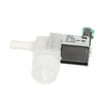
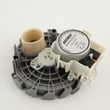
If the dishwasher is otherwise in good shape, replacing a failed component can extend life. For this model, common functional parts we see customers replace include the dishwasher drain pump 00631200, dishwasher circulation pump with heater 12008381, and the dishwasher water inlet valve 10023852.
Why it matters
Knowing the average lifespan helps you decide whether to invest in maintenance and targeted part replacement now, or plan for a future upgrade if multiple major components begin failing close together.
Last updated: February 2026
How to fix Bosch dishwasher error code 09?
Error code E09 on a Bosch dishwasher like model SHP68T55UC usually points to a heating problem, most often in the heater circuit that’s part of the circulation pump assembly. We start by resetting the dishwasher, then checking for simple causes (filters, water temperature, wiring) before replacing the heating circulation pump if needed. See the owner's manual for reset steps and safety notes.
Quick reset you can try first
A reset clears a stuck cycle and forces a fresh start.
- Open the door.
- Press and hold Start for about 3 seconds until the display changes.
- Wait about 1 minute while the dishwasher drains.
- Press On/Off to turn it off, then power it back on and start a new cycle.
What usually causes E09 (and what to check)
E09 is commonly tied to the dishwasher not heating water correctly.
- Incoming water is too cold: Run the kitchen hot water until it’s hot before starting.
- Clogged filters or poor circulation: Clean the filter area so water can move through the sump.
- Heater circuit issue: Loose connection, damaged wiring, or a failed heater integrated with the circulation pump.
- Drain or fill problems that prevent heating: If the unit is not filling correctly, it may never heat.
Parts that commonly solve E09 on SHP68T55UC
On many Bosch designs, the heater is built into the circulation pump assembly.
| Symptom you notice | Most likely system | Part to consider |
|---|---|---|
| Wash is cold, E09 returns quickly | Heating and circulation | Dishwasher circulation pump with heater 12008381 |
| Poor wash plus odd water routing | Diverter system | Dishwasher diverter assembly 00751950 |
| Not filling well, weak wash | Fill system | Dishwasher water inlet valve 10023852 |
Why it matters
Without proper heating, detergent won’t dissolve correctly and the dishwasher can stop mid-cycle or keep throwing E09. Fixing the heat and circulation issue restores cleaning performance and normal cycle completion.
Last updated: February 2026
How do I force a Bosch dishwasher to drain?
To force your Bosch SHP68T55UC dishwasher to drain, terminate (reset) the wash cycle by pressing and holding Start for about 3 seconds until the display changes, then wait about 1 minute while it drains. The exact reset sequence is shown in the owner's manual.
Fast drain (reset) steps
- Press and hold Start for approximately 3 seconds.
- Confirm the display changes (this indicates the reset is active).
- Wait about 1 minute while the dishwasher pumps water out.
- Press On/Off to turn the dishwasher off.
- Start a new cycle if needed.
If it still will not drain
These checks fix most “won’t drain” situations on Bosch dishwashers:
- Remove and clean the filter system (food debris can block flow).
- Check the drain hose routing for kinks, crushing, or a high loop problem.
- Inspect the drain pump area for a foreign object (glass, labels, bones).
- Make sure the drain pump cover is snapped fully into place (it must click).
- If you have an air gap, check it for blockage.
What to check first (quick guide)
| Symptom | Most likely cause | What to do |
|---|---|---|
| Water left in tub after cancel | Filter or pump area blocked | Clean filters; clear pump area |
| Hums but does not move water | Drain pump jammed | Check pump cover and impeller area |
| Drains slowly | Drain hose restriction | Straighten hose; clear obstruction |
| Drains but returns water | Drain hose routing/backflow | Verify proper routing and connection |
Why it matters
Standing water can lead to odors, poor wash results, and repeated drain errors. Resetting the cycle forces a drain attempt, and cleaning the filters and pump area prevents repeat clogs.
For error displays related to draining (such as drain-related fault codes), use our Bosch dishwasher error codes guide to match the code to the most likely drain system issue.
Last updated: February 2026





