 Owner’s manual
 Error Codes







How to tell if Samsung dryer thermal fuse is bad?
On a Samsung dryer like model DVG50A8600V, a bad thermal fuse typically shows no continuity when tested with a multimeter; the dryer may not start or may run with no heat. Replace the fuse only after fixing the overheating cause, most often a restricted vent.
How to test the thermal fuse (quick, accurate check)
- Unplug the dryer (and shut off gas if you have a gas model).
- Access the fuse (commonly on the blower housing or heater housing, depending on design).
- Pull the two wires off the fuse terminals.
- Set your multimeter to continuity (beep) or ohms.
- Touch a probe to each terminal:
- Good fuse: beeps or reads close to 0 Ω
- Blown fuse: no beep or reads OL/infinite
- If the fuse is blown, do not bypass it; replace it.
Fix the root cause first (what usually blows the fuse)
Overheating is almost always caused by poor airflow. The DVG50A8600V manual notes that a clogged duct can let the dryer keep running but extend drying time and trigger airflow-related messages; restricted venting also drives temperatures up. Use this checklist:
- Clean the lint screen before every load.
- Inspect and clean the exhaust duct from dryer to outside.
- Check the outside vent hood for a stuck flap or blockage.
- Reduce long runs and extra elbows; too many bends restrict airflow.
- Confirm the door closes fully and the filter cover is seated.
Related symptoms and what they point to
| Symptom | Most likely issue | What to check next |
|---|---|---|
| Dryer will not start | Safety circuit open | Thermal fuse, door switch, power supply |
| Runs but no heat | Heating circuit issue | Venting, high-limit thermostat, burner/heater |
| Long dry times | Airflow restriction | Lint filter, duct, blower wheel |
| “tC” code (thermistor issue) | Temperature sensing problem | Vent restriction, thermistor wiring/sensor |
Parts that commonly relate to overheating and no-heat problems
If testing points away from the fuse, these model-matched parts are common suspects:
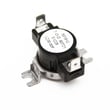
- Dryer high-limit thermostat DC47-00017A (opens if temperatures get too high)
- Dryer thermistor DC32-00007A (helps the control sense temperature)
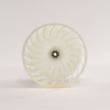
- Dryer blower wheel DC67-00180B (moves air; damage reduces airflow)
Why it matters
The thermal fuse is a one-time safety device. If you replace it without correcting airflow or temperature-control problems, it often blows again and the dryer can keep drying poorly.
For model-specific access steps and safety notes, follow the owner's manual.
Last updated: February 2026
How long does a Samsung VRT washer last?
Most Samsung VRT washers typically last about 10 years with normal household use; with consistent care (proper loading, correct detergent, and routine cleaning), it’s common to reach 12 years. For model-specific care and maintenance details, follow the owner's manual.
Typical lifespan and what affects it
Washer life is driven more by usage and maintenance than the badge on the lid. The biggest factors are load size, cycle frequency, water quality, and how well the machine is kept clean.
- Loads per week: more cycles equals more wear on bearings, suspension, and motor components
- Overloading: increases stress on the tub, shocks, and drive system
- Detergent choice and amount: too much detergent can cause residue and odor issues
- Leveling and vibration control: reduces strain on suspension parts
- Routine cleaning: helps prevent buildup that can lead to drainage and spin problems
Quick care checklist to help your washer reach 10+ years
These habits reduce vibration, moisture problems, and premature part wear.
- Keep the washer level and stable on the floor
- Avoid consistently washing heavy, unbalanced loads (blankets, rugs) without balancing items
- Use the correct detergent type and measure it carefully
- Leave the door/lid open after use to help the interior dry out
- Run a monthly cleaning cycle (or the washer’s self-clean cycle if equipped)
What “end of life” usually looks like
Most washers don’t fail all at once; they show repeat symptoms that become more frequent.
| Symptom | Common underlying issue | What to do first |
|---|---|---|
| Loud roaring in spin | Worn tub bearing | Stop heavy loads; plan repair evaluation |
| Walking/shaking | Leveling or worn suspension | Re-level; reduce load size |
| Not draining | Pump/filter/clog | Check drain path; clean filter |
| Won’t spin consistently | Lid/door switch or control issue | Check for error codes; inspect latch/switch |
Why it matters
A washer that’s nearing the end of its service life often uses more time and energy per load due to repeated rebalancing, longer cycles, and incomplete draining. Catching early symptoms can prevent secondary damage.
Last updated: February 2026
How to tell if a Samsung dryer heating element is bad?
A bad heating element usually shows up as no heat or very weak heat, so clothes stay damp or cycles run much longer than normal. On your Samsung DVG50A8600V dryer, we confirm it by checking airflow first, then testing the heater circuit for continuity and checking for a grounded element; use the owner's manual for model-specific access and safety steps.
Quick symptoms to look for
- Dryer tumbles normally but produces little or no heat
- Dry times suddenly get much longer on similar loads
- An “HC” high-temperature heating check code appears (often tied to airflow restriction)
- A “tC” thermistor resistance code appears (can affect heat control)
- Burning smell or repeated overheating shutoffs (stop using until checked)
Safe test steps (what we do)
- Disconnect power (and shut off gas if you have a gas version).
- Check airflow first: clean the lint filter and confirm the vent is not restricted. Restricted venting can mimic heater failure and can also trigger “HC”.
- Access the heater circuit using the disassembly guidance in the owner's manual.
- Continuity test the heating element with a multimeter (element should show continuity; an open circuit indicates a failed element).
- Ground test: check from each heater terminal to the metal heater housing or cabinet; any continuity indicates a grounded element.
What to check if the element tests good
If the element has continuity and is not grounded, we focus on common heat-control parts:
| What you find | Most likely cause | What to check next |
|---|---|---|
| No heat, element open | Failed heating element | Replace the heater assembly (model-specific) |
| Overheats or “HC” | Airflow restriction or heat safety trip | Venting, lint buildup, then thermostat |
| “tC” code | Temperature sensing issue | Thermistor and wiring |
Model-matched parts that commonly relate to heat problems on this page include the dryer high-limit thermostat DC47-00017A and the dryer thermistor DC32-00007A.
Why it matters
A dryer that is not heating is often a simple electrical failure, but airflow restrictions can cause overheating, repeated shutdowns, and premature failure of thermostats and sensors. Verifying venting before replacing parts prevents repeat repairs.
Last updated: February 2026









