Owner’s manual
 View engine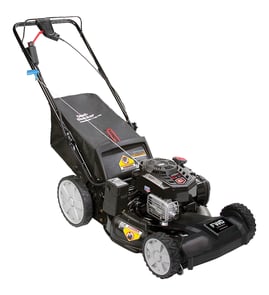



Are gas lawn mowers being phased out?
Gas walk-behind mowers like the Snapper 7800776 are not being “phased out” everywhere at once, but the market is shifting toward battery-electric models due to local regulations, noise and emissions goals, and customer preference. Gas mowers remain common for many homeowners and some heavy-duty use.
- Some states and cities restrict or plan to restrict sales of certain new gas-powered outdoor equipment.
- Many retailers are expanding electric mower selection because electric is quieter and needs less routine engine maintenance.
- Existing gas mowers can still be used and maintained; parts support often continues for years.
- Gas still makes sense for longer run times, refueling convenience, and certain mowing conditions.
- Maintenance and safe fueling practices remain important for any gas mower.
Your mower’s core service needs are the same regardless of market trends: keep the blade sharp, keep the drive system working smoothly, and follow safe operation and fueling steps in the Snapper 7800776 owner’s manual.
| What you’re servicing | What to check | Example model-matched part |
|---|---|---|
| Cutting performance | Bent/dull blade, vibration | Blade 7103288YP |
| Self-propel drive | Slipping, won’t move, squeal | Belt 7103362YP |
If your area tightens rules on new gas equipment sales, keeping your current Snapper mower running well becomes even more valuable. A sharp blade and a healthy drive belt improve cut quality, reduce strain on the engine, and help the mower last longer.
- Confirm local rules before buying a new mower (rules vary by location).
- Keep the blade sharp and balanced; see how to sharpen a lawn mower blade.
- If you remove the blade, use the right method and tools; see lawn mower blade removal tool.
- If the mower won’t move, inspect the drive belt and drive control linkage.
- Store fuel properly and avoid stale gas during off-season storage.
Last updated: January 2026
What are the most common issues with 7800776?
The most common issues we see on the Snapper 7800776 gas walk-behind mower are starting problems, poor cut quality, and self-propel/drive issues. These usually trace back to routine wear items, loose hardware, or deck and drive components that need cleaning, adjustment, or replacement; use the 7800776 owner's manual for model-specific checks and settings.
- Won’t start or starts then dies: stale fuel, dirty air filter, fouled spark plug, or carburetor varnish
- Uneven cut or poor mulching/bagging: dull/bent blade, deck buildup, incorrect height setting
- Vibration or rattling: loose fasteners, damaged blade, worn hardware
- Self-propel weak or not moving: worn/loose drive belt, drive control out of adjustment
- Rear discharge door not closing right: worn hinge/rod parts or misalignment
- Disconnect the spark plug wire before working near the blade.
- Confirm fresh fuel and the correct oil level.
- Inspect the blade for damage; replace if bent or badly nicked.
- Check the drive system for belt wear and proper tension.
- Clean packed grass from under the deck (a common cause of poor cutting).
| Symptom | Commonly involved part | Example part for model 7800776 |
|---|---|---|
| Poor cut, tearing grass | Blade | Blade 7103288YP |
| No/weak self-propel | Drive belt | Belt 7103362YP |
| Handle won’t stay set | Handle knob | Handle knob 703065 |
| Rear door issues | Rear discharge hinge | Door hinge, rear discharge 7103292 |
A worn blade or slipping belt makes the mower work harder, increases vibration, and can lead to faster wear on the deck, height adjustment, and drive components. Keeping the cutting and drive systems in good shape improves cut quality and reduces breakdowns.
Last updated: March 2026
What model snapper do I have?
Your Snapper model number is printed on the equipment ID tag (a small white label) mounted on the mower frame. For Snapper walk-behind mowers, it’s commonly on the rear of the mower near the lower frame area; match that number to the format shown in the Snapper 7800776 operator’s manual.
Check these common locations on a Snapper walk-behind mower:
- Rear of the mower deck, near the bottom edge of the frame
- Back of the mower, near the discharge door or bagging area
- Lower corner of the frame below the deck (near the wheel area)
- Handle mounting area (where the handle brackets attach)
Record the full ID information so we can match the correct parts list and diagrams.
- Equipment model number (example: 7800776)
- Equipment serial number
- Engine model/type/code (often listed separately on the engine)
| Item | Where it’s used | Why it matters |
|---|---|---|
| Equipment model number | Mower parts lookup | Ensures the correct deck, handle, and drive parts |
| Equipment serial number | Production break info | Helps match running changes |
| Engine model/type/code | Engine parts lookup | Matches carburetor, air filter, spark plug, recoil parts |
Snapper used multiple versions of similar-looking walk-behind mowers; the exact model number is what keeps you from ordering the wrong blade, belt, or handle hardware.
Last updated: January 2026