

Can you replace the battery in a Black and Decker CHV1408?
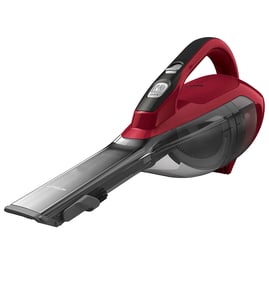
Yes, the battery in a Black & Decker CHV1408 handheld vacuum can be replaced, but it is typically an internal battery pack rather than a quick-swap, user-removable battery. Replacement usually requires opening the housing, disconnecting the old pack, and installing a matching pack.
Most CHV1408 units do not have an external battery door or slide-out battery. In practice, battery replacement is a small repair job (screws, case separation, wiring connections), not a simple accessory swap.
- Run time drops sharply (for example, seconds to a minute)
- Vacuum runs only after a long charge, then dies quickly
- Charging light behavior changes (never indicates full, or indicates full too fast)
- Motor sounds weak even with a clean filter and empty bowl
- Unit works only while held at certain angles (battery connection issue)
These steps fix many “dead battery” complaints caused by airflow restriction or poor charging contact.
- Fully empty the dirt bowl and clean the pre-filter and filter
- Check the nozzle and intake for clogs
- Clean charging contacts on the vacuum and charger base
- Confirm the outlet works and the charger is firmly seated
- Let it charge uninterrupted for a full cycle (overnight is common for older packs)
| Task | What you do | Why it matters |
|---|---|---|
| Open housing | Remove screws and separate the case halves | Access the internal battery pack safely |
| Identify pack | Match voltage, connector style, and physical size | Prevents fit and charging problems |
| Swap pack | Disconnect old pack, connect new pack | Restores run time and suction |
| Reassemble | Route wires correctly, reinstall screws | Avoids pinched wires and shorts |
A weak battery pack can mimic other problems (low suction, stalling motor). Doing the airflow and charging-contact checks first helps you avoid replacing a battery when the real issue is a clogged filter or poor charging connection.
For electrical testing during diagnosis, we recommend using a meter the right way; see how to use a multimeter to test electrical parts video.
Last updated: February 2026
How do I find the model number on my CHV1408?
On the Black & Decker CHV1408 handheld vacuum, the model number is printed on the product rating label on the vacuum body. We use that exact model number to match the correct diagrams and replacement parts for your unit.
Check these common label locations on handheld vacuums like the CHV1408:
- Bottom of the vacuum body (underside)
- Back of the handle area
- Near the dust bowl release latch
- Under the removable dust cup or filter cover
- On the charging base (sometimes lists base model, not the vacuum)
Record the information exactly as shown on the label:
- Model number (for example, CHV1408)
- Type number or series code (if listed)
- Electrical rating (volts/amps), helpful for charger or battery matching
- Any revision letters or suffixes
| Label item | What it means | Why we need it |
|---|---|---|
| Model number | The main identifier | Matches the correct parts list |
| Type/series | Variant within the model | Prevents ordering the wrong version |
| Electrical rating | Power specs | Helps confirm charger/battery compatibility |
Black & Decker handheld vacuums often have multiple versions that look similar; using the exact model and type from the label prevents fit issues when you are selecting a filter, charger, battery pack, or dust cup.
For a quick walkthrough on locating and using the label info, use [how to find your appliance model number (and what it means for parts)].
Last updated: March 2026
What is the average lifespan of CHV1408?
The average lifespan of a Black & Decker CHV1408 handheld vacuum is 3 to 5 years with typical home use. Battery condition and filter maintenance drive most of the real-world lifespan for cordless handheld vacuums.
These factors have the biggest impact on how long a CHV1408 keeps working well:
- Battery wear from frequent full discharges and long storage on a dead battery
- Clogged filters reducing airflow and overheating the motor
- Dust and debris buildup in the dust cup and intake path
- Using it on fine powders (drywall dust, fireplace ash) that load filters quickly
- Charger issues that prevent a full charge
| Task | How often | What it prevents |
|---|---|---|
| Empty dust cup | Every use | Loss of suction, motor strain |
| Clean or replace filter | Monthly (more for heavy use) | Overheating, weak pickup |
| Clear intake/nozzle | As needed | Blockages, noise, poor airflow |
| Store on charge correctly | Ongoing | Premature battery failure |
- Run time drops sharply even after a full charge
- Suction stays weak after cleaning the filter and clearing clogs
- Motor surges, smells hot, or shuts off during use
- Charger light behavior changes (no charge indication or intermittent charging)
Most handheld vacuum “failures” are airflow restriction or battery wear; keeping airflow open and charging habits consistent typically delivers the full 3 to 5 year lifespan.
If you plan to troubleshoot electrical issues safely (charger, switch, wiring), follow the steps in [are diy appliance repairs safe].
Last updated: March 2026