Owner’s manual
 Error Codes



Are Kenmore ovens in Fahrenheit or Celsius?
Kenmore ovens, including model 66595802000, can typically display and set temperature in Fahrenheit or Celsius. You can switch the temperature unit in the electronic oven control settings; the exact button sequence for your range is listed in the 66595802000 owner's manual.
How to tell which unit your oven is using
Look at the temperature shown when you set BAKE (for example, 350 vs 180). In most homes in the U.S., the oven is set to Fahrenheit.
- 350 usually indicates Fahrenheit
- 180 usually indicates Celsius
- If the display shows a C or F indicator, that confirms the unit
- If baking times seem “off,” the unit setting is a common cause
How to switch between Fahrenheit and Celsius
On Kenmore electronic oven controls, the unit change is usually found under a settings or special-functions mode.
Typical steps (varies by control style):
- Press a settings or function key (sometimes labeled “Clock,” “Options,” or similar)
- Navigate to Celsius/Fahrenheit
- Select °F or °C
- Press Start to save
For the exact key presses for model 66595802000, use the 66595802000 owner's manual.
Quick reference: Fahrenheit vs Celsius
| Common baking target | Fahrenheit | Celsius |
|---|---|---|
| Cookies/cakes | 350°F | 177°C |
| Roasts | 325°F | 163°C |
| Pizza | 425°F | 218°C |
Why it matters
If the oven is set to Celsius when you are following Fahrenheit recipes (or the other way around), food can undercook or burn because the set temperature is dramatically different.
Last updated: January 2026
How to reset Kenmore oven control board?
To reset the oven control on your Kenmore 66595802000 electric range, disconnect power at the breaker (or unplug the range) for about 2 minutes, then restore power. This clears many temporary control glitches and restores normal keypad operation.
Safe reset steps (recommended)
- Turn the range OFF/CANCEL if the keypad responds.
- Shut off the range circuit at the household breaker (preferred) or unplug the power cord.
- Wait 2 minutes.
- Restore power and set the clock if needed.
- If the display shows “Loc”, press and hold the OVEN keypad for 5 seconds to unlock.
What to check if the reset does not help
- Nothing works at all: check for a tripped breaker or blown fuse (power supply issue).
- Oven will not start but cooktop works: confirm no delay start is set; cancel and reprogram.
- Keypad seems locked: look for “Loc” and use the oven lockout unlock step.
- Heats poorly or not at all: a failed heating component is common; inspect for visible damage.
| Symptom after reset | Most likely cause | What we recommend |
|---|---|---|
| Display blank, no beeps | No power to range | Reset breaker fully; verify outlet power |
| “Loc” on display | Oven lockout enabled | Hold OVEN keypad 5 seconds |
| Oven runs then stops, odd behavior | Control setting issue | Cancel and re-enter settings per 66595802000 owner's manual |
| Oven will not heat | Heating circuit problem | Check elements and wiring; replace failed parts |
Parts that commonly relate to “no heat” complaints
If the control resets but the oven still will not heat, the heating circuit is the next place to focus.
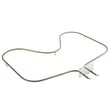
- Bake element WPW10308477 (primary bake heat)
- Range broil element WP8053874 (broil heat and some preheat assist)
- Range oven temperature sensor WP8273340 (tells the control the oven temperature)
Why it matters
A power reset is the fastest way to clear a stuck control state, but it will not fix a hard failure like a burned-out bake element, a bad temperature sensor, or a wiring problem. Checking lockout and basic power first prevents unnecessary parts replacement.
Last updated: January 2026
What does F2 mean on a Kenmore stove?
On Kenmore electric range model 66595802000, an F2 code points to an oven temperature problem, most often a failed or shorted oven temperature sensor circuit. Clearing the code may get you cooking again briefly, but the fix is usually checking the sensor and its wiring, then replacing the failed part.
What to do first (safe, quick checks)
- Press OFF/CANCEL to clear the code.
- If the code returns, turn off power at the breaker before inspecting anything.
- Check for a loose connector at the oven temperature sensor and at the control (if accessible).
- Look for pinched, burned, or brittle wires near the rear oven wall and where the harness routes.
- If the oven recently ran self-clean, let everything cool fully; heat can reveal weak connections.
How we typically confirm the cause
The most common causes of an F2-style temperature fault on electric ranges are the sensor circuit or the electronic control.
| Likely cause | What you may notice | Typical fix |
|---|---|---|
| Oven temperature sensor circuit issue | F2 returns quickly; oven may overheat or stop heating | Test sensor resistance; repair wiring; replace sensor if out of range |
| Control/relay issue | Erratic heating; code returns even with good sensor readings | Replace the control (if applicable for your symptom) |
For model-specific access steps and troubleshooting flow, use the 66595802000 owner's manual.
Parts that commonly relate to this symptom
If testing shows the sensor is the problem, the correct replacement is the range oven temperature sensor WP8273340.
Why it matters
An F2 code is the range telling you it cannot reliably control oven temperature. Fixing the sensor circuit helps prevent overheating, undercooking, and repeated shutdowns during baking or broiling.
Last updated: January 2026