 Owner’s manual




Why won't my Kenmore vacuum brush spin?
If the brush on your Kenmore upright vacuum model 12531230610 will not spin, the most common causes are a worn or broken belt, a jammed brush area, or restricted airflow that triggers a protection feature. Unplug the vacuum, clear the nozzle, then inspect the belt and brush roll per the owner's manual.
Quick checks that fix most “brush won’t spin” problems
- Unplug the vacuum before touching the brush area (the brush can start unexpectedly).
- Remove the nozzle or lower plate and clear hair, string, and debris from the brush roll.
- Check for clogs in the nozzle, wand, and hose; restricted airflow can reduce performance and change sound.
- Empty the dust cup and clean the filters; a clogged filter can contribute to poor pickup and airflow issues.
- Inspect the belt for cracks, glazing, stretching, or if it has slipped off the motor shaft.
- If the belt is damaged or loose, replace it with the correct belt for this model.
Belt and brush roll: what to look for
A belt can look “fine” but still slip under load. If the brush spins freely by hand but stops on carpet, the belt is usually stretched.
| Symptom | Most likely cause | What to do |
|---|---|---|
| Brush never spins, motor runs | Belt broken or off | Reinstall or replace the belt; check brush roll for binding |
| Brush spins in air, stops on carpet | Belt stretched or brush roll jammed | Replace belt; remove hair wrap and check end caps |
| Loud change in sound, weak pickup | Clog or dirty filters | Clear clogs; clean pre-filter and filter |
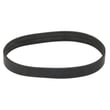
If you need the belt for this model, use the vacuum beater bar belt KC28SEDCZ000.
Why it matters
A non-spinning brush roll reduces carpet cleaning and can overwork the drive system. Keeping the belt, brush roll, and airflow path clean helps maintain suction and prevents repeat belt failures.
Last updated: February 2026
What model is my vacuum?
Your Kenmore upright vacuum’s model number is printed on the model and serial number plate. For Kenmore model 125.31230610 (shown as 12531230610 on parts listings), use the plate information exactly as printed when looking up parts or using the owner's manual.
Where to find the model number label
On Kenmore uprights like model 12531230610, the model and serial number plate is on the vacuum body (not on the cord or attachments). Check these common spots:
- Back or bottom of the main vacuum body
- Near the dust bin area or behind the dust bin
- On the rear housing close to the handle pivot
- Under a removable cover or near the nozzle connection
How to read the label (and why it matters)
Use the full model number and, when available, the serial number from the plate.
- The model number ensures you get the correct fit for filters, belts, and electrical parts
- The serial number helps match production variations
- The exact characters matter (numbers, dots, and spacing)
Quick reference
| What you see | What it’s used for | Example for this vacuum |
|---|---|---|
| Model number | Parts lookup and manual match | 125.31230610 (also listed as 12531230610) |
| Serial number | Version and production details | Varies by unit |
If you’re trying to match parts to your model
Once you confirm the model number, match it to common maintenance items for this Kenmore vacuum:
- Replace clogged filters to restore suction
- Replace worn belts if the brush roll stops spinning
- Inspect the power cord if the vacuum cuts out
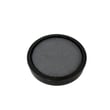
If you need a filter for this model, start with the parts list and compare to your current filter style, such as the vacuum filter KC44KEDCZ000 or vacuum pre-filter KC43KEDCZV0S.
Why it matters
Using the exact model number prevents ordering the wrong Kenmore Elite parts, especially for items like vacuum filters, beater bar belts, and electronic components that can look similar but fit differently.
Last updated: February 2026
Why is my Kenmore vacuum not suctioning?
Loss of suction on your Kenmore 12531230610 upright vacuum is almost always caused by restricted airflow: a full dust cup, a clog in the nozzle, hose, or wand, or a dirty pre-filter or filter. Restoring airflow (and letting the motor cool if it overheated) brings suction back.
Quick checks that fix most no-suction problems
- Empty the dust cup completely and re-seat it so it seals.
- Check the nozzle, hose, and wand for clogs; remove hair, lint, and debris.
- Clean or replace the pre-filter and primary filter (a clogged filter blocks airflow).
- If the sound suddenly changes, the by-pass valve may be open due to a clog; clear the clog and clean filters.
- If the vacuum shut off, unplug it and wait about 50 minutes for the thermal protector to reset.
Filter and airflow parts for this model
If cleaning does not restore airflow, replacing the filters used on this model is the next step.
| What to check | What it affects | Model-matched part to consider |
|---|---|---|
| Pre-filter condition | Protects the main filter; clogs quickly | Vacuum pre-filter KC43KEDCZV0S |
| Main filter condition | Directly controls airflow and suction | Vacuum filter KC44KEDCZ000 or Kenmore vacuum filter KC44KEDAZ000 |
Step-by-step: clear a clog safely
- Unplug the vacuum.
- Remove the dust cup and check the air path behind it for packed debris.
- Detach the hose and wand; look through each section toward a light.
- Check the nozzle inlet and brush area for a blockage.
- Reassemble tightly; a loose connection can leak air and reduce suction.
Why it matters
Your 12531230610 has a by-pass valve designed to prevent motor overheating when airflow is blocked. Clearing clogs and keeping filters clean protects the suction motor, improves pickup, and reduces overheating shutoffs.
For model-specific care steps and the troubleshooting chart, follow the owner's manual.
Last updated: February 2026


