








Where to find part number on GE dryer?
On your GE DPXQ473ET5WW electric dryer, the model and serial tag (where you will find the model number and serial number used to look up the correct parts) is typically located on the door opening, either on the inside of the dryer door or on the front door frame.
What to look for on the tag
Use the information on the tag to match parts to your exact dryer configuration.
- Model number: DPXQ473ET5WW
- Serial number: a longer mix of letters and numbers
- Electrical rating: voltage and amperage (helpful for diagnosing heat issues)
- Manufacturing date code: sometimes included on GE tags
Part number vs. part ID (what Sears PartsDirect uses)
GE parts are often identified two ways. Knowing both helps you order the right replacement.
| What you have | Example | What it’s used for |
|---|---|---|
| Manufacturer part number | WE12M0022 | GE’s reference number for the part |
| Sears PartsDirect part ID | WE03X29897 | The identifier used on the part page and diagrams |
If you are replacing a common wear item like a belt, match it by model first, then confirm the identifier on the part listing, such as the drive belt WE03X29897.
Tips if you cannot find the tag quickly
These checks usually locate it in under a minute.
- Open the door and inspect the front door frame around the opening
- Check the inside edge of the door itself
- Look near the lint screen housing area (some designs place labels nearby)
- Wipe dust off the frame; tags can blend into the paint
- Take a photo of the tag so you can zoom in on small print
Why it matters
GE dryers can use different components across similar-looking models. Using the DPXQ473ET5WW model number from the tag helps us match the correct drive belt, idler pulley, heater housing, door switch, and other dryer parts the first time.
Last updated: February 2026
What if I can't find my part on Sears PartsDirect?
If you cannot find a part for your GE DPXQ473ET5WW electric dryer, we recommend confirming the model number from the dryer’s ID tag and then searching by the part name or part ID; if it still does not appear, contact our parts specialists for help matching the correct replacement.
Quick checks that usually solve it
- Recheck the model number character-by-character: DPXQ473ET5WW
- Search using a common part name (example: “drive belt”)
- Search using a part ID when you have it (example: drive belt WE03X29897)
- Try alternate terms: “drum belt”, “belt”, “idler pulley”, “door switch”, “timer”
- If your dryer is stacked or in a laundry center, confirm you are shopping the dryer model, not the washer model
Common reasons a part does not show up
| What you see | Most common cause | What to do next |
|---|---|---|
| No results | Typo in model number or part ID | Re-enter DPXQ473ET5WW and search again |
| Similar parts, not exact | You searched by a generic name | Search by the exact part ID from the old part label |
| Part looks right but won’t fit | Variant/sub-model difference | Match by model number first, then confirm part ID |
| Part is missing from the list | You are in the wrong section | Browse the full parts list for DPXQ473ET5WW |
Why it matters
Dryer parts are fit-specific. Matching your GE DPXQ473ET5WW by exact model number helps ensure the replacement part aligns with the correct drum size, mounting points, and electrical connectors.
Helpful DIY reference
If you are troubleshooting instead of replacing a known part, use dryer common questions to narrow down symptoms (no heat, won’t start, long dry times) before ordering.
Last updated: February 2026
Why is my GE dryer running but no heat?
If your GE DPXQ473ET5WW electric dryer tumbles but won’t heat, the most common causes are a power supply issue (missing one leg of 240V), restricted airflow from lint buildup, or a failed heating circuit component such as the heating element, high-limit thermostat, or safety thermostat.
Quick checks that fix many “no heat” calls
- Confirm the dryer is on a 240V circuit; a tripped breaker can let the motor run on 120V but prevent heat.
- Clean the lint screen completely (wash off fabric softener residue if present).
- Check airflow at the outside vent hood; it should be strong and steady.
- Inspect the vent hose for kinks, crushing, or heavy lint buildup.
- Run a timed dry cycle (not auto) to rule out a control or sensor-related issue.
Parts that commonly cause “runs but no heat” on electric dryers
On DPXQ473ET5WW, these parts are frequent suspects when airflow and power are good:
| Symptom | Most likely area | Common related part on this model |
|---|---|---|
| Tumbles, no heat at all | Heating circuit open | Heater housing WE11M23 |
| Heats briefly, then stops | Overheating protection tripping | T'stat saf. WE4M137 or therm. l210 WE4M160 |
| Long dry times, weak airflow | Venting or internal air path restriction | Air duct WE14X25080 |
Why it matters
A clogged vent or restricted air duct can overheat the heater housing and repeatedly trip safety thermostats, which leads to “no heat” and can also shorten the life of other components.
What we recommend next
- If airflow is weak: clean the full vent run to the outside and inspect the internal ducting.
- If airflow is strong: test the heating circuit components for continuity (unplug dryer first).
- If you find heat damage, burning smell, or repeated overheating: stop using the dryer until the restriction and failed part are corrected.
For more step-by-step help, use our electric dryer wont heat troubleshooting video.
Last updated: February 2026
How to remove front panel of GE front load dryer?
To remove the front panel on your GE DPXQ473ET5WW electric dryer, we typically lift the top, remove the screws that secure the front panel, then disconnect the door switch wiring so the panel can come off cleanly. This gives access to the drum, belt, and blower area.
Before you start (safety and setup)
- Unplug the dryer from the wall outlet.
- If it is stacked or tight to a wall, pull it forward for working room.
- Wear cut-resistant gloves; cabinet edges can be sharp.
- Keep a small container for screws so nothing gets lost.
- Take a quick photo of wire connections before unplugging anything.
Front panel removal steps (common GE front-load design)
- Remove the lint screen (if your lint screen is in the top panel) and take out the screws in that opening (if present).
- Lift the top panel: remove the screws at the back edge of the top, then slide the top back slightly and lift it up.
- Remove front panel mounting screws: look for screws at the upper inside corners (under the lifted top) and sometimes along the lower edge.
- Disconnect the door switch harness: support the front panel with one hand, then unplug the door switch connector.
- Lift and pull off the front panel: most panels lift up off lower retaining tabs/clips, then pull forward.
What you can inspect once the front is off
| Symptom | Common area to check | Related part (if needed) |
|---|---|---|
| Drum not turning | Belt and idler system | Drive belt WE03X29897, idler pulley WE03X31620 |
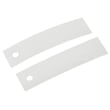
| Loud scraping or thumping | Drum slides and felt seal | Slide drum WE03X37317, felt WE09X27634 |
| Poor airflow/noisy air movement | Blower housing/wheel | Dryer blower wheel WE16M15 |
Why it matters
Removing the front panel the right way prevents broken plastic tabs, stripped screws, and damaged wiring. It also makes it easier to diagnose common issues like a broken belt, worn drum slides, or a failing idler pulley.
For efficiency and to reduce lint buildup after reassembly, follow how to clean and maintain your clothes dryer.
Last updated: February 2026





