Owner’s manual
 Error Codes
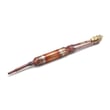


How do I remove the base grille on my Whirlpool refrigerator?
On the Whirlpool WRF757SDEM01, we remove the base grille by grasping it firmly and pulling it straight toward you. This grille snaps on and off; once it’s off, you can access the brake feet and front roller area for leveling and cleaning (see the WRF757SDEM01 use & care guide).
Steps to remove the base grille (WRF757SDEM01)
- Unplug the refrigerator (recommended anytime you’re working around the bottom front area).
- Open the freezer drawer for better access to the brake feet area.
- Stand in front of the unit and grip the base grille with both hands.
- Pull the grille straight toward you to release the retaining clips.
- Set the grille aside on a soft surface to avoid scratches.
How to reinstall it
Align the ends of the grille with the leveling assemblies on each side, then press until it snaps into place.
What you’ll see behind the grille (and why it matters)
The base grille covers components that affect door closing and stability:
- Brake feet (leveling feet)
- Front rollers
- Floor clearance area where dust can collect
Keeping this area accessible helps you level the cabinet correctly and maintain airflow and cleanliness.
Quick reference
| Task | Tool needed | Freezer drawer position |
|---|---|---|
| Remove base grille | None | Open |
| Adjust brake feet | 1/4-in. hex driver | Open |
| Reinstall base grille | None | Open |
If the grille is cracked or won’t stay clipped
If tabs are broken or the grille won’t snap back securely, replacement is typically the fix. For this model, the compatible part is the refrigerator grille W10871842.
Last updated: January 2026
How do you remove the bottom freezer drawer on a Whirlpool refrigerator?
On the Whirlpool WRF757SDEM01 bottom-mount refrigerator, we remove the bottom freezer drawer by fully opening it, taking out the fasteners that secure the drawer front to the glides, lifting the drawer front up to release it from the glide brackets, then sliding the glides back in. See the WRF757SDEM01 use & care manual for the exact steps and tool size.
Steps to remove the freezer drawer front (WRF757SDEM01)
- Unplug the refrigerator (or disconnect power) for safety.
- Open the freezer drawer to its full extension.
- Remove the two screws at the top, inside the drawer front (one left, one right) that fasten the drawer front to the drawer glides.
- Lift up on the drawer front to release the plastic studs from the drawer glide bracket slots.
- Slide the drawer glides back into the freezer.
What you will need
| Item | Purpose |
|---|---|
| 1/4-inch hex driver | Removes the two drawer-front screws |
| Towel or blanket | Protects the drawer front and floor |
| Helper (recommended) | Makes lifting and aligning easier |
Reinstalling the drawer front (quick checklist)
- Pull the drawer glides out fully.
- Align the bottom plastic studs with the glide bracket slots.
- Push down to seat the studs, then reinstall and tighten the two top screws.
Why it matters
Removing the drawer front the right way prevents bent glides, broken plastic studs, and a freezer drawer that will not seal or slide smoothly, which can lead to frost buildup and temperature swings.
Last updated: January 2026
What is the most common problem with a Whirlpool refrigerator?
For Whirlpool refrigerators like model WRF757SDEM01, the most common service issue we see is a cooling complaint (fridge too warm, freezer too warm, or temperatures that swing). The root cause is often airflow restriction, dirty condenser coils, or a failing fan or control component.
What “most common” usually means on WRF757SDEM01
Cooling problems typically show up as one of these symptoms:
- Fresh food section warm but freezer OK
- Freezer not cold enough and ice production slows
- Unit runs a lot, or seems louder than normal
- Frost buildup that blocks airflow
- Food freezing in the refrigerator section (airflow or control issue)
For model-specific operating basics and troubleshooting charts, use the WRF757SDEM01 use & care manual.
Quick checks that fix many Whirlpool refrigerator problems
Before replacing parts, we recommend these high-impact checks:
- Confirm set points are at 37°F (refrigerator) and 0°F (freezer)
- Make sure vents inside the compartments are not blocked by food packages
- Clean dust from the condenser area (restricted heat release can mimic “not cooling”)
- Verify doors seal fully and close on their own
- Allow 24 hours after changes for temperatures to stabilize
Common “cooling problem” parts on this model
If the quick checks do not help, these parts are commonly involved in cooling and airflow complaints:
| Symptom | Likely system area | Example compatible part for WRF757SDEM01 |
|---|---|---|
| Warm temps, poor airflow | Evaporator fan circuit | Refrigerator evaporator fan motor assembly W11452196 |
| Runs a lot, warm temps | Condenser airflow | Condenser fan (varies by symptom and diagnosis) |
| Erratic temps, odd behavior | Electronic control | Electronic control board (varies by diagnosis) |
Why it matters
A refrigerator that is not moving air correctly can’t hold safe food temperatures. Catching airflow and condenser issues early can prevent spoiled food, heavy frost buildup, and unnecessary strain on the compressor.
Helpful DIY references
- Troubleshooting a refrigerator not cooling video
- How to clean refrigerator condenser coils
- Diagnosing refrigerator evaporator fan problems video
Last updated: January 2026
How do I reset the feeler arm on my Whirlpool ice maker?
On the Whirlpool WRF757SDEM01, the ice maker shutoff (feeler) arm is a simple on/off lever: lift it to stop ice, lower it to restart. If it seems “stuck,” power-cycle the refrigerator and make sure the arm can move freely; then allow time for a new harvest cycle.
Quick reset steps (WRF757SDEM01)
- Lift the shutoff arm fully up, then lower it fully down.
- Remove the ice bin and clear any cubes that could be jamming the arm or ejector area.
- Turn the ice maker off, wait 10 seconds, then turn it back on (if your model has an ice maker on/off control).
- Unplug the refrigerator (or switch off the breaker) for 2 minutes, then restore power.
- After restoring power, wait up to 24 hours for normal ice production; discard the first few batches if the unit was off.
For model-specific ice maker details and normal production expectations, use the WRF757SDEM01 use & care manual.
What to check if the arm won’t reset
If the arm won’t move smoothly or keeps popping back up, the issue is usually mechanical blockage or an ice maker problem.
- Ice clumps in the bin or chute holding the arm up
- Ice maker mold overfilled (often tied to water supply or valve issues)
- Frozen fill tube (water can’t enter the ice maker)
- Ice maker module not cycling
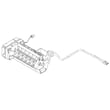
If the ice maker itself is not cycling after the arm is lowered and the bin area is clear, inspecting or replacing the ice maker assembly is a common next step: refrigerator ice maker assembly W11658802.
Timing guide: what “normal” looks like after a reset
| Situation | What to expect |
|---|---|
| Arm lowered and unit running | First cubes can take several hours |
| Power was off or ice maker was off | Up to 24 hours to normalize |
| Bin was emptied | 1 to 3 days to fill the bin |
Why it matters
The shutoff arm is the ice maker’s “full bin” sensor. If it is stuck up or blocked by ice, the refrigerator will act like the bin is full and stop making ice even though everything else is working.
Last updated: January 2026