Owner’s manual
 Error Codes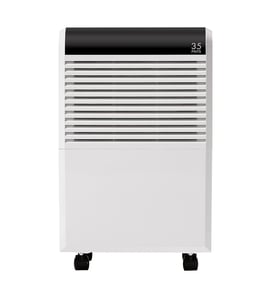



How to clean kenmore dehumidifier filter?
For the Kenmore Elite dehumidifier model 40554530410, we clean the air filter by turning the unit off, unplugging it, removing the bucket, pulling the filter downward, washing it with clean water, drying it completely, then reinstalling it (see the owner's manual).
Step-by-step: cleaning the air filter
- Turn the dehumidifier off and unplug the power cord.
- Remove the water bucket.
- Pull the air filter downward to remove it.
- Rinse and wash the filter with clean water only.
- Let the filter dry fully before reinstalling.
- Reinstall the filter, then reinstall the bucket so it is securely seated.
Resetting the “check filter” light
This model uses a filter reminder light to help keep airflow strong.
- The filter light can come on after about 250 hours of operation.
- After cleaning and reinstalling the filter, press and hold the Filter button for 1 second to reset the light.
Cleaning frequency (what we recommend)
Most homes do best with a simple schedule based on the manual guidance.
| Home conditions | Recommended filter cleaning |
|---|---|
| Normal use | Every 2 weeks |
| Dusty area, pets, remodeling | Weekly |
| Low runtime (occasional use) | Every 2 to 4 weeks |
Why it matters
A clean filter keeps airflow moving across the evaporator and condenser coils, which helps your Kenmore dehumidifier remove moisture efficiently. Running without a filter lets dirt and lint clog the unit and reduces performance.
Parts that can help if the filter is damaged
If the filter is torn, warped, or will not come clean, replacement is the right fix. Use the model-specific part list for Kenmore Elite 40554530410, or search by model on Sears PartsDirect.
Last updated: February 2026
What are the parts of a dehumidifier?
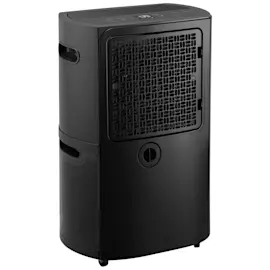
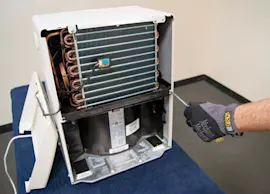
A Kenmore Elite dehumidifier like model 40554530410 is built around an airflow system (fan and air passages), a refrigeration system (evaporator and condenser coils with a compressor), and a water-handling system (bucket or drain connection). These parts work together to pull moisture from indoor air safely and efficiently.
Main parts you will typically find
Most residential dehumidifiers, including the Kenmore Elite 40554530410, include these core components:
- Air filter: traps dust so the coils stay clean; operating without filters can cause failures
- Fan and air outlet grille: moves room air through the unit for circulation
- Evaporator coil: the cold coil that condenses moisture out of the air
- Condenser coil: reheats the air after moisture is removed
- Compressor: pumps refrigerant through the coils (often includes a short safety delay before restarting)
- Water bucket (reservoir) and bucket switch/position sensing: collects water and prevents overflow
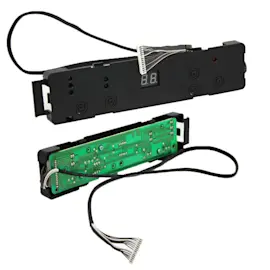
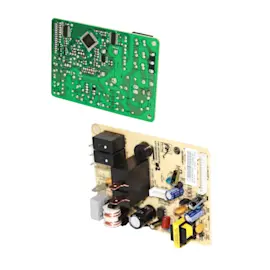
- Humidity sensor and control board: reads humidity and runs the unit to the set level
- Power cord and internal wiring: supplies power to the compressor, fan, and controls
Model 40554530410 parts we stock that match those functions
Here are examples of model-specific parts that correspond to the systems above:
| System | What it does | Example part for 40554530410 |
|---|---|---|
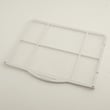
| Airflow/filtration | Keeps air moving and coils protected | Midea dehumidifier air filter 201126590468 |
| Refrigeration | Removes moisture by cooling and reheating air | Kenmore elite evaporator 201526490141, Kenmore elite condenser 201526590037 |
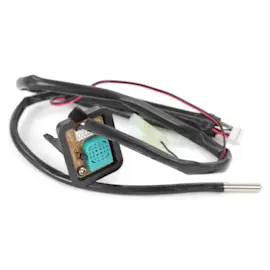
| Electrical | Powers and controls operation | Kenmore elite power cord 202402260025, Kenmore elite sensor 202301310076 |
Why it matters
When you know which system is involved, troubleshooting gets faster. For example, loud operation often points to a clogged air filter or an unlevel unit, and poor drying can be caused by blocked airflow, doors/windows left open, or room temperature below 41°F (5°C).
Quick care and placement tips (prevents common failures)
We recommend these basics from the model’s safety and operating guidance:
- Keep air openings clear and do not block the intake or exhaust
- Allow about 8 inches of clearance on all sides for airflow
- Clean the filter about every two weeks and reinstall it securely
- Use indoors only; run in an enclosed area for best results
- Plug into a 115V, 60 Hz grounded outlet (15- or 20-amp circuit)
For diagrams, control details, and error-code references, use the 40554530410 owner’s manual. For ordering, use the parts list for this model or search by model number on Sears PartsDirect.
Last updated: February 2026
What does P2 mean on a dehumidifier?
On the Kenmore Elite 40554530410 dehumidifier, P2 means the water bucket is full or the bucket is not seated correctly. The unit beeps, the Full light turns on, and the compressor stops until you empty the bucket and reinstall it securely (then it restarts after the compressor safety delay).
What to do when you see P2
- Turn the unit off, then slowly pull the bucket straight out to avoid spills.
- Empty the bucket, then slide it back in gently until it is fully seated.
- Confirm the Full indicator turns off and the display clears.
- Wait for the compressor delay (about 3 minutes); the unit restarts automatically once it is safe.
- If the bucket keeps triggering P2, check for a warped bucket, debris in the bucket track, or a misaligned float.
Bucket handling tips (to prevent repeat P2 codes)
The bucket bottom is uneven, so it can tip and spill if set on the floor. We recommend:
- Carrying the bucket with both handles
- Emptying into a sink or tub immediately
- Avoiding bumping the bucket when reinstalling
- Keeping the bucket area clean so it seats fully
If you are using a drain hose (continuous drain)
P2 is a bucket-related code, but drainage setup issues can still cause water handling problems.
| Setup | What you should see | Common issue to check |
|---|---|---|
| Bucket collection | Bucket fills normally; P2 only when full or removed | Bucket not fully seated |
| Continuous drain hose | Water drains steadily; bucket stays mostly empty | Drain plug removed or hose/connector blocked |
If water is going to the bucket when you expect continuous drain, check that the drain connection is tight and clear, and that the drain plug and hose routing match the instructions in the owner's manual.
Why it matters
When P2 appears, the dehumidifier shuts the compressor off to prevent overflow. Getting the bucket seated correctly restores normal moisture removal and helps protect internal components like the evaporator coil and fan from water exposure.
Last updated: February 2026
Why is my Kenmore dehumidifier not working?
If your Kenmore Elite dehumidifier model 40554530410 is not working, the most common causes are power supply issues, a full or mispositioned bucket, or the built-in 3-minute compressor delay after the unit stops. We also check airflow restrictions and room conditions using the steps in the owner's manual.
Quick checks that fix most no-start problems
- Confirm the plug is fully seated in a grounded outlet (avoid shared multi-outlet use).
- Check the home fuse or circuit breaker.
- Reseat the bucket; if it is not correctly fitted, the unit will not run.
- If the bucket is full, empty it and reinstall it firmly.
- Wait at least 3 minutes after the compressor stops; it will not restart immediately.
If it runs but does not collect water
A dehumidifier can run and still remove little or no moisture if airflow is blocked, the humidity setting is too high, or the room is outside the operating range.
- Make sure curtains, furniture, or walls are not blocking the front or back airflow.
- Set the humidity control lower and give it time to pull moisture down.
- Close doors and windows so you are not dehumidifying the outdoors.
- Verify room temperature is within the typical operating range (about 41°F to 95°F).
- Clean the filter; a clogged filter can reduce airflow and performance.
If your filter is damaged or will not clean up well, replace it with the dehumidifier air filter 201126590468.
Symptoms and what they usually mean
| Symptom | Most likely cause | What we do first |
|---|---|---|
| No power, no lights | Outlet, breaker, cord issue | Check outlet, breaker, then inspect cord |
| Runs, little water | Airflow blocked, setting too high, doors/windows open | Clear airflow, lower setpoint, close room |
| Frost on coils | Normal auto-defrost behavior | Let it run; ensure room is above 41°F |
| Loud operation | Clogged filter or unit not level | Clean filter; level the unit |
Why it matters
When airflow is restricted or the bucket switch is not satisfied, the unit either cannot move enough air across the evaporator coil to remove moisture or it will prevent operation for safety. Fixing these basics avoids unnecessary parts replacement.
Parts we commonly see involved
- Airflow restriction: dehumidifier air filter 201126590468
- Power issue (visible damage, intermittent power): power cord 202402260025
- Poor humidity sensing or erratic operation: sensor 202301310076
For ordering, we recommend using the parts list for model 40554530410 on this page; you can also search by model number on Sears PartsDirect.
Last updated: February 2026