 Error Codes




How long do Jenn-Air wall ovens last?
A Jenn-Air wall oven like model JJW9627AAW typically lasts 15 years with normal household use and basic maintenance. Keeping the oven sealed properly, heating evenly, and avoiding overheating events helps you reach (and often exceed) that lifespan.
Typical lifespan and what to expect
Most wall ovens fall into a predictable ownership pattern:
- 0 to 5 years: Mostly routine use; occasional light bulb or cosmetic issues
- 5 to 10 years: Higher chance of wear items (door seal, elements) needing replacement
- 10 to 15 years: More frequent repairs; heating and control issues become more common
- 15+ years: Many units still run well, but repair decisions often depend on part cost and condition
What shortens (or extends) wall oven life
These are the biggest real-world factors we see:
- Door not sealing tightly (heat loss and longer bake times)
- Frequent self-clean cycles (extra heat stress on wiring and controls)
- Heavy broiling use (more stress on the broil element and receptacles)
- Power surges (can damage the electronic control)
- Grease buildup around vents and cooling paths (traps heat)
Parts that commonly affect “how long it lasts”
When a wall oven stops heating correctly, it often comes down to a few serviceable parts. For JJW9627AAW, these are common examples:
| Symptom | Common part involved | What it impacts |
|---|---|---|
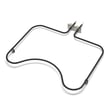
| Oven won’t bake or bakes unevenly | Broiler element WPW10310260 | Top heat and overall temperature balance |
| Door leaks heat, longer cook times | Door seal WP71001970 | Heat retention and temperature stability |
| Oven overheats or shuts down | Range high-limit thermostat WP71001844 | Safety temperature limiting |
| Dead display or erratic operation | Wall oven control board WP71003401 | Controls, timing, and heating commands |
Why it matters
A wall oven that is sealed well and heats evenly runs fewer extended cycles, which reduces stress on the heating elements, wiring, and control board. That directly supports a longer service life and more consistent cooking results.
Last updated: January 2026
How to reset Jenn-Air wall oven?
To reset your Jenn-Air wall oven model JJW9627AAW, we recommend doing a power reset at the home breaker: turn the oven circuit breaker(s) OFF for 1 minute, then turn them back ON. After power is restored, start a Bake cycle and watch for any error code to return.
Reset steps (power reset)
- Turn OFF the wall oven circuit breaker(s) in your electrical panel.
- Wait 1 full minute.
- Turn the breaker(s) ON.
- Set the oven to Bake and let it run for about 1 minute.
- If an error code reappears, press Cancel/Off once and retry Bake.
If the reset does not fix the problem
A reset clears many temporary control glitches, but it will not correct a failed heating circuit, door issue, or control problem. These checks help narrow it down:
- No heat in Bake: inspect the bake element 71001636 for visible damage (blisters, cracks, burn spots).
- No heat in Broil: inspect the broiler element WPW10310260.
- Oven overheats or shuts down: a safety device such as the range high-limit thermostat WP71001844 can trip when temperatures get unsafe.
- Intermittent operation or dead display: the electronic control may be involved; check the wall oven control board WP71003401.
Quick symptom-to-part guide
| Symptom after reset | Most common area to check | Example part for JJW9627AAW |
|---|---|---|
| Bake does not heat | Bake heating circuit | Bake element 71001636 |
| Broil does not heat | Broil heating circuit | Broiler element WPW10310260 |
| Random shutdown/overheat behavior | Safety temperature limit | Range high-limit thermostat WP71001844 |
| Display issues or recurring error codes | Electronic control | Wall oven control board WP71003401 |
Why it matters
A proper breaker reset restores clean power to the control and can clear a “stuck” keypad or temporary fault. If the same error returns quickly, it usually points to a component issue (heating element, thermostat, or control) that needs troubleshooting or replacement.
Last updated: January 2026
How to calibrate a Jenn-Air wall oven?
On the Jenn-Air JJW9627AAW wall oven, you calibrate (adjust) the oven temperature by changing the control’s temperature offset so baking temperatures match what you measure with an oven thermometer.
Before you start
- Use a quality oven thermometer; place it in the center of the middle rack.
- Preheat at least 20 to 30 minutes so temperatures stabilize.
- Check temperature at 350 F; average the reading over 15 to 20 minutes.
- If the oven is off by 15 to 25 F or more, calibration is the right next step.
Typical calibration steps (common Jenn-Air style controls)
Many Jenn-Air wall ovens use a bake-key hold to enter calibration, then an offset adjustment:
- Press Bake.
- Set a high temperature (often 500 to 550 F).
- Press and hold Bake for about 5 seconds to enter offset mode.
- Use the control’s AutoSet or arrow pads to adjust the offset up or down.
- Stop pressing keys for a few seconds to save.
If your control panel labels differ, the same goal applies: find the temperature offset or calibration setting in the control options.
What offset to use
Use your thermometer results to choose an offset.
| Thermometer average at 350 F | What to do | Example offset |
|---|---|---|
| 335 F | Increase oven temp | +15 F |
| 350 F | No change needed | 0 F |
| 365 F | Decrease oven temp | -15 F |
When calibration will not fix the problem
If temperatures swing wildly, preheat takes too long, or food burns on one side, calibration is not the root cause. These issues often point to a heating or control problem.
- Weak lower heat: inspect the bake element and wiring; replace the broiler element WPW10310260 only if broil heat is also weak.
- Poor broil performance: check the broil element for blistering or cracks.
- Temperature runaway or error behavior: suspect the wall oven control board WP71003401.
- Door not sealing: heat loss can mimic low temperature; inspect the door seal WP71001970.
Why it matters
Correct calibration helps the JJW9627AAW bake evenly, improves cooking times, and prevents overbaking or underbaking without changing how you use Bake or Broil day to day.
Last updated: January 2026
Why is my Jenn-Air oven not working?
If your Jenn-Air wall oven model JJW9627AAW is completely not working (no heat, no display, or dead controls), the most common causes are a tripped breaker, a loose/burned wire connection, or a failed electronic control such as the wall oven control board WP71003401.
Quick checks first (fastest fixes)
- Reset power at the home breaker: wall ovens typically use a 240V double-pole breaker; switch it fully OFF, then ON.
- Confirm the oven is getting power: if the display is blank and the oven light is off, suspect a power supply issue.
- Check for a control lock feature: some ovens appear “dead” when control lock is enabled.
- If the oven heats sometimes, then stops: suspect overheating protection or a failing control.
- If you smell burning or see arcing: leave power OFF and inspect wiring and terminals.
What the symptoms usually mean
| Symptom | Most likely cause | Parts commonly involved |
|---|---|---|
| No display, no heat | No power to oven, failed control | House breaker, wiring, wall oven control board WP71003401 |
| Display works, no bake heat | Failed bake circuit | Bake element, wiring, element terminals |
| Display works, no broil heat | Failed broil circuit | Broiler element WPW10310260, wiring |
| Heats briefly then shuts down | Overheat protection opening | Range high-limit thermostat WP71001844, cooling/airflow issues |
| Intermittent heat, melted connector | Loose/burned element connection | Receptacle WP74011278 or receptacle WP74008015 |
Safe troubleshooting steps we recommend
- Kill power at the breaker before removing panels or touching wiring.
- If the oven is dead, check the breaker and junction box connections first.
- If the display is on but there is no heat, inspect the heating element for visible damage and test it for continuity.
- If an element terminal looks scorched or loose, replace the matching receptacle and repair any damaged wiring.
- If multiple functions fail (bake and broil) or the keypad is unresponsive, the control board is the best next suspect.
Why it matters
A wall oven that is “not working” can be a simple power issue, but it can also be a failing control or overheated connection. Catching a loose receptacle or failing thermostat early helps prevent repeat shutdowns and wiring damage.
Last updated: January 2026





