 Installation guide
 Owner’s manual




What are common problems with Speed Queen dryers?
Common problems we see with the Speed Queen ADE3SRGS175TW01-START-S dryer include not starting, not heating, long dry times, overheating, and noisy or no-tumble operation. Many issues trace back to airflow restrictions, load/setting choices, or worn drive parts; use the owner's manual for model-specific checks.
- Dryer will not start: power supply issue, door switch, start switch, timer/control problem
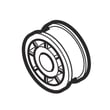
- Drum not turning or stopped spinning: worn belt, failed idler, worn rollers, motor issue
- Takes too long to dry: restricted venting, lint buildup, overdrying settings, oversized loads
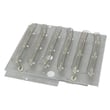
- Overheating: blocked airflow, crushed/kinked vent, lint accumulation inside cabinet
- Wrinkling or odor: overdrying, large loads not tumbling well, room odors pulled into dryer air
- Clean the lint screen before every load and confirm strong airflow at the outside vent hood.
- Inspect the vent run for kinks, crushing, or restrictions; keep it as short and straight as possible.
- Match cycle and heat setting to fabric type; overdrying commonly causes wrinkles.
- Reduce load size if items are balling up or not tumbling freely.
- If you hear squealing, thumping, or scraping, stop the dryer and check drum support and belt-drive parts.
If the motor runs but the drum does not turn, or you hear belt slip noises, these parts are frequent fixes for this model:
| Symptom | Common wear item | Example part for this model |
|---|---|---|
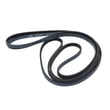
| Drum will not turn | Drum belt | Commercial dryer drum belt D511255P |
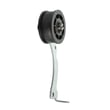
| Squeal, chirp, belt slack | Idler wheel/lever | Idler lever and wheel assembly D516792 |
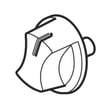
| Thump or rumble | Drum rollers | Cylinder roller D510708P |
Airflow problems (plugged or restricted venting, kinked venting, lint buildup) are a top driver of long dry times and overheating. Fixing airflow first protects the heater circuit, improves drying performance, and reduces repeat failures.
For replacement parts and diagrams for ADE3SRGS175TW01-START-S, order directly from the parts list for this model or search by model number on Sears PartsDirect.
Last updated: February 2026
Why does my dryer suddenly have no power?
If your Speed Queen dryer model ADE3SRGS175TW01-START-S suddenly has no power, the most common cause is a power supply issue: a tripped breaker, blown/loose fuse, or a plug that is not fully seated in the outlet. We also see this when the door is not fully closed or the motor overload protector has tripped.
- Make sure the dryer power cord is plugged fully into the wall receptacle.
- Confirm the door is fully closed and the start control is engaged.
- Check your home’s dryer circuit breaker(s) or fuse(s); electric dryer circuits often use two fuses/breakers, and one can trip without the other.
- If the dryer stopped mid-cycle, wait 10 minutes and try again (the motor overload protector can reset after cooling).
- If you have a metered setup, make sure the timer is activated and any required payment/activation steps are completed.
Your installation instructions specify a properly grounded 3-prong receptacle and a 110/120V, 15A grounded outlet for the cord connection. Use the installation guide to confirm the correct receptacle, grounding, and polarity requirements for your setup.
| What you observe | What it usually means | What to do next |
|---|---|---|
| No lights, no sound, nothing happens | No incoming power or plug not seated | Reset breaker(s)/replace fuse(s), reseat plug |
| Power returns after waiting | Motor overload protector tripped | Improve airflow, reduce load size, re-test |
| Starts only with door pushed/held | Door not closing fully or switch issue | Inspect latch alignment; test door switch |
| Breaker trips again quickly | Short, failing motor/heater, or wiring issue | Stop using and have wiring/components checked |
A dryer that “loses power” is often reacting to an electrical protection event (breaker/fuse/overload). Restoring safe, stable power and proper grounding prevents repeat shutdowns and helps protect the motor, heater circuit, and controls.
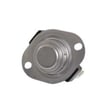
If the outlet and breakers are good but the dryer still will not start, a failed switch can be a common culprit. For this model, see the switch D512973. You can also find additional replacement parts for ADE3SRGS175TW01-START-S on the parts list for this model, or search by model number on Sears PartsDirect.
Last updated: February 2026
Why is my Speed Queen dryer not starting but has power?
If your Speed Queen ADE3SRGS175TW01-START-S has power but will not start, the usual causes are the door not fully closed (door switch not engaged), the timer/START not set correctly, a tripped breaker leg or blown fuse, or the motor overload protector needing about 10 minutes to reset. Use the owner's manual for model-specific start and safety checks.
- Close the loading door firmly; the dryer will not run with the door open.
- Turn the timer further into a cycle, then push the timer knob in (or press/turn START).
- Verify the power cord is fully seated in the outlet.
- Check the home electrical supply; many electric dryers use a 2-pole breaker or two fuses.
- If the motor overheated, wait 10 minutes, then try again.
- If the dryer is metered, make sure the timer is activated and any required payment/slide is fully engaged.
A lighted console or drum light can work even when the motor circuit is missing one leg of power. That is why checking the breaker/fuses is a must on a no-start complaint.
| Symptom | Most likely direction | Next step |
|---|---|---|
| Hums but won’t tumble | Motor is trying to start; drum may be hard to turn | Check belt/idler/rollers for drag |
| Starts after a wait | Motor overload protector tripped | Reduce load, improve airflow, retry |
| Nothing happens when you press START | Door/start circuit issue | Recheck door closure and start action |
If the checks above pass and it still will not start, a binding drive system can overload the motor. For this model, a common wear item is the commercial dryer drum belt D511255P.
A no-start issue is often a simple setup or power-supply problem; when it is mechanical drag, fixing it early helps protect the drive motor and prevents repeat shutdowns.
Last updated: February 2026





