Installation guide
 Owner’s manual



What does SF mean on a Frigidaire oven?
On the Frigidaire FPMC3085KFA wall oven/microwave combo, SF means Sabbath Failure. It appears after a power failure or interruption while the Sabbath feature is active; the oven shuts off and will not restart automatically until you clear Sabbath mode.
What to do when you see SF
- Press CANCEL to stop any active cooking function.
- If food is inside, use caution; trapped heat may continue cooking briefly.
- After the Sabbath observance, turn OFF the Sabbath feature (the control returns to normal operation).
- If SF returns repeatedly, check your home power supply for interruptions (loose breaker, flickering power).
- Review the exact key sequence for your control in the FPMC3085KFA owner's manual.
Clearing Sabbath mode on this model
The manual instructions for this Frigidaire control describe turning Sabbath off by pressing and holding the specified keypad combination until the Sabbath indicator disappears.
| Display | Meaning | What it tells you |
|---|---|---|
| SF | Sabbath Failure | Power was interrupted during Sabbath mode; oven will not resume automatically |
| SAb (or Sabbath indicator) | Sabbath feature active | Most keys are disabled; oven behavior is restricted |
Why it matters
SF is not a cooking mode and it is not a temperature problem; it is a status message tied to the Sabbath feature and a power interruption. Clearing Sabbath mode restores normal features like Bake, Broil, Convection, timers, and audible alerts.
Last updated: January 2026
How to calibrate a Frigidaire wall oven?
On the Frigidaire FPMC3085KFA wall oven/microwave combo, oven temperature calibration is done through the electronic oven control so you can fine-tune baking accuracy when foods consistently come out too hot or too cool. Use the exact key sequence and adjustment limits shown in the FPMC3085KFA owner's manual.
Before you calibrate (quick checks)
Calibration helps when the oven is consistently off by a similar amount; it will not fix a failing heating circuit.
- Confirm you are using Bake or Quick/Power Plus Preheat correctly (preheat is typically needed for baking).
- Avoid opening the door often during baking; it drops temperature and skews results.
- Use the right rack position and leave 2 to 4 inches of clearance around pans for airflow.
- If cakes bake unevenly, verify the unit is level; leveling is covered in the FPMC3085KFA installation guide.
- Test temperature with a reliable oven thermometer over multiple cycles (don’t judge from one reading).
How calibration typically works on Frigidaire electronic controls
Most Frigidaire wall ovens use a control setting that lets you adjust the displayed and regulated bake temperature by a small offset (commonly in 5°F increments, within a limited range). Follow the manual’s steps to:
- Enter the oven temperature adjustment mode.
- Increase or decrease the offset.
- Save the setting and retest with a standard bake (for example, 350°F).
What to do based on your results
| What you notice | What to try first | What it points to |
|---|---|---|
| Food consistently overbrowns | Calibrate slightly cooler | Normal calibration need |
| Food consistently undercooks | Calibrate slightly hotter | Normal calibration need |
| Temps swing wildly or preheat never stabilizes | Don’t calibrate yet; troubleshoot heating | Sensor, element, control, or airflow issue |
When calibration is not the right fix
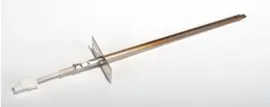
If the oven won’t hold temperature, takes unusually long to preheat, or throws error codes, calibration won’t solve the root cause. In those cases, checking the oven temperature sensor is a common next step; for this model, see the Frigidaire range oven temperature sensor 316217002.
Why it matters
A small temperature offset can change bake times, browning, and doneness. Calibrating the control (after confirming preheat, rack placement, and leveling) is the fastest way to restore predictable results.
Last updated: January 2026
Where is the temperature sensor on a Frigidaire wall oven?
On the Frigidaire FPMC3085KFA wall oven/microwave combo, the oven temperature sensor is typically mounted inside the oven cavity on the rear wall, with its tip protruding into the oven and a small mounting plate held by screws. Use the FPMC3085KFA owner’s manual to confirm the exact access steps for your unit.
What you’ll usually see (and where to look)
In most Frigidaire electric wall ovens, the sensor is easy to spot once you remove the racks and look at the back interior panel.
- Look on the upper oven’s rear wall (the cooking cavity, not behind the unit)
- The sensor usually looks like a thin metal probe (about pencil-thickness)
- It’s commonly held by 2 screws on a small bracket
- The wiring connector is typically behind the rear wall (you access it from the back of the oven or by pulling the unit)
- If your oven is showing temperature-related errors, check the Frigidaire self-cleaning wall oven error codes list for codes tied to sensor or heating control issues
Safe access checklist (before you remove anything)
Because the sensor wiring is behind panels, treat this as an electrical service task.
- Turn off power at the breaker (wall ovens are hardwired; do not rely on the control panel)
- Let the oven cool completely
- Remove oven racks for working room
- Take a photo of wire routing and connectors before disconnecting anything
- Avoid pulling on wires; disconnect at the plug/connector
Quick symptom guide: sensor vs. other causes
| Symptom | More likely cause | What to check next |
|---|---|---|
| Oven heats but temperature is consistently off | Sensor out of range or calibration needed | Sensor resistance test; control calibration steps in the manual |
| Oven won’t heat and shows an error code | Sensor circuit, control, or safety device | Error code meaning; wiring and connectors |
| Oven overheats or swings widely | Sensor or control issue | Sensor mounting tightness; harness condition |
Why it matters
The temperature sensor is the feedback device the electronic oven control uses to regulate bake and broil temperatures. If it’s loose, damaged, or reading incorrectly, you can get poor baking results, overheating, or error codes.
Last updated: January 2026
How to reset a Frigidaire wall oven?
To reset your Frigidaire FPMC3085KFA wall oven/microwave combo, we use a power reset at the breaker to reboot both the oven and microwave controls. After power is restored, set the clock and confirm normal operation using the FPMC3085KFA owner's manual.
Reset options to try first
- Cancel a microwave cycle: Press STOP/CLEAR once to stop; press twice to cancel a program.
- After a power interruption: Press STOP/CLEAR, then reset the clock.
- Full reset (best overall): Turn the dedicated breaker OFF for 1 to 2 minutes, then ON.
- If the oven is locked: Press and hold the Oven Lockout pad for 3 seconds to unlock.
Step-by-step: breaker reset (hard reset)
- Make sure the oven and microwave are idle.
- Switch the unit’s breaker OFF.
- Wait 1 to 2 minutes.
- Switch the breaker ON.
- Set the clock and test Bake or Microwave Start.
If a reset does not fix it
A reset clears temporary control glitches; repeated errors point to a condition the control is detecting.
- Error code returns right away: use Frigidaire self-cleaning wall oven error codes.
- Oven temperature problems: check the sensor circuit; consider Frigidaire range oven temperature sensor 316217002.
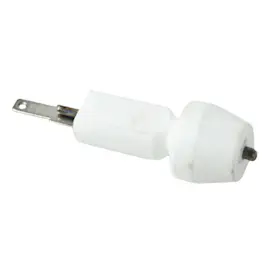
- Microwave will not start: door safety circuit may be open; consider microwave door interlock switch 5304493153.
| What you did | What it affects | Typical result |
|---|---|---|
| STOP/CLEAR | Microwave controls only | Cancels cooking and clears the display |
| Breaker reset | Whole combo unit | Reboots controls and clears temporary faults |
Why it matters
Resetting is the fastest way to recover from a power glitch, canceled cycle, or control lockup. If the same symptom returns immediately after a reset, the issue is usually a sensor, door-safety circuit, or electronic control problem.
Last updated: January 2026