




How to calibrate a Jenn-Air wall oven?
For the Jenn-Air JMW9527CAS wall oven/microwave combo, oven calibration is done by changing the oven temperature offset in the control settings; once set, the oven automatically adds (or subtracts) that offset from your selected bake temperature to improve accuracy.
How to calibrate (temperature offset)
Use these steps as the standard approach for Jenn-Air wall ovens with a digital control:
- Start with the oven empty and the door fully closed.
- Press Bake (or Upper Bake if your unit shows upper/lower options).
- Set a test temperature (many controls use 550°F as the entry point for calibration mode).
- Press and hold Bake (or Upper Bake) for about 5 seconds to enter the offset setting.
- Use the AutoSet pad or the arrow/temp pads (varies by control) to adjust the offset.
- Stop pressing keys for about 5 seconds so the control saves the new offset.
How much should we adjust the offset?
We recommend adjusting in small increments and confirming results with a repeatable test.
- Typical offset changes are 5°F to 20°F at a time.
- If food is consistently underdone, increase the offset.
- If food is consistently overdone, decrease the offset.
- Re-test at the same rack position and with the same cookware.
| What you observe | What to do | What it changes |
|---|---|---|
| Oven runs cool | Increase offset | Raises actual cooking temperature |
| Oven runs hot | Decrease offset | Lowers actual cooking temperature |
| Temps vary a lot | Do not keep chasing the offset | Look for a heating or sensing issue |
If calibration does not fix the problem
If the oven still bakes unevenly or the temperature swings widely after calibration, a component issue is more likely than an offset issue.
- Check for error codes or shutdowns during preheat.
- Inspect the door seal for gaps or damage (heat loss affects baking).
- If preheat is slow or temps overshoot badly, test the oven temperature sensor.
- If the oven overheats and trips off, a high-limit thermostat can be involved.
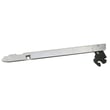
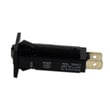
Model-matched parts we commonly see tied to temperature complaints include the oven sensor 12001656 and the range high-limit thermostat WP71001844.
Why it matters
Calibration corrects small, consistent temperature bias. It does not repair a failing sensor, thermostat, or heating circuit; fixing those restores stable temperature control and more even baking results.
Last updated: February 2026
How do I reset my Jenn Air oven control panel?
For the Jenn-Air JMW9527CAS wall oven/microwave combo, the most reliable control-panel reset is a power reset: turn the unit off at the household breaker for 1 minute, then restore power. This clears many temporary glitches, stuck keys, and display errors.
Quick reset steps (power reset)
- Turn the oven off.
- Locate the correct breaker for the wall oven/microwave combo (often a 240V double-pole breaker).
- Switch the breaker OFF for 60 seconds.
- Switch the breaker ON.
- Set the clock, then test Bake and Microwave functions.
If the panel still will not respond
A reset will not fix a failed keypad, door switch issue, or an overheat safety trip. Check these common causes:
- Stuck or unresponsive key: press each key once; if one feels stuck, the panel may not accept inputs.
- Door not registering closed: if the oven thinks the door is open, some functions will not start; inspect the latch area and consider the door switch WB24T10147.
- Overheat condition: after heavy use or blocked airflow, a safety device can interrupt operation; let the unit cool fully and retry.
- Temperature sensing problems: if the oven heats erratically or throws temperature-related faults, the oven sensor 12001656 is a common check point.
What to expect after a reset
| After power is restored | What it means | What to do |
|---|---|---|
| Display returns, clock flashes | Normal after power loss | Set clock and test cooking modes |
| Display returns but keys do nothing | Likely control or keypad issue | Try reset once more; then inspect door switch and wiring |
| Unit powers but heats poorly | Likely sensing or heating circuit issue | Test with a simple bake; check sensor and elements |
Why this matters
A breaker reset is the fastest way to clear control logic faults without replacing parts. If the problem returns quickly, focusing on door sensing (interlocks) and temperature feedback (sensor) helps you avoid unnecessary part swaps.
Last updated: February 2026
How long do Jenn-Air wall ovens last?
A Jenn-Air wall oven typically lasts 15 years with normal household use and basic maintenance. For your JMW9527CAS wall oven/microwave combo, keeping door sealing tight, temperatures accurate, and airflow unobstructed is what most directly protects long-term reliability.
Typical lifespan and what affects it
Most wall ovens reach their full life when heat stays controlled and the door closes correctly.
- Cooking frequency: daily high-heat use shortens life faster than occasional baking
- Self-clean use: frequent self-clean cycles add extra heat stress to wiring and controls
- Door seal condition: heat leaks make components run hotter and longer
- Temperature accuracy: overheating strains elements and insulation
- Ventilation: blocked vents trap heat around electronics
Quick checks that help your oven reach 15 years
These are simple, high-impact habits that reduce wear on heating and safety components.
- Keep the door closing smoothly; replace worn hinges such as the door hinge WP74008014
- If you notice heat escaping or longer preheat times, inspect the door seal WP71001970
- If baking temps seem off by 25 degrees or more, test or replace the oven sensor 12001656
- Avoid slamming the door; it stresses hinges, switches, and glass
- Keep racks and cavity clean so airflow and heat circulation stay even
Common “end-of-life” symptoms and likely causes
| Symptom | What it often points to | Example part on this model |
|---|---|---|
| Food consistently undercooks or overcooks | Temperature sensing problem | Oven sensor 12001656 |
| Door won’t close evenly or drops open | Hinge wear | Door hinge WP74008014 |
| Heat leaking around the door | Worn gasket | Door seal WP71001970 |
| Oven shuts down during high heat | Overheat protection opening | Range high-limit thermostat WP71001844 |
Why it matters
A wall oven that holds temperature and seals properly runs fewer long cycles, which reduces stress on the bake/broil system, insulation, wiring harness connections, and safety thermostats. That is the difference between replacing a few parts over time and replacing the whole unit early.
Last updated: February 2026
Is JennAir considered high end?
Yes. Jenn-Air is widely considered a high-end appliance brand; it is positioned as a premium line with higher-end design, features, and pricing than mainstream brands. For your Jenn-Air JMW9527CAS wall oven/microwave combo, that typically means more advanced cooking modes and tighter fit-and-finish expectations.
What “high end” means in practical terms
High-end positioning usually shows up in day-to-day ownership in a few consistent ways:
- More feature-rich controls (specialty bake/roast modes, sensor cooking, convection options)
- More emphasis on appearance (trim, glass, handle styling, lighting)
- Higher expectations for temperature accuracy and door sealing
- Higher part costs for certain assemblies (hinges, receptacles, control-related components)
- Repairs that benefit from using model-correct OEM parts
Parts that commonly matter most on premium wall oven/microwave combos
If performance or fit starts to slip, these are frequent “quality feel” parts to check first:
- Temperature accuracy issues: oven sensor 12001656
- Door not closing smoothly or sitting evenly: door hinge WP74008014
- Heat escaping, longer preheat, or uneven baking: door seal WP71001970
- Oven overheating or shutting down: range high-limit thermostat WP71001844
Quick symptom-to-part guide
| Symptom | What to check first | Why it matters |
|---|---|---|
| Oven temp seems off | Oven sensor | Premium ovens rely on accurate sensing for consistent results |
| Door drops, won’t stay aligned | Door hinge | Door alignment affects sealing and cooking performance |
| Hot air leaks around door | Door seal | Leaks reduce efficiency and can cause uneven cooking |
| Random shutdown or overheating | High-limit thermostat | Protects the unit from unsafe temperatures |
Why it matters
With a high-end unit like the JMW9527CAS, small issues (a weak hinge, worn seal, drifting sensor) can noticeably affect cooking results and the “solid” door feel. Replacing the correct part early often restores performance and prevents secondary wear.
Last updated: February 2026
Why is my Jenn-Air oven not working?
If your Jenn-Air JMW9527CAS oven is not working at all, the most common causes are a tripped breaker, a door switch problem, or an overheat safety device opening. Start with a power reset and basic checks; then focus on the door circuit and temperature-sensing parts that can stop heating.
Quick checks we recommend first
- Confirm the wall oven breaker is fully reset (switch OFF, then ON).
- Make sure the oven door closes firmly and latches normally.
- Try a power reset: turn the breaker OFF for 5 minutes, then restore power.
- Check for a locked control (Control Lock) and turn it off if enabled.
- If the display works but it will not heat, test Bake and Broil modes separately.
Parts that commonly stop an oven from running or heating
When power is present but the oven will not start or will not heat, these parts are frequent culprits:
| Symptom | What it often points to | Part to consider for JMW9527CAS |
|---|---|---|
| Oven seems dead or shuts off | Overheat protection opening | Range high-limit thermostat WP71001844 |
| Oven will not start with door closed | Door circuit not proving closed | Door switch WB24T10147 |
| Oven heats poorly or temperature is erratic | Temperature feedback problem | Oven sensor 12001656 |
Safe troubleshooting steps (before replacing parts)
- Kill power at the breaker before removing panels or testing continuity.
- Inspect the door area for looseness, misalignment, or a hinge that is not holding the door tight.
- If the oven starts only when you press on the door, the door switch or hinge alignment is the first place to focus.
- If the oven starts but stops mid-cycle, check for overheating causes (blocked vents, heavy insulation displacement, or a failing high-limit thermostat).
Why it matters
On a wall oven/microwave combo like the JMW9527CAS, the control system relies on safety inputs (door switch and high-limit thermostat) and accurate temperature feedback (oven sensor). If any of these signals are wrong, the oven can refuse to run or stop heating to protect the appliance.
Last updated: February 2026