Owner’s manual



Do KitchenAid stand mixer attachments fit all models?
Yes. KitchenAid hub-style attachments are designed to connect to the multipurpose attachment hub on your KitchenAid stand mixer, including model KG25H3XOB5, so you can use the same hub attachment across stand mixer models that have that hub.
What “fits all models” means (and what to check)
Most KitchenAid attachments that drive from the hub fit across stand mixers because the attachment power shaft and hub socket are designed for a snug, non-slip connection.
Before you buy or install an attachment, we recommend:
- Confirm your mixer has the multipurpose attachment hub and hinged hub cover.
- Set the speed control to OFF/0 and unplug the mixer before installing.
- Insert the attachment shaft housing fully into the hub, then tighten the attachment knob.
- Use the attachment’s use and care instructions for speed and run-time guidance.
Hub attachments vs. bowl accessories
Not every accessory is a “hub attachment.” Some items mount to the beater shaft or bowl-lift system.
| Accessory type | Where it connects | “Fits all” expectation |
|---|---|---|
| Hub attachment (pasta roller, grinder, etc.) | Multipurpose attachment hub | Typically interchangeable across hub-equipped models |
| Beater/whip/hook | Beater shaft | Must match bowl size and mixer series |
| Bowl/pouring shield | Bowl support area | Must match bowl-lift design and capacity |
Why it matters
Using the correct attachment type helps prevent wobble, poor performance, and unnecessary wear on the direct-drive gear transmission. It also helps you choose the right speeds for mixing, kneading, and food prep.
For model-specific features and the correct attachment installation steps, use the owner's manual.
Last updated: February 2026
Does KitchenAid sell replacement parts?
Yes. KitchenAid replacement parts are available for the KitchenAid stand mixer model KG25H3XOB5, and you can also order many common repair parts directly for this model through our parts list. Use the owner's manual to confirm the correct part and service approach for your situation.
How to order the right replacement part for KG25H3XOB5
We recommend matching parts by model number first, then confirming the failed component by symptom.
- Find the model number on your mixer and match it to KG25H3XOB5
- Identify the symptom (won’t start, speeds jump, grinding noise, oil leak)
- Use the parts list for this model to select the exact replacement
- Compare the part name and part ID before ordering
- If you are unsure, use the diagrams and parts breakdown in the owner's manual
Common stand mixer parts customers replace
These are examples of parts available for KG25H3XOB5 that often solve common problems:
| Symptom | Likely area | Example part on this model |
|---|---|---|
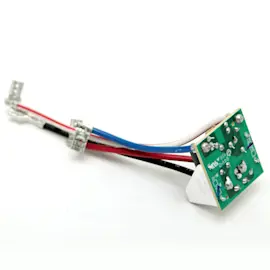
| Speeds cut in and out or won’t change | Speed control | Stand mixer speed control board and knob (black) WP9706648 |
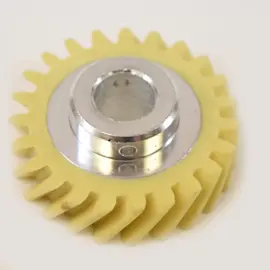
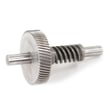
| Loud grinding or clicking under load | Gear train | Stand mixer worm follower gear W11086780 |
| Grease or oil seepage around gearcase | Seals and gaskets | Seal WP9706247 or gasket WP9709511 |
Why it matters
Ordering by the exact model number (KG25H3XOB5) helps you avoid look-alike parts that fit other KitchenAid mixers but do not match your speed control, gearcase, or finish. That saves time and prevents repeat repairs.
Last updated: February 2026
How old is my KitchenAid appliance by serial number?
For your KitchenAid stand mixer model KG25H3XOB5, the serial number is the best way to estimate the build date; most KitchenAid serial formats encode the year and production week (or a year code plus week digits). Use the serial plate information and confirm the format in your owner's manual.
Where to find the serial number on a stand mixer
On many KitchenAid stand mixers, the serial plate is on the base or underside of the mixer head or pedestal.
- Unplug the mixer before handling it
- Look on the bottom of the base first
- Check the rear of the pedestal/column area
- Write down the full serial number and model number (KG25H3XOB5)
How KitchenAid serial numbers typically decode
KitchenAid serial formats vary by era, but these patterns are common:
- Letter plus digits format: a character can represent the year code, followed by digits that represent the week of the year
- All-digit format (older styles): the last 2 digits often represent the year, with earlier digits indicating the week or production sequence
- Cycled year codes: some year codes repeat on a cycle; the correct decade is confirmed by features, styling, and parts used
Quick decode checklist
| What you see in the serial | What it usually means | What to do next |
|---|---|---|
| Letters + numbers | Year code + week/sequence | Identify which character is the year code, then read the week digits |
| Mostly numbers | Week + year (often last 2 digits) | Use the last 2 digits as the year, then confirm the decade |
| Code seems to repeat | Year code cycle | Cross-check with mixer design and parts list for KG25H3XOB5 |
Why it matters
Knowing the approximate age helps you choose compatible replacement parts (like a speed control board, gears, seals, or gaskets) and decide whether symptoms point to normal wear (gearcase grease, bearings) versus an electrical issue.
Safety note before inspecting labels or servicing
We recommend unplugging the mixer and keeping hands, hair, clothing, and utensils away from moving parts during operation; these safety basics are covered in the owner's manual.
Last updated: February 2026
What is the most common problem with the KitchenAid mixer?
The most common issues we see with the KitchenAid KG25H3XOB5 stand mixer are beater-to-bowl clearance problems (beater hits the bowl or misses ingredients) and “stops running” complaints caused by overheating under heavy loads. Noisy operation and grease seepage from aging gearcase lubricant are also very common; see the owner's manual for the model’s troubleshooting checks.
Most common symptoms and what they usually mean
- Beater hits the bowl: beater-to-bowl clearance needs adjustment.
- Beater does not reach ingredients: clearance is too high; mixing is inefficient.
- Mixer stops, then works later: thermal overload protection tripped; cooling time is needed.
- Warm top housing or motor smell: normal under heavy mixing or when new.
- Grinding/clicking or loud gear noise: worn gear train is likely; the worm follower gear is a common wear item.
Quick checks we recommend first (safe, no disassembly)
- Unplug the mixer, then plug it back into a grounded outlet.
- Turn the mixer off for 10 to 15 seconds, then try again.
- If it still will not start, let it cool for 30 minutes and retry.
- If the flat beater hits the bowl, stop the mixer and adjust beater-to-bowl clearance per the manual.
Common fixes and parts that often solve the problem
| Problem you notice | Most likely fix | Part that may be involved (if worn) |
|---|---|---|
| Speeds surge, stall, or won’t change smoothly | Inspect speed control and wiring | Stand mixer speed control board and knob (black) WP9706648 |
| Grinding, clicking, or poor power under load | Inspect/replace worn gear | Stand mixer worm follower gear W11086780 |
| Grease leaking, oily drip, or messy gearcase | Repack with food-grade grease; replace seals/gaskets if needed | Seal WP9706247, gasket WP9709511 |
Why it matters
Running with incorrect beater clearance can damage the bowl and beater, and worn gears can shed metal and quickly escalate into a bigger gearcase repair. Addressing the early symptoms keeps your KG25H3XOB5 mixing smoothly and protects the motor.
Last updated: February 2026