 Owner’s manual



What is the most common problem with GE washers?
For the GE GTW725BPN0DG washer, the most common service issues we see are “won’t drain” or “won’t spin” symptoms. These problems are often tied to a drain restriction, a failing lid lock system, or a drive system/control issue; the troubleshooting section in the GTW725BPN0DG owner’s manual is a good starting point.
Most common symptoms (and what usually causes them)
- Washer won’t drain: clogged drain path, failing pump, kinked drain hose
- Washer won’t spin or leaves clothes wet: out-of-balance load, lid lock not engaging, drive system fault
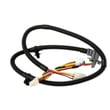
- Lid won’t lock or “Lid” message: lid lock, strike, or wiring issue
- Stops mid-cycle: control sensing an error condition, lid lock interruption, drain problem
- Excessive vibration during spin: load distribution, leveling, suspension wear
Quick checks you can do first (GTW725BPN0DG)
- Run Drain & Spin and listen for the drain pump running.
- Confirm the lid is fully closed; if the display shows “Lid”, open and close the lid once, then restart.
- Check the standpipe and drain hose for kinks or a partial clog.
- Redistribute the load evenly if the spin light is blinking (out-of-balance correction).
- Verify both water supply valves are on if you see “H2O SUPPLY”.
Parts that commonly relate to these problems
If your GTW725BPN0DG won’t drain or won’t spin, these model-matched parts are often involved:
| Symptom | Common part to inspect | What it does |
|---|---|---|
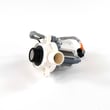
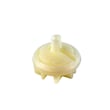
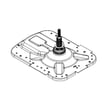
| Won’t drain | GE washer drain pump assembly WH23X28418 | Pumps water out during drain/spin |
| Won’t start/spin, “Lid” issues | Washer lid lock WH08X37938 | Confirms lid closed and locks for spin |
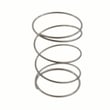
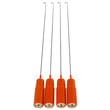
| Shakes or bangs in spin | Rod & spring orange air 4-pack WH03X35580 | Helps support and stabilize the tub |
Why it matters
Drain and spin problems can look like “the washer is broken,” but they are often caused by a simple restriction, an out-of-balance condition, or a lid lock system fault. Catching the root cause early helps prevent repeat stoppages and reduces wear on the motor, clutch, and gear case.
Last updated: January 2026
What is the deep fill option on a GE washer?
On the GE GTW725BPN0DG washer, Deep Fill is an option that adds extra water to the wash (or even during the wash phase) for special-case loads that need more water than the normal auto-sensing level. It is not intended for typical everyday loads; see the GTW725BPN0DG owner’s manual for exact operation details.
How Deep Fill works on GTW725BPN0DG
Deep Fill changes the water level beyond the washer’s normal high-efficiency, auto-load sensing fill.
- Press Deep Fill once before starting to add about 3 additional gallons
- Press and hold Deep Fill for 3 seconds to get the deepest fill level possible
- You can press Deep Fill after the washer has already filled and is washing to add more water
- Deepest fill can increase cycle time because the washer needs more time to fill
- Press Deep Fill again to stop/cancel the extra fill
When we recommend using Deep Fill
Use Deep Fill when the load truly benefits from more water coverage.
- Bulky items (jackets, mattress pads, bath mats)
- Loads that float or trap air (some synthetics)
- Very large loads where you want more water for turnover
- Loads where you are trying to improve rinse-out (pair with Deep Rinse when needed)
Deep Fill vs normal fill (quick comparison)
| Setting | What it does | Best for |
|---|---|---|
| Normal (auto sensing) | Uses a lower, efficient water level based on load sensing | Most everyday loads |
| Deep Fill (tap once) | Adds extra water above normal | Occasional “needs more water” loads |
| Deep Fill (hold 3 sec) | Provides the deepest fill level possible | Special-case bulky loads |
Why it matters
This washer is designed to clean well with less water. Deep Fill is helpful when extra water improves fabric movement and saturation, but using it on every load can reduce water and energy efficiency.
For more water-level and efficiency tips, see washer water usage explained.
Last updated: January 2026
How to force GE washer to drain and spin?
To force a GE GTW725BPN0DG washer to drain and spin, we recommend selecting the Drain & Spin cycle and pressing Start with the lid closed. If the washer is paused or the lid is left open too long, it may cancel and drain automatically.
Steps to drain and spin on model GTW725BPN0DG
- Press Power to wake the controls.
- Turn the cycle knob to Drain & Spin.
- Choose a Spin setting (Max, More, Normal, or No Spin).
- Close the lid (the washer will not start most cycles with the lid open).
- Press Start to begin draining and spinning.
For the exact button names and display messages used on this model, use the GTW725BPN0DG owner’s manual.
If it still will not drain or spin
These checks are the most common causes on GTW725BPN0DG-STYLE top-load washers:
- Out-of-balance load: Redistribute items evenly, then run Drain & Spin again.
- Lid not locking: If the washer thinks the lid is open/unlocked, it may stop before spinning.
- Drain path restriction: Check the standpipe and drain hose for kinks or clogs.
- Pump problem: If you hear humming but no draining, the drain pump may be jammed or failing.
- Control lock enabled: If controls are locked, unlock them before starting a new cycle.
Quick symptom-to-likely-cause table
| What you notice | What it usually means | What to do next |
|---|---|---|
| Tub full of water, no drain sound | Drain pump not running or blocked | Inspect drain hose; consider the drain pump |
| Drains but won’t spin fast | Load is unbalanced or spin limited | Rebalance load; rerun Drain & Spin |
| “Lid” message or won’t start | Lid not closed/recognized | Close lid firmly; check lid lock |
| Stops after being paused a long time | Auto-cancel behavior | Re-select cycle and press Start |
Parts that commonly affect draining and spinning
If troubleshooting points to a failed component, these model-compatible parts are commonly involved:
- GE washer drain pump assembly WH23X28418 (moves water out of the tub)
- Washer lid lock WH08X37938 (must lock for spinning on most cycles)
Why it matters
A washer that cannot fully drain will usually refuse to spin at full speed, leaving clothes soaking wet and potentially triggering repeated rebalancing. Running Drain & Spin is the fastest way to confirm whether the drain system and lid lock are working normally.
Last updated: January 2026


