Owner’s manual
 Error Codes

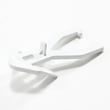
How to remove bottom grille on GE refrigerator?
On the GE PDS22MHRBBB bottom-mount refrigerator, we remove the bottom grille (base grille) by grasping it at the bottom and pulling it straight out. It’s a snap-in grille, so it releases from the cabinet holes without removing screws.
Steps to remove the bottom grille
- Unplug the refrigerator or switch off power at the breaker (recommended when working near wiring).
- Open the fresh-food doors for better access.
- Grip the grille along the lower edge (center works best).
- Pull straight out toward you; avoid twisting so the prongs do not crack.
- Set the grille aside on a non-scratching surface.
How to reinstall it correctly
Align the grille’s rear prongs with the matching holes in the cabinet, then push forward until it snaps into place. For the exact prong locations and cabinet hole alignment, follow the PDS22MHRBBB owner’s manual.
Quick troubleshooting if it won’t come off
| What you notice | Most likely cause | What we do |
|---|---|---|
| One side pops loose but the other won’t | A prong is still engaged | Re-grip closer to the stuck side and pull straight out |
| Grille feels “glued” on | Debris at the bottom edge | Wipe along the seam, then pull again |
| Grille flexes a lot | Pulling from the top edge | Pull from the bottom edge only |
Why it matters
The base grille area is where you often access leveling legs and lower hinge hardware during moves, door swing changes, and some service checks. Removing it the right way helps prevent broken grille prongs and cabinet scratches.
Last updated: January 2026
What is the most common problem with GE profile refrigerators?
The most common issue we see on GE Profile refrigerators like model PDS22MHRBBB is a cooling problem (refrigerator or freezer too warm), often caused by airflow, dirty condenser coils, or a control setting issue. Use the troubleshooting steps in the PDS22MHRBBB owner's manual to narrow it down.
Most common symptoms (and what they usually point to)
- Not cooling or too warm: dirty condenser, door left open, heavy use, or a failed cooling component
- Strange noises: normal cycling, fan noise, or a part contacting ice buildup
- Ice maker not making ice: freezer not cold enough, cubes jammed, or shutoff triggered
- Dispenser not working: filter restriction, air in the line, or dispenser switch issue
- Water leaking: clogged defrost drain, loose water line, or reservoir issue
Quick checks we recommend first (PDS22MHRBBB)
- Confirm the temperature controls are set correctly (not at 0/Off).
- Make sure doors fully close and nothing is holding them open.
- Clean the grille and condenser area (a common cause of warm temps).
- If the ice maker is on but jammed, remove stuck cubes and restart the ice maker.
- If water flow is slow, replace the water filter and purge air from the dispenser.
Common problems and likely parts to inspect
| Problem | What to check first | Parts that often relate |
|---|---|---|
| Too warm | condenser cleaning, door sealing, control settings | GE profile refrigerator temperature sensor WR55X10025, evaporator fan motor, main board |
| No ice | freezer temp, jammed cubes, shutoff | ice maker, fill system |
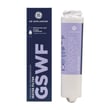
| Slow water | filter age, air in line | GE smartwater refrigerator water filter GSWF, water reservoir |
Why it matters
Cooling and airflow issues can make the compressor run longer and temperatures swing. Catching a simple cause (like dirty condenser coils or a door not sealing) helps protect food and reduces wear on major components.
For model-specific troubleshooting flowcharts and safety notes (including unplugging before repairs), follow the PDS22MHRBBB owner's manual.
Last updated: January 2026
What is the average lifespan of PDS22MHRBBB?
A GE bottom-mount refrigerator like model PDS22MHRBBB typically lasts 13 years with normal household use. Keeping condenser coils clean, maintaining good door seals, and replacing the water filter on schedule helps you reach (and often exceed) that average.
Typical lifespan and what affects it
Most lifespan differences come down to usage and maintenance, not the brand badge.
- Dirty condenser coils make the compressor run hotter and longer
- Worn door gaskets cause temperature swings and longer run times
- Overpacked compartments restrict airflow and reduce cooling efficiency
- Power surges and frequent outages can stress the main board and compressor
- Skipping water filter changes can reduce water flow and strain the dispenser system
Maintenance schedule we recommend
Use this as a practical baseline; for model-specific care and cleaning steps, follow the PDS22MHRBBB owner's manual.
| Task | How often | Why it matters |
|---|---|---|
| Clean condenser coils | Every 6 to 12 months | Reduces compressor workload |
| Check door seal for gaps | Every 3 months | Prevents warm air leaks |
| Replace water filter | Every 6 months or 750 gallons | Maintains flow and water quality |
| Verify temps (fresh food/freezer) | Monthly | Catches cooling issues early |
Parts that commonly support long life
If you are restoring performance, these are common wear items for this model family.
- GE smartwater refrigerator water filter GSWF for routine filter replacement
- Refrigerator evaporator fan motor WR60X10196 if the freezer is cold but fresh food warms
- Refrigerator condenser fan motor WR84X10055 if the unit runs hot or is noisy near the back
- GE profile refrigerator temperature sensor WR55X10025 if temperatures swing or seem inaccurate
Why it matters
A refrigerator near the end of its average lifespan can still be reliable, but small airflow, fan, or sensor problems can look like major cooling failures. Basic maintenance and targeted part replacement often restore normal temperatures and reduce run time.
Last updated: March 2026