 Installation guide
 Owner’s manual
 Error Codes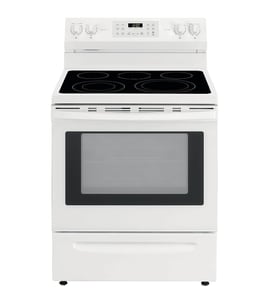

How to reattach a JennAir oven door?
To reattach the oven door on your Jenn-Air JDR8895AAB dual-fuel range, align the door slots with the hinge arms, slide the door fully down onto the hinges, then press down on the top corners so it seats evenly and does not look crooked (never use the handle to lift the door). See the owner's manual for the exact door removal and reinstallation steps.
Reattach the door (step-by-step)
- Make sure the oven is cool and the door is supported with both hands.
- Hold the door by the sides (not the handle).
- Align the slots in the door with the hinge arms on the range.
- Slide the door straight down onto the hinge arms until fully seated.
- Push down on the top corners of the door to fully seat it.
- Close the door slowly and confirm it moves smoothly.
Safety checks before you use the oven
- Do not operate bake or broil until the door is properly replaced.
- Keep fingers away from the hinge area; hinge arms are spring-loaded.
- Do not put weight on an open door (no leaning or standing).
- If the door looks uneven, remove it and reseat it on both hinges.
- Confirm the door closes without rubbing the front frame.
Quick troubleshooting if the door will not sit right
| What you notice | What it usually means | What to do |
|---|---|---|
| Door looks crooked | One hinge is not fully seated | Lift off and reinstall, then press down on both top corners |
| Door will not close fully | Door not slid all the way down | Reinstall and slide down until it stops |
| Door feels “spongy” when closing | Normal on some new ranges | Use normally; it typically decreases with use |
Why it matters
A properly seated door helps maintain stable oven temperature, supports safe broiling, and prevents hinge damage. If you are also replacing a damaged door component, we stock model-matched parts such as the range oven door inner glass 74003645. You can also search by model number on Sears PartsDirect.
Last updated: February 2026
What are the different parts of an oven?
An oven is made up of heating, airflow, lighting, and support components that work together to cook evenly and safely. On your Jenn-Air JDR8895AAB dual-fuel range, key parts include the bake system, racks, oven venting, convection fan, and the oven light system (see the JDR8895AAB owner's manual).
Main oven parts and what they do
- Bake element: Provides the primary heat for baking and roasting.
- Broil element: Provides intense top heat for broiling and browning.
- Oven racks: Support cookware; many racks have a lock-stop edge to help prevent tipping.
- Convection fan: Circulates hot air for more even cooking; it typically stops when the door is opened.
- Oven light and light switch/pad: Illuminates the cavity; the light often turns on when the door opens.
- Oven vent: Routes heat and moisture out of the oven; on this model it’s located at the base of the backguard.
Common replaceable parts you may see for this model
These are examples of parts customers often replace on the JDR8895AAB:
| Part | What it affects | Example from our parts list |
|---|---|---|
| Temperature sensing | Baking accuracy, overheating, error symptoms | Oven sensor 12001656 |
| Heating | No-heat or uneven baking | Range bake element 74004105 |
| Air circulation | Convection performance, noisy fan | Convection fan WPW10206586 |
| Visibility | Light out or flickering | Range oven light bulb WP74009925 |
| Door assembly | Heat retention, safe closing | Range oven door inner glass 74003645 |
Safety and care notes that matter
- Keep the oven vent clear; blocking vents or air intakes restricts airflow and creates unsafe operating conditions.
- Don’t cover the oven bottom or entire rack with foil; it blocks airflow and can trap heat.
- Let surfaces cool before touching the vent area, doors, and windows.
- Replace a hot bulb only after the oven cools; disconnect power first.
Why it matters
Knowing the major oven parts helps you troubleshoot symptoms faster (uneven baking, no heat, dim lighting, noisy convection) and choose the right replacement part the first time.
Last updated: February 2026
Why is my JennAir oven not working?
If your Jenn-Air JDR8895AAB oven has lights or a clock but will not heat, the most common causes are a control setting issue (Control Lockout, Delay, Cook and Hold), a tripped breaker or blown fuse, or a failed heating or temperature-sensing component. Start with power and settings checks, then test likely parts.
Quick checks we recommend first
- Confirm the oven controls are set correctly (not in Delay or Cook and Hold).
- Make sure Control Lockout is off; locked touchpads prevent normal operation.
- Verify the range plug is fully seated in the outlet.
- Reset the home circuit breaker or replace the house fuse if needed.
- If your range has a convenience outlet breaker on the backguard, reset it (it can trip if a small appliance draws over 10 amps).
Settings that stop heating (but make it look like the oven is “on”)
The JDR8895AAB can appear normal (clock and icons lit) while heating is disabled by a mode or lock.
| What you see | Likely cause | What to do |
|---|---|---|
| Touchpads do not respond | Control Lockout enabled | Turn off lockout per the owner's manual |
| Oven won’t start at the expected time | Delay set | Cancel Delay and set a normal Bake cycle |
| Oven stops after holding temp | Cook and Hold used | Cancel Cook and Hold and restart Bake |
| LOCK or BAKE flashes | Fault/lock condition | Clear the cycle, let oven cool if hot, then retry |
When it’s a part problem (common on dual-fuel ranges)
If power and settings are correct and the oven still will not heat, these parts are frequent culprits:
- Temperature sensor: a bad sensor can prevent proper heating or cause erratic temps; see oven sensor 12001656.
- Bake heating circuit: if the oven will not bake (or heats very slowly), inspect and test the range bake element 74004105.
- Convection fan: if convection modes fail or airflow is abnormal, the convection fan WPW10206586 may be involved.
Why it matters
An oven that will not heat is often a simple control or power issue; fixing that first prevents unnecessary part replacement. If a sensor or bake element is failing, addressing it restores safe, consistent temperatures for baking and broiling.
You can order replacement parts for your JDR8895AAB from the parts list for this model, or search by model number on Sears PartsDirect.
Last updated: February 2026
What are the most common stove parts to replace?
On the Jenn-Air JDR8895AAB dual-fuel range, the most commonly replaced parts are the ones tied to heating accuracy, ignition, lighting, and door sealing, such as the oven sensor, bake element, oven light bulb, burner parts, and door hardware.
Common replacement parts (often needed on this model)
- Oven temperature sensor (fixes temperature swings and inaccurate baking)
- Bake element (restores baking heat when the oven will not heat or heats unevenly)
- Oven light bulb (restores interior light)
- Burner and burner base (helps resolve weak flame, uneven flame, or ignition issues)
- Spark/ignition components (addresses constant clicking or no-ignite symptoms)
- Door parts (hinge, inner glass, door lock assembly) for sagging doors, heat loss, or self-clean lock problems
Quick symptom-to-part guide
| Symptom | What to check first | Example part for JDR8895AAB |
|---|---|---|
| Oven temp is off or fluctuates | Temperature sensing | Oven sensor 12001656 |
| Oven will not bake or bakes unevenly | Heating circuit | Range bake element 74004105 |
| Oven light is out | Bulb and cover | Range oven light bulb WP74009925 |
| Burner will not ignite or keeps clicking | Spark and gas valve path | Spark module, burner valve |
Why it matters
When a sensor, element, or ignition part is weak, the range can underheat, overheat, or fail to light reliably. Replacing the correct part restores safe, consistent cooking performance and helps prevent repeat failures.
Safety notes we follow
- Disconnect power before servicing electrical parts (including the oven light).
- Shut off gas before moving the range or disconnecting any gas tubing.
- Re-engage the anti-tip bracket after reinstalling.
For model-specific procedures and warnings, use the JDR8895AAB owner's manual. You can order parts from the parts list for this model, or search by model number on Sears PartsDirect.
Last updated: February 2026




