 Owner’s manual








Can I fix a D90 error myself?
Yes. On your LG DLGX4501B dryer, a D90 (Flow Sense) code means the exhaust duct is about 80% to 95% blocked. You can often fix it yourself by cleaning the lint path and correcting vent restrictions; do not keep running the dryer until airflow is restored (fire risk).
What to do first (safe, DIY steps)
- Turn the dryer off and let it cool.
- Remove and clean the lint screen; wash off residue, then let it dry fully before reinstalling.
- Pull the dryer away from the wall and check the vent hose for kinks, crushing, or a loose connection.
- Disconnect the vent and remove lint buildup from the hose and the wall duct.
- Go outside and confirm the vent hood damper opens freely and blows strong air while the dryer runs.
How to confirm the vent is the real problem
The D90 code is about airflow, not a failed dryer part. Use this quick check:
| Check | What you want to see | If not |
|---|---|---|
| Outside vent airflow | Strong, steady airflow | Clean/repair ducting and vent hood |
| Vent hose condition | Short, straight, not crushed | Replace or reroute for fewer turns |
| Lint screen area | No lint bypassing the screen | Clean housing and reseat screen |
When a part may be involved
If the venting is clear but drying performance is still poor, a sensor issue can contribute. For this model, the temperature sensing circuit uses a thermistor; a failing sensor can cause odd heat behavior even when airflow is good.
- If you are diagnosing temperature-related symptoms, check the dryer thermistor AGM30045804.
- For exact Flow Sense test steps and venting requirements for D80/D90/D95 codes, follow the DLGX4501B owner's manual.
Why it matters
A severely restricted exhaust makes drying times longer and can overheat the dryer. Restoring proper venting protects the burner, thermostats, and drum system, and it helps prevent repeat Flow Sense warnings.
If you need replacement parts for your LG DLGX4501B, order from the parts list for this model or search by model on Sears PartsDirect.
Last updated: February 2026
What is the most common problem with LG dryers?
The most common problem we see with LG dryers like model DLGX4501B is long dry times or clothes not drying fully. In most cases, the root cause is restricted airflow (a clogged lint filter or vent ducting) or a heat-related issue such as a thermostat or sensor problem; the DLGX4501B owner's manual troubleshooting chart helps narrow it down fast.
Most common symptoms and what they usually mean
- Clothes still damp or cycles take too long: lint filter clogged, vent/hood clogged, duct run too long, or ENERGY SAVER option adding air-dry time
- Dryer runs but no heat: gas shutoff closed (gas models), tripped breaker or blown fuse, or a failed heat-control component
- Stops early on sensor cycles: very small load, moisture sensing issue, or sensor bars need cleaning
- Unusual noises (thumping/squealing): worn belt, idler pulley, or drum support rollers
- Error codes: often point to sensor or power-supply issues; use LG dryer error codes to interpret the code before replacing parts
Quick checks we recommend first (safe, high-impact)
- Clean the lint filter completely and reseat it.
- Check the outside vent hood for a strong, steady airflow.
- Inspect the vent duct for crushing, kinks, lint buildup, or excessive length and elbows.
- For gas drying issues, confirm the house gas shutoff and dryer gas shutoff are fully open.
- If drying a very small load, switch to a timed cycle or add a few items for better tumbling.
Parts that commonly relate to these problems (DLGX4501B)
If airflow is good but performance is still poor, these model-matched parts are common suspects:
| Symptom | Common part to check | Example part on this page |
|---|---|---|
| No heat or overheating | High-limit thermostat | Dryer high-limit thermostat 6931EL3003C |
| Long dry times, temperature issues | Thermistor (temperature sensor) | Dryer thermistor AGM30045804 |
| Squealing or drum not turning smoothly | Idler pulley or belt | LG dryer drum belt 4400EL2001F |
Why it matters
Restricted venting and heat-control problems do more than slow drying; they can cause overheating, repeated shutdowns, and unnecessary wear on the motor, belt, and rollers. Fixing airflow first is the fastest way to restore normal cycle times.
Last updated: February 2026
What is the average lifespan of an LG dryer?
An LG dryer typically lasts 10 to 15 years with normal household use and basic maintenance. For your LG DLGX4501B, keeping airflow strong (clean lint filter, clear venting) and addressing wear parts early helps you reach the upper end of that range; see the DLGX4501B owner's manual.
Typical lifespan and what affects it
A dryer’s life is mostly determined by heat management, airflow, and drum support wear.
- Airflow and venting: restricted exhaust makes the dryer run hotter and longer
- Load habits: frequent overloading strains the drum belt, rollers, and motor
- Maintenance: lint buildup increases run time and component temperatures
- Fuel type and heat system: gas ignition and thermostats must cycle correctly
- Environment: garages and dusty areas accelerate lint and debris buildup
Parts that commonly wear first (and why)
On the DLGX4501B, these are the parts we most often see replaced as the dryer ages:
- LG dryer drum belt 4400EL2001F: belt wear can cause slipping, squealing, or a drum that will not turn
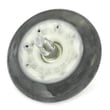
- Dryer drum support roller assembly 4581EL2002H: worn rollers can cause thumping or rumbling
- Dryer idler pulley 4560EL3001A: a noisy or seized pulley can damage the belt
- LG dryer lint screen ADQ56656403: a damaged screen lets lint bypass and collect inside the cabinet
| Symptom | Most likely wear area | What it can lead to if ignored |
|---|---|---|
| Squealing, drum not turning | Belt, idler pulley | No-tumble, overheating from long run times |
| Thumping or rumbling | Support rollers | Drum wear, motor strain |
| Long dry times | Venting, lint screen, airflow | Overheating, thermostat trips |
Maintenance that extends dryer life
These steps protect the motor, thermostats, and gas heat system by keeping temperatures and run times normal.
- Clean the lint screen every load
- Check and clean the exhaust duct regularly (short, smooth metal venting performs best)
- Avoid overloading; the drum should tumble freely
- If you see airflow warnings or repeated long dry times, correct vent restrictions promptly
Why it matters
A dryer that runs longer than normal wears out moving parts faster and cycles hotter, which shortens the life of components like thermostats, sensors, and the motor. Good airflow is the simplest way to protect the DLGX4501B and reduce repairs.
Ordering replacement parts
We list model-matched replacement parts for LG DLGX4501B on this page; for broader model searches and ordering, use Sears PartsDirect.
Last updated: February 2026
How do you reset the flow sensor on a LG dryer?
On the LG DLGX4501B dryer, the Flow Sense (duct blockage) indicator resets automatically after you correct the vent restriction and run multiple consecutive drying cycles. There is no separate “flow sensor reset button”; the dryer clears the alert only after it confirms improved exhaust airflow.
How the Flow Sense reset works
Flow Sense monitors exhaust flow and warns when ductwork restrictions reduce venting. After you clear the blockage, the dryer needs several back-to-back cycles to verify performance has improved and then it turns the indicator off.
- Clear the vent restriction first (lint buildup, crushed hose, too many turns).
- Run multiple consecutive cycles; the indicator clears after airflow improves.
- If the indicator remains active after more than five cycles, follow the troubleshooting steps in the DLGX4501B owner's manual.
- If the indicator stays on after a cycle, it can remain lit for up to 2 hours; opening the door or pressing Power turns off the display.
Steps we recommend before you try to “reset” anything
- Clean the lint screen before every load and make sure it seats fully.
- Inspect the vent hose behind the dryer; remove lint and straighten kinks.
- Check the outside vent hood for a stuck flap or blockage.
- Confirm strong airflow outside while the dryer is running.
Quick symptom guide
| What you see | What it means | What to do |
|---|---|---|
| Flow Sense bars during cycle | Restricted exhaust flow | Clean and correct venting |
| “d80”, “d90”, “d95” after drying | Severe blockage level | Do not run until vent is cleaned |
| Indicator stays on after cleaning | Needs consecutive cycles to verify | Run several cycles; recheck vent |
Why it matters
Restricted venting increases dry time and heat stress, which can trip safety thermostats and reduce overall dryer performance.
Last updated: February 2026









