 Installation guide
 Owner’s manual




How do I reset a Speed Queen dryer?
For the Speed Queen ADE6HRYS177TW01 dryer, there is no special “reset” button for normal operation. To restart after a pause or door-open stop, close the door fully and press Start/Pause again; this restores operation in the selected cycle.
- Make sure the door is fully closed; the dryer will not run with the door open.
- Press Start/Pause once to stop (if it is running).
- Close the door (if you opened it).
- Press Start/Pause again to restart.
- If the controls seem unresponsive, unplug the dryer (or switch off the breaker) for 1 minute, then restore power and try again.
These checks solve most “needs reset” complaints on this model:
- Confirm power is on (breaker not tripped; outlet working).
- Verify you selected a cycle and temperature/dryness setting.
- Check that the door closes and latches firmly.
- If the dryer overheated, it may stop until it cools; clean lint buildup and check venting.
| Symptom | Most likely cause | What to do next |
|---|---|---|
| Starts, then stops when door is moved | Door not fully closed or door switch issue | Reclose door; inspect latch area; test door switch if needed |
| Runs but no heat, then seems to “need reset” | Airflow restriction causing overheating | Clean lint screen and venting; verify strong exhaust airflow |
| Won’t start at all | Power issue or failed start/door circuit | Check breaker/outlet; then consider switch testing |
A “reset” is usually the dryer protecting itself after a door-open event or an overheating/airflow problem. Restoring normal airflow and confirming the door and start circuit work correctly prevents repeat shutdowns and long dry times.
For model-specific operating steps and control behavior, follow the ADE6HRYS177TW01 user manual.
Last updated: February 2026
What are common problems with Speed Queen dryers?
Common problems we see with Speed Queen dryer model ADE6HRYS177TW01 are long dry times from restricted venting, overheating from poor airflow, wrinkling from overdrying or oversized loads, and noise from worn drum support parts. Start with airflow and load checks, then move to heat and drive components using the ADE6HRYS177TW01 owner's manual.
- Dryer takes too long to dry: lint screen clogged, vent hose kinked, exterior vent hood blocked
- Overheats or shuts off: restricted venting, high-limit thermostat opening to protect the dryer
- Clothes are wrinkled: heat setting too high, overdrying, load too large to tumble freely
- Clothes smell like room odors: dryer pulls in air from the laundry area (paint, cleaners, cooking odors)
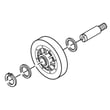
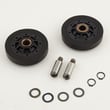
- Rumbling/squealing noise: worn drum rollers, idler components, or drum glides
- Won’t start or stops mid-cycle: door switch or control/timer circuit issue (after verifying power)
- Clean the lint screen and confirm strong airflow at the outside vent.
- Inspect the entire vent run for kinks, crushed flex duct, or heavy lint buildup.
- Reduce load size and match the cycle and heat setting to the fabric care label.
- Level the dryer and check for coins or small items in the drum area.
- If heat seems inconsistent, inspect safety thermostats and airflow before replacing parts.
| Symptom | Commonly involved part | Example from this model’s parts |
|---|---|---|
| Overheating, cycling off | High-limit safety thermostat | Limit thermostat D515873 |
| Thumping/rumbling | Drum support rollers | Cylinder roller D510708P |
| No tumble (motor hums or won’t run) | Drive motor (after power checks) | Dryer drive motor D511629P |
Restricted venting is the root cause behind many dryer complaints; it increases dry time, can trigger safety shutoffs, and makes parts like thermostats work harder than they should.
Last updated: February 2026
Why is my Speed Queen dryer not starting?
If your Speed Queen dryer model ADE6HRYS177TW01 won’t start, the most common causes are a power supply issue, the door not fully closed (door safety switch), or the motor overload protector needing time to reset. Start with the quick checks in the ADE6HRYS177TW01 owner's manual before replacing parts.
- Confirm the power cord is fully plugged in.
- Make sure the loading door is completely closed; the dryer will not run with the door open.
- Press the Start button firmly.
- Check the home fuses or circuit breakers (electric dryers often use two fuses/breakers).
- If the dryer stopped mid-cycle, wait 10 minutes for the motor overload protector to reset, then try again.
- If the drum starts tumbling with the door open, stop using the dryer and follow the safety guidance in the manual.
If the quick checks don’t solve it, these components are typical suspects on dryers:
| Symptom | Most likely area | What to do next |
|---|---|---|
| No response at all | Power supply, start circuit | Recheck breakers, then inspect wiring and start switch |
| Starts then stops quickly | Motor overload, airflow restriction | Let it cool 10 minutes; clean lint and venting |
| Door must be slammed to start | Door switch alignment/wear | Inspect door latch and switch operation |
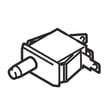
If you’re diagnosing a start circuit issue, a failed switch can prevent the motor from running; the switch D512973 is one of the start and safety related parts used on this model.
A dryer that won’t start is often a simple electrical or door-safety condition, but repeated no-start events can also point to overheating from restricted airflow. Keeping the lint filter and venting clear helps prevent nuisance shutdowns and protects key components like the drive motor.
For better starting and drying performance:
- Clean the lint filter before every load.
- Vacuum the duct under the lint filter area periodically (the manual recommends an annual deep clean).
For step-by-step operating and troubleshooting guidance, use the ADE6HRYS177TW01 owner's manual.
Last updated: February 2026





