Owner’s manual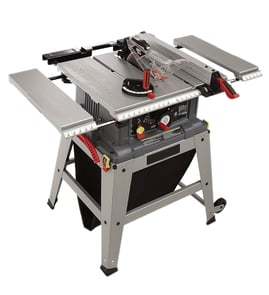

How to date a Craftsman table saw?
To date a Craftsman table saw, we start with the model and serial number tag on the saw. For Craftsman model 152221140, the most reliable approach is to use the serial number (and sometimes the motor data plate) along with the identification details shown in the Craftsman 152221140 owner's manual.
Look for a metal or adhesive ID plate in one of these common spots:
- On the rear of the cabinet or stand
- On the right side panel near the power switch
- Under the table top near the trunnion area (use a flashlight)
- On the motor housing (motor data plate)
- Near the cord entry or junction box
Craftsman table saws were produced by different manufacturers over the years, so serial number formats vary. Use this process:
- Write down the full model number and serial number exactly as shown.
- Check for a date code on the serial tag (often a year and week, or a month and year).
- Compare the saw’s features to the manual specs (10-inch blade, 120/240V motor, left-tilt design, belt drive) to confirm you are matching the correct product family.
- Use the parts list section in the manual to identify assemblies (blade guard, splitter bracket) that can help narrow the production era.
| What’s on the tag | What it usually means | What to do next |
|---|---|---|
| Serial includes a clear year (YYYY) | Direct manufacture year | Use that year as the build year |
| Serial looks like week/year code | Build week and year | Treat it as production timing |
| Serial is only letters and digits | Manufacturer-specific code | Match features and manual details |
Knowing the build timeframe helps us choose compatible replacement parts and safety components (like the blade guard assembly) and it also helps when you are troubleshooting issues such as alignment, blade height adjustment, or slow blade speed.
If you are diagnosing performance problems while you are identifying the saw, our DIY resources like table saw common question can help you narrow the cause by symptom.
Last updated: February 2026
Where is the reset button on a Craftsman table saw?
On the Craftsman 152221140 table saw, the “reset” is the motor’s thermal-overload reset button; it’s located on the side of the ON/OFF switch assembly (not on the motor end cap). Use it only after turning the saw OFF and letting the motor cool.
Look for the resettable thermal-overload relay reset near the power switch:
- Locate the green ON button and the large red OFF paddle.
- Find the ON/OFF switch assembly housing.
- The thermal-overload reset button is on the side of that switch assembly.
- If the saw stopped mid-cut, treat it as an overload trip first.
For the exact illustration and labeling, use the Craftsman 152221140 owner’s manual.
- Press the red OFF paddle/button.
- Unplug the power cord.
- Clear the blade area and remove any jammed stock or debris.
- Let the motor cool for 3 to 5 minutes.
- Confirm the OFF button is depressed.
- Press the thermal-overload reset button.
- Plug in and restart.
These are the most common causes we see with table saw thermal overloads:
- Feeding the workpiece too fast
- Dull, dirty, or incorrect blade for the material
- Cutting beyond the saw’s capacity (thick hardwood, wet lumber)
- Low voltage or an undersized extension cord
- Binding from fence or blade misalignment
| Check | What to look for | What to do |
|---|---|---|
| Blade condition | Burn marks, pitch buildup, missing teeth | Clean or replace the blade |
| Alignment | Wood pinches, burning, kickback tendency | Verify fence and blade alignment |
| Power supply | Slow start, dimming lights | Use a proper outlet and heavy-gauge cord |
| Feed rate | Motor bogs down | Slow the feed and support the workpiece |
If your cuts are binding or drifting, our table saw bad cuts and table saw bad angle cuts resources walk through the most common alignment causes.
The thermal-overload reset protects the motor from overheating. Resetting without cooling down or without clearing a bind can trip it again immediately and can damage the blade, workpiece, or motor.
Last updated: February 2026
What are the parts of a table saw?
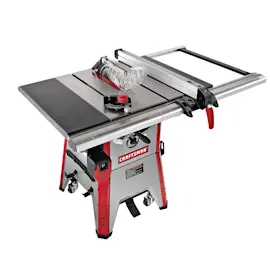
Most table saws share the same core parts: a flat tabletop that supports the workpiece, a blade driven by a motor through an arbor, and adjustment and safety systems. On the Craftsman 152221140, the manual also calls out key assemblies like the fence, blade guard and splitter, switch, and dust collection parts (see the 152221140 owner's manual).
These are the common, high-impact components that affect cut quality, safety, and setup:
- Table saw assembly and tabletop: the main cast/metal surface that supports material
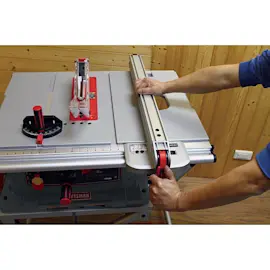
- Fence (with fence hooks): guides rip cuts parallel to the blade
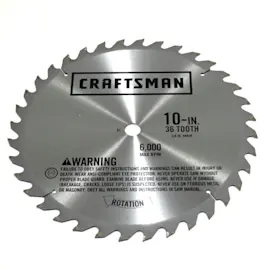
- Saw blade: the cutting tool mounted to the arbor
- Blade guard and splitter assembly: helps reduce contact with the blade and helps control kickback
- Splitter bracket assembly and splitter mounting rod: supports and positions the splitter system
- Handwheels and handwheel lock knobs: raise/lower the blade and adjust blade angle (depending on design)
- Switch: the on/off control for the saw
Many “mystery problems” like rough cuts and overheating start with poor support or clogged dust flow.
| Area | Parts you may have | What it does |
|---|---|---|
| Dust collection | Dust port, dust chute | Routes sawdust away from the blade area |
| Stand/support | Leg assemblies, tie bars | Stabilizes the saw to reduce vibration |
| Drive system | Poly-V belt (on belt-drive designs) | Transfers power from motor to arbor |
Knowing the names of the parts speeds up troubleshooting and ordering. For example, if the saw cuts poorly, the issue is often fence alignment, blade condition, or the guard/splitter setup rather than the motor.
- Match your symptom to a guide like table saw bad cuts
- Review safe setup and guarding in the 152221140 owner's manual
- Keep rails clean and waxed; buff wax fully before use
Last updated: February 2026
Does Craftsman make a good table saw?
Yes. Craftsman table saws, including the Craftsman model 152221140, are a solid choice for DIYers and hobbyists who want dependable basic ripping and crosscutting at a reasonable cost, as long as you keep the saw tuned (fence alignment, blade condition, and smooth rail travel) and follow the safety setup in the 152221140 owner's manual.
A table saw is “good” when it cuts accurately, adjusts smoothly, and stays safe under load. For the 152221140, the manual emphasizes correct fence use, miter gauge crosscutting, and using recommended accessories to reduce injury risk.
Common strengths many Craftsman saw owners like
- Good value for home shops and weekend projects
- Capable of accurate cuts after basic setup and alignment
- Widely supported with standard 10-inch blades and common accessories
- Straightforward maintenance (cleaning, waxing rails, tightening hardware)
Common tradeoffs to expect
- Fence and miter gauge may need careful adjustment for repeatable accuracy
- Dust collection is often basic compared to pro cabinet saws
- Vibration or “wandering” cuts can happen if the saw is out of level or hardware is loose
These steps match the kind of upkeep and adjustments called out in the manual.
- Check fence alignment before precision rip cuts
- Keep the blade sharp; replace it if it burns wood or leaves rough edges
- Clean and apply paste wax to the rails so the fence slides consistently
- Reposition the saw on a flat surface; adjust leveling feet (if equipped)
- Tighten all hardware periodically
| Symptom | Most common cause | What to do first |
|---|---|---|
| Cuts are not square | Fence or blade not aligned | Verify fence alignment; check 90-degree stop |
| Rough, burned cuts | Dull/dirty blade | Clean or replace blade |
| Saw feels weak | Belt/blade drag | Check belt condition; confirm blade spins freely |
| Inconsistent crosscuts | Work not held firmly to miter gauge | Use miter gauge correctly; feed steadily |
A “good” table saw is mostly about setup and safe technique. When the fence, blade, and stops are dialed in, you get cleaner cuts, less kickback risk, and more predictable results.
Helpful DIY reading: how to maintain a table saw, table saw bad cuts.
Last updated: February 2026