Owner’s manual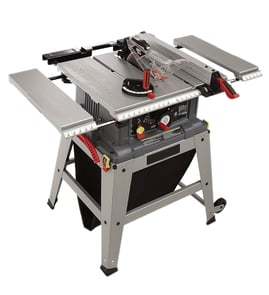

What not to do with a table saw?
On the Craftsman table saw model 315218291, do not cut freehand, do not reach over or around the blade, and do not operate the saw on the floor. Keep hands out of the blade line, use the blade guard and spreader/riving knife when possible, and use a push stick when required (see the owner's manual).
Top “don’ts” that prevent serious injuries
- Do not perform any operation freehand; always use the fence, miter gauge, or a proper jig.
- Do not reach over, across, or around the blade; keep your hands out of the blade path.
- Do not stand directly in line with the blade; stand slightly to the side to reduce kickback risk.
- Do not operate the saw on the floor or below waist height; mount it securely to a workbench or approved leg stand.
- Do not remove cutoff pieces until the blade stops; disconnect power before clearing jams.
- Do not cut more than one piece at a time; stack cutting increases binding and kickback risk.
- Do not use unapproved accessories or the wrong blade setup; use only recommended accessories and blades that match the spreader/riving knife thickness range.
Safe setup checklist (quick reference)
| Step | What to do | Why it helps |
|---|---|---|
| Guarding | Use blade guard and spreader/riving knife when the cut allows | Reduces contact and kickback risk |
| Work support | Keep the workpiece firmly against the table and fence | Prevents twisting and binding |
| Blade height | Raise the blade only as needed for the cut | Limits exposed blade |
| Power | Turn the saw off before unplugging; unplug before adjustments | Prevents accidental starts |
Why it matters
Most table saw injuries happen during a momentary slip, a reach near the blade, or a kickback event. Following the model 315218291 safety rules keeps your hands out of danger zones and keeps the workpiece controlled.
Related DIY help
If your cuts are drifting or the saw is hard to control, use our troubleshooting steps for table saw bad angle cuts.
You can also search your model number and order replacement parts through Sears PartsDirect.
Last updated: February 2026
Where is the reset button on a Craftsman table saw?
On the Craftsman table saw model 315218291, the “reset” is typically part of the motor’s overload protection, not a separate button on the front of the saw. On many versions, it’s accessed at the motor end under small caps; use the steps in the 315218291 owner's manual to confirm the exact location and procedure for your saw.
What to check first (safe, quick steps)
- Unplug the saw before touching the motor, switch, or wiring.
- Let the motor cool 10 to 20 minutes if it stopped during a cut.
- Check the outlet and breaker; a weak circuit can mimic an overload trip.
- Remove dust buildup around the motor housing and vents.
- Verify the blade spins freely by hand (with the saw unplugged).
Typical reset location on this style of Craftsman saw
Many Craftsman bench and contractor-style saw motors use an internal overload reset that’s accessed at the end of the motor. You may see two small plastic caps; behind them are spring-loaded reset points. If your saw matches that design, pressing the spring-loaded reset restores power after an overload trip.
Why it trips
- Dull or dirty blade
- Feeding stock too fast
- Binding wood (pinching the blade)
- Misalignment causing drag
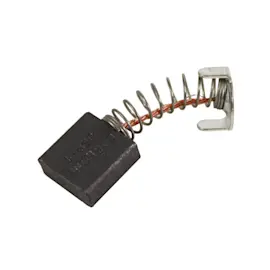
- Motor brushes worn (on brush-type motors)
Troubleshooting guide: symptom to next step
| What happened | Most likely cause | What we do next |
|---|---|---|
| Saw stops mid-cut | Overload trip from load/heat | Cool down, then reset at motor end |
| Saw hums but won’t spin | Binding blade or start issue | Check blade free-spin; inspect drive components |
| Starts, then slows badly | Dull blade or motor issue | Clean/replace blade; check for drag |
Why it matters
Using the correct reset procedure protects the motor windings and switch from repeated overheating. If the overload keeps tripping, fixing the underlying load (blade condition, alignment, feed rate) prevents repeat shutdowns.
For cut quality and alignment issues that can increase load, use our DIY guide table saw bad angle cuts. For blade service steps, follow how to replace a table saw blade. If you need to look up additional replacement items by model number, search by 315218291 on Sears PartsDirect.
Last updated: February 2026
What are the parts of a table saw?
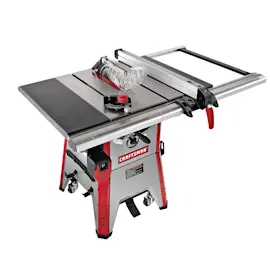
A table saw is built around a flat work surface and a spinning blade, with guides and controls that keep cuts accurate and safe. On the Craftsman model 315218291, key assemblies include the table/cabinet, rip fence system, miter gauge or sliding miter table, blade height and bevel adjustments, and safety accessories.
Main parts you will see on the Craftsman 315218291
- Table top and cabinet: the flat surface and base that support the workpiece and house the mechanisms.
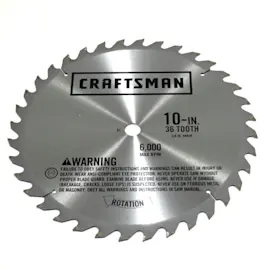
- Blade and arbor assembly: the blade mounts to the arbor; this is what actually makes the cut.
- Throat plate (blade insert): the removable insert around the blade opening that supports material near the cut.
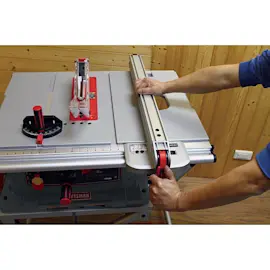
- Rip fence and fence lock: the long guide that sets rip width and locks parallel to the blade.
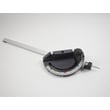
- Miter gauge and miter fence: guides crosscuts and angled cuts; this model also uses a sliding miter table system.
- Blade height adjustment: raises and lowers the blade for depth of cut.
- Bevel (tilt) adjustment: sets the blade angle for bevel cuts.
- Stand and leveling feet: helps stabilize the saw; leveling feet are adjusted until the stand does not rock.
- Safety accessories: commonly include a push stick and blade guard style components (varies by setup).
Where these parts matter most
For straight rip cuts
| Part | What it controls | Common symptom when off | Quick check |
|---|---|---|---|
| Rip fence | Cut width and parallel guidance | Burning, wandering cut | Fence locks firmly and stays parallel |
| Blade | Cut quality | Tear-out, rough edges | Sharp, clean, correct blade type |
| Table surface | Work support | Inconsistent feed | Clean, waxed, no debris |
For crosscuts and angles
- Use the miter gauge or sliding miter table for crosscuts, not the rip fence.
- If angles are inconsistent, focus on miter settings and alignment; see table saw bad angle cuts.
Why it matters
Knowing the names and functions of the main parts helps you troubleshoot faster (for example, separating a fence alignment issue from a dull blade issue) and order the correct replacement components by model number.
Helpful references for this model
- For diagrams, accessory storage locations, and adjustment procedures, use the 315218291 owner's manual.
- To find and order replacement parts by model number, search Sears PartsDirect.
Last updated: February 2026
What size dado blade do I need for a 10 inch table saw?
For the Craftsman 315218291 10-inch table saw, use a 6-inch stacked dado set (not an adjustable wobble dado). This model is designed for dado cuts up to 13/16 inch wide and requires an optional dado throat plate for dado cutting; see the 315218291 owner's manual.
What this model supports
The 315218291 manual calls out these dado-cut requirements and limits:
- Blade capacity: 10 in. (254 mm) maximum standard blade diameter
- Dado set type: stacked dado set
- Dado diameter: 6 in.
- Maximum dado width: 13/16 in.
- Required accessory: optional dado throat plate (manual lists part number 089110122059)
- Not allowed: adjustable (wobble) dado sets and molding cutters
Quick comparison: 10-inch saw vs dado size
Many 10-inch table saws accept an 8-inch dado set, but this Craftsman model is specified for a 6-inch stack dado.
| Saw type | Common dado diameter | What to use on 315218291 |
|---|---|---|
| Many 10-inch table saws | 8 in. stacked dado | 6 in. stacked dado |
| Compact/limited-arbor designs | 6 in. stacked dado | 6 in. stacked dado |
Setup checks we recommend before cutting dadoes
These steps help prevent binding, kickback, and arbor-nut engagement problems:
- Unplug the saw before changing blades or accessories.
- Install the optional dado throat plate so the workpiece is supported.
- Build the stack to the width you need, staying at or under 13/16 in.
- Tighten the arbor nut fully; confirm the arbor extends slightly past the nut.
- Rotate the dado by hand to confirm it spins freely before powering on.
- Reinstall the riving knife/spreader, blade guard, and anti-kickback pawls after non-through cuts.
Why it matters
Using the specified 6-inch stacked dado and throat plate keeps the cut supported at the table opening and helps ensure the arbor hardware clamps the stack securely, which reduces rough cuts and kickback risk.
For safe blade-change steps that also apply when swapping to a dado stack, use how to replace a table saw blade. For parts and accessories, search by model number on Sears PartsDirect.
Last updated: February 2026