Owner’s manual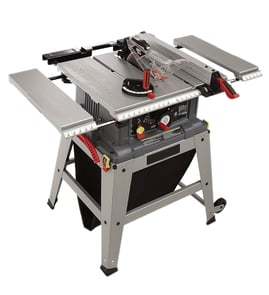

Where is the reset button on a Craftsman table saw?
On the Craftsman table saw model 152221040, the reset is the thermal-overload reset button located on the side of the ON/OFF switch assembly (under the front rail). Turn the saw OFF, unplug it, let the motor cool 3 to 5 minutes, then press the reset.
How to reset the thermal overload (safe, correct steps)
- Press the large red OFF paddle so the saw is fully off.
- Unplug the power cord.
- Wait 3 to 5 minutes for the motor to cool.
- Find the ON/OFF switch under the front rail.
- Press the thermal-overload reset button on the side of that switch assembly.
- Clear the blade area and table surface, then plug in and restart.
What usually causes the overload to trip
Thermal overload protection trips to prevent motor damage when the motor is working too hard or power is poor.
Common causes include:
- Feeding stock too fast
- A dull or dirty blade
- Cutting material beyond the saw’s capacity
- Low voltage at the outlet
- Long or undersized extension cords
Quick checks before you restart
| Check | What to do | Why it matters |
|---|---|---|
| Blade condition | Inspect for dull teeth, pitch buildup, wobble | A dull blade overloads the motor fast |
| Work area | Remove offcuts and debris near the blade | Debris can stall the blade on startup |
| Power | Use a proper outlet, avoid long cords | Low voltage can trip overload and damage the motor |
Why it matters
Resetting the overload without turning the saw fully OFF first can create an unsafe restart condition. Following the correct reset sequence protects the motor and helps prevent kickback and stalled-blade situations.
For diagrams showing the switch location and the thermal-overload reset (often labeled in the switch figure), use the 152221040 owner's manual. If you need replacement parts for this Craftsman table saw, we recommend starting with the model parts list, or searching by model number on Sears PartsDirect.
Last updated: February 2026
What not to do with a table saw?
For the Craftsman 152221040 table saw, do not operate it unless it’s fully assembled and you understand the tool’s limits; keep hands away from the blade, unplug before blade changes or cleaning, and never modify the saw. See the owner's manual for the full safety rules.
Top “don’ts” that prevent most injuries
- Don’t put your hands near the spinning blade; use a push stick or push block to keep your hands safely away.
- Don’t run the saw if it is not assembled and installed correctly.
- Don’t leave it plugged in when not in use; unplug before servicing, changing blades, or cleaning.
- Don’t operate with wet hands or in wet conditions; don’t use outdoors in rain.
- Don’t pull or carry the saw by the power cord; don’t unplug by yanking the cord.
- Don’t use accessories that are not recommended for the saw.
- Don’t allow children near the work area.
Safe setup habits (what we recommend instead)
- Set blade height so it is only high enough to cut the workpiece cleanly (a lower blade exposure reduces the amount of blade above the wood).
- Wear eye protection and hearing protection every time you cut.
- Keep the table, floor, and area under the saw clear of dust and offcuts.
- Use proper support for long stock (outfeed support) so the workpiece stays flat and controlled.
Quick checklist: power, blade, and work area
| Before you cut | What to check | Why it matters |
|---|---|---|
| Power | Switch OFF before unplugging; cord in good condition | Reduces shock and accidental start risk |
| Blade | Correct blade installed; blade height set appropriately | Helps prevent binding and kickback |
| Work area | Clean table and clear footing | Improves control and cut accuracy |
Cleaning and maintenance “don’ts”
- Don’t clean with flammable materials.
- Don’t use high-pressure air above about 50 PSI when blowing dust off the motor.
- Don’t let chips and dust build up under the saw.
Why it matters
Most table saw incidents come from loss of control, accidental startup, or unsafe hand placement. Following the Craftsman 152221040 safety rules and keeping the work area clean lowers the risk of injury, electrical shock, and fire.
If you need replacement parts for your Craftsman 152221040, start with the parts list for this model, or search by model number on Sears PartsDirect.
Last updated: February 2026
What size motor is on a 10 inch Craftsman table saw?
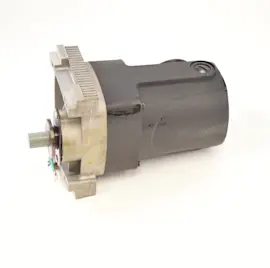
For the Craftsman 152221040 10-inch table saw, the motor is a dual-voltage, single-phase induction motor rated at 1.5 continuous-duty HP (up to 2 max developed HP). It runs at 3450 RPM (no-load) and is factory-wired for 120V.
Motor specs for Craftsman 152221040
These are the key motor and electrical ratings we use for troubleshooting power, speed, and circuit issues:
- Motor type: Induction
- Continuous-duty horsepower: 1.5 HP
- Maximum developed horsepower: 2 HP
- Voltage: 120/240V, 60 Hz, single-phase
- Current draw: 15A at 120V (and 7.5A at 240V)
- Speed: 3450 RPM (no-load)
| Spec | 120V operation | 240V operation |
|---|---|---|
| Amps | 15A | 7.5A |
| Typical wiring state | Factory wired | Requires lead reconnection |
For the exact wiring diagram and lead reconnection details, use the 152221040 owner's manual.
Why the motor “size” matters
Motor horsepower and voltage determine how well your saw maintains blade speed under load and what kind of circuit it needs. A saw that is underpowered for the cut (or under-supplied electrically) is more likely to bog down, trip a breaker, or leave burn marks.
If your saw feels weak or the blade slows down
Before assuming the motor is failing, we recommend these quick checks:
- Use a sharp, correct blade for the material and cut type
- Avoid forcing the feed rate; let the blade do the work
- Verify you are on a proper 15A, 120V branch circuit (for 120V use)
- Inspect the power cord and extension cord; use a grounded 3-wire cord of proper gauge
- Check belt condition and tension (this model uses a Poly-V belt drive)
If you want a step-by-step diagnostic path, use table saw blade spins too slow.
Ordering parts
When you’re ready to replace wear items (like a belt, switch, or blade-related hardware), order by the exact part number listed for model 152221040, or search by model on Sears PartsDirect.
Last updated: February 2026
What are the parts of a table saw?
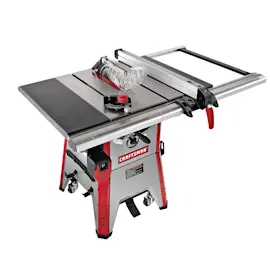
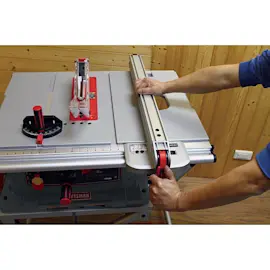
On the Craftsman 152221040 table saw, the main parts include the saw table, rip fence system, blade and guard components, and the height/tilt controls. These parts work together to guide the workpiece, set the cut, and help reduce kickback during ripping; see the 152221040 owner's manual.
Core parts you will see on this model
- Saw table: The flat surface that supports the workpiece during cuts.
- Rip fence (and fence rails): Positions and guides the workpiece for ripping with the grain.
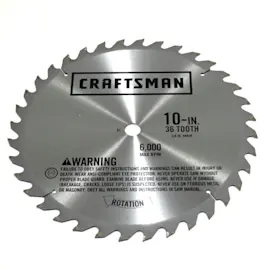
- Saw blade: The cutting tool; the manual notes a saw blade is included (not shown in the packing figure).
- Blade guard and splitter assembly: Covers the blade and helps keep the kerf from closing.
- Splitter with anti-kickback fingers: Helps prevent the workpiece from kicking back during ripping.
- Handwheels and lock knobs: Used to adjust blade height and blade angle (bevel), then lock settings.
Parts called out in the manual (what ships with the saw)
The packing list for the Craftsman 152221040 identifies these common assemblies and hardware:
| Assembly or part | What it does | When you notice it most |
|---|---|---|
| Extension wings (2) | Expands table support area | Ripping wider stock, supporting panels |
| Switch | Turns saw on/off | Starting and stopping cuts |
| Poly-V belt | Transfers motor power to the blade | Slipping, slow blade speed, squealing |
| Leg assembly and tie bars | Supports and stabilizes the saw | Vibration, leveling, moving the saw |
Why it matters (safety and cut quality)
Knowing the names and roles of the fence, blade guard, splitter, and anti-kickback fingers helps you set up safer ripping cuts and troubleshoot issues like binding, burning, or poor alignment.
Helpful related DIY guides
- If your cuts are not square or consistent, use table saw bad angle cuts.
- If you are changing blades, follow how to replace a table saw blade.
Finding replacement parts
We recommend matching parts to your exact model number (152221040) when ordering. Start with the parts list for this model, or search by model number on Sears PartsDirect.
Last updated: February 2026