Installation guide
 Owner’s manual
 Error Codes



How to reset jenn air cooktop?
To reset the Jenn-Air JED4430WB02 electric cooktop, turn the cooktop off and cycle power at the home breaker for about 1 minute, then restore power and wait for the cooktop to cool before using it. This clears many temporary control and heat-related faults.
Reset steps (recommended)
- Turn all surface controls to OFF.
- Turn OFF the cooktop circuit breaker (or remove the fuse) for 1 minute.
- Turn the breaker ON.
- Wait until the cooktop surface is cool to the touch.
- Use one element and watch the display/indicators for about 1 minute to confirm the issue does not return.
If the cooktop still will not operate
These checks help separate a simple power issue from a control or heating problem.
- Confirm the breaker is fully reset (switch OFF, then ON).
- Check for a tripped GFCI (if your installation uses one).
- If only one element fails to heat, the issue is often the radiant element or its wiring.
- If the downdraft fan runs poorly or the cooktop overheats, clean the vent path and filter.
| Symptom | Most common area to check | Example model-matched part |
|---|---|---|
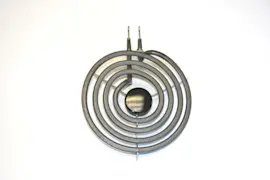
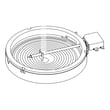
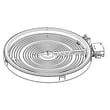
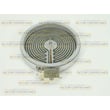
| One burner does not heat | Radiant surface element | Range radiant surface element W11171119 |
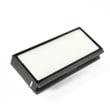
| Downdraft airflow is weak | Grease filter and grille | Cooktop downdraft vent grease filter WPW10240990 |
| Touch controls act erratic | User interface or control board | Cntrl-tch WPW10190398 |
Why it matters
A breaker reset restores clean power to the electronic controls and can clear a temporary fault caused by heat, a brief power interruption, or a control lock condition. If the same symptom returns quickly, focusing on the specific circuit (element, harness, or control) prevents repeat shutdowns.
For model-specific operating notes and indicator meanings, use the JED4430WB02 owner’s manual.
Last updated: January 2026
How do you unlock the Jenn Air cooktop?
To unlock the Jenn-Air JED4430WB02 cooktop, touch and hold the ALL OFF/LOCK keypad for 4 seconds. When the lockout is cleared, the cooktop touch controls will respond normally again. For the exact control layout, use the JED4430WB02 owner's manual.
Quick unlock steps
- Make sure the cooktop has power.
- Locate the ALL OFF/LOCK touch keypad.
- Touch and hold ALL OFF/LOCK for 4 seconds.
- Confirm the lock indicator light turns off.
- Test a surface cooking area by selecting a heat level, then turn it back off.
What to expect when Control Lock is on
When the cooktop is locked, the surface cooking areas cannot be turned on using the touch controls. This feature helps prevent unintended use during cleaning or when children are nearby.
| Status | What you can do | What you cannot do |
|---|---|---|
| Locked | Turn the lock feature off using ALL OFF/LOCK | Start a surface element or change heat settings |
| Unlocked | Use all touch controls normally | None (normal operation) |
If it still will not unlock
- Press and hold the keypad for a full 4 seconds (a quick tap will not work).
- Wipe the control area dry; moisture can interfere with touch controls.
- Turn off power at the breaker for 1 minute, restore power, then try again.
- If the touch panel is unresponsive or behaves erratically, a control issue is possible; the cooktop uses an electronic control system such as the cooktop electronic control board WPW10190396 on some configurations.
Why it matters
Control Lock prevents accidental burner activation and helps keep the downdraft cooktop safer during cleanup, especially when the glass surface is still hot.
Last updated: January 2026
How long do Jenn Air cooktops last?
Most Jenn-Air electric cooktops, including model JED4430WB02, typically last 10 to 15 years with normal household use and basic care. Keeping the glass-ceramic top clean, using the right cookware, and addressing heating issues early helps you reach the full lifespan.
Typical lifespan and what to expect
A cooktop’s life is usually limited by wear on the radiant elements, electronic controls, and the glass-ceramic surface. Your JED4430WB02 owner's manual also outlines warranty coverage periods for key components, which is a helpful reference point for long-term ownership.
- 10 to 15 years is the typical service life for an electric cooktop
- Heavy daily cooking can shorten lifespan; light use can extend it
- Radiant elements and touch controls are common wear items over time
- A cracked glass-ceramic top usually means the cooktop needs major repair
What shortens cooktop life fastest
These are the most common causes of early failure on electric cooktops:
- Boilovers and spills that bake onto the surface and stress the glass
- Using rough-bottom cookware that scratches and creates hot spots
- Repeated overheating from oversized pans or running elements on high constantly
- Loose or overheated wiring connections in the harness
- Ignoring early symptoms (cycling oddly, uneven heating, dead zones)
Parts that commonly affect longevity (JED4430WB02)
If performance drops, replacing the failed component often restores normal cooking.
| Symptom | Common part area | Example part for this model |
|---|---|---|
| One burner will not heat | Radiant surface element | Range radiant surface element W11171119 |
| Burner heats unevenly | Radiant element | Cooktop radiant element WPW10221529 |
| Touch controls act erratic | Electronic controls | Cooktop electronic control board WPW10190396 |
Why it matters
A cooktop that is nearing end-of-life often costs more to keep repairing because multiple components age together (elements, controls, wiring). Catching a single failing part early can prevent heat damage to nearby wiring and reduce downtime.
Last updated: January 2026
Can an electric cooktop be repaired?
Yes. The Jenn-Air JED4430WB02 electric cooktop is repairable in many common failure situations, especially when the issue is a failed radiant surface element, a control problem, or a ventilation component. For safety, we follow the repair guidance in the JED4430WB02 owner's manual and use model-matched parts.
What we repair most often on this model
Common repairs focus on parts that wear out or are affected by heat and spills:
- Radiant surface element replacement when a burner will not heat
- Control issues when the cooktop will not respond or beeps continuously
- Downdraft airflow problems caused by grease buildup or a restricted filter
- Wiring connection issues (burned terminals, loose connectors)
- Glass top replacement when the surface is damaged (do not cook on a broken top)
Quick checks before scheduling a repair
These steps can prevent an unnecessary service call and match the troubleshooting guidance for this cooktop:
- Check the house fuse or reset the circuit breaker
- Confirm the control is set correctly (push in the knob before turning)
- If the cooktop beeps continuously, wipe debris from the control panel surface
- Verify cookware size; pans should not extend more than 1/2 inch past the cooking area
- Clean the downdraft area and filter regularly to prevent grease buildup
Parts that are commonly replaced
If a burner will not heat or heats unevenly, a radiant element is a frequent fix. For downdraft issues, the grease filter is a common maintenance replacement.
| Symptom | Likely area | Example model-matched part |
|---|---|---|
| One burner not heating | Radiant surface element | Range radiant surface element W11171119 |
| Weak downdraft suction or greasy airflow | Vent filter | Cooktop downdraft vent grease filter WPW10240990 |
| No response or erratic operation | Electronic controls | Cooktop electronic control board (model-matched) |
Why it matters
Electric cooktop repairs are often cost-effective because replacing a single failed component (like an element or filter) can restore normal cooking performance without replacing the entire appliance. Just as important, following the manual safety guidance helps prevent shock and burn hazards.
Last updated: January 2026