Owner’s manual
 Error Codes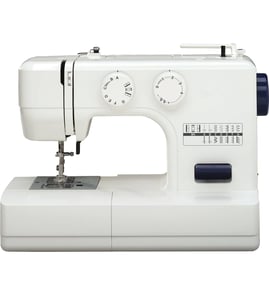

How do I know what model my Kenmore sewing machine is?
Your Kenmore sewing machine’s model number is printed on the nomenclature plate on the back of the machine. For Kenmore model 1581784182, the manual notes that this plate shows the model number you’ll need for parts lookups and service records; see the owner's manual.
Where to look on the machine
Check these common spots first (starting with the one confirmed for this model):
- Back of the machine: look for the nomenclature plate (confirmed location for model 1581784182)
- Underside of the base: some machines also have an ID plate or sticker there
- Inside the face cover area: occasionally an ID label is placed near the light or wiring
- On the carrying case/cabinet paperwork: sometimes the model is printed on original documents
What the model number looks like
Kenmore sewing machine model numbers are typically a string of numbers (often starting with a prefix such as 158 or 385 on many Kenmore lines). For this page, the correct model number format is:
| Item | What to record | Example for this machine |
|---|---|---|
| Model number | Exact digits as printed | 1581784182 |
| Item name | Product type | Kenmore sewing machine |
| Part description | What you need | Needle plate, bobbin winder, foot control, etc. |
Tips to avoid mix-ups
Use these checks so you match the right parts list and diagrams:
- Copy the model number exactly, including all digits
- Confirm you are reading the model number, not a patent number or casting number
- If multiple numbers appear, use the one on the nomenclature plate
- Keep the model number with your maintenance notes (oil points, needle sizes, tension settings)
Why it matters
Kenmore sewing machines can look similar across model families, but parts and adjustments (needle system, presser feet, bobbin style, and threading path) can differ. Using the exact model number ensures you get the correct diagrams, compatible parts, and setup steps.
Last updated: February 2026
How to set tension on Kenmore 1581784182 sewing machine?
For the Kenmore 1581784182, we set upper thread tension by starting in the normal range (the white zone between 3 and 5) and then making small adjustments while test-stitching on scrap fabric. Adjust with the presser foot down so the tension discs are engaged (as described in the owner's manual).
Quick steps to set upper thread tension
- Thread the machine correctly (rethread the top path if stitches look inconsistent).
- Set the tension dial to 4 as a starting point (middle of the 3 to 5 range).
- Lower the presser foot before sewing and before making fine adjustments.
- Sew a short test seam on the same fabric and thread you will use.
- Turn the dial left (lower numbers) if the top tension is too tight.
- Turn the dial right (higher numbers) if the top tension is too loose.
How to read your stitches (what you see tells you what to change)
| What you see on the fabric | What it usually means | What to do next |
|---|---|---|
| Bobbin thread shows on the top side | Upper tension is too loose | Turn tension dial right (higher) |
| Top thread lays flat on top and looks “pulled” | Upper tension is too tight | Turn tension dial left (lower) |
| Zigzag puckers as width increases | Tension and or zigzag width is too aggressive | Slightly lower top tension and or reduce zigzag width |
Bobbin tension: usually leave it alone
On this model, bobbin thread tension is factory set and normally does not need adjustment. If you suspect a bobbin issue, focus first on correct bobbin winding, correct bobbin insertion, and cleaning lint from the bobbin area.
Fabric and thread tips that affect tension
- Heavy, stiff fabric: increase top tension; use a larger needle and longer stitch length.
- Heavy, soft fabric: decrease top tension; use a longer stitch length.
- Light, sheer fabric: decrease top tension and presser foot pressure; use a shorter stitch length and sew slowly.
- Polyester or silk thread: decrease top tension.
- Nylon thread: increase top tension.
Why it matters
Balanced tension prevents skipped stitches, looping, puckering, and thread breaks. Getting tension right for your needle size, thread type, and fabric makes the stitch lock in the middle of the layers for a clean seam.
Last updated: February 2026
When was the Kenmore 1581784182 sewing machine made?
We treat Kenmore model 1581784182 as a vintage, mechanical sewing machine; this model family is commonly associated with mid-to-late 20th century production. The most reliable way to narrow the exact build period for your specific unit is to match the model and identification details shown on the machine to the information in the owner's manual.
How to identify your machine’s production era
Use these quick checks to narrow it down accurately:
- Confirm the model number on the nomenclature plate (typically on the back of the machine).
- Compare the control layout (stitch selector, stitch width, stitch length, reverse lever) to the diagrams in the manual.
- Note whether your machine has features called out as “available depending upon model” (for example, certain built-in buttonhole controls).
- Check the electrical specs you are using; these machines are designed for standard 110 to 120 volt A.C. household power.
- If your machine has a parts list or part number printed in the manual, keep it with your records for future repairs.
What the manual confirms (and what it’s best for)
The documentation for this Kenmore mechanical platform focuses on operation, maintenance, and identification rather than publishing a specific “manufactured on” date.
| What you want to know | Best place to look | What you’ll get |
|---|---|---|
| Exact model identification | Nomenclature plate + manual diagrams | Confirms you have 1581784182 and the correct configuration |
| Setup and electrical requirements | Manual setup section | Correct power, foot control, and switch use |
| Maintenance history clues | Manual maintenance section | Oiling points, light bulb replacement, and care guidance |
Why it matters
Knowing the approximate era helps us choose compatible repair parts and service approaches (for example, motor, wiring, light bulb style, and lubrication points) so the machine runs smoothly and avoids damage from incorrect adjustments.
Last updated: February 2026