 Owner’s manual



What is the capacity of the Samsung SMH1816W?
The Samsung SMH1816W microwave/hood combo has a 1.8 cu. ft. oven capacity, which is the interior cooking space available for dishes and microwave-safe containers. For the exact specs and feature details for your unit, check the SMH1816W owner's manual.
How to confirm you have the right model
We recommend matching the model tag on the microwave to the parts listing so you are using the correct specifications.
- Look for the model label inside the door opening or on the frame behind the door
- Confirm the model reads SMH1816W (letters and numbers must match)
- If your label includes a suffix (such as XAA-00), match that when ordering parts
- Use the model number when searching parts on this model page or on Sears PartsDirect
What “1.8 cu. ft.” means in everyday use
Capacity is a volume measurement; it helps you estimate what will fit inside the cavity.
| Capacity | Typical fit | What it helps with |
|---|---|---|
| 1.8 cu. ft. | Medium to large dinner plates, most covered casserole dishes | Choosing cookware size and planning reheating/cooking space |
Why it matters
Knowing the capacity helps you pick appropriately sized microwave-safe cookware and avoid crowding, which can reduce heating performance and increase splatter cleanup.
Last updated: February 2026
How to hard reset a Samsung microwave?
To hard reset your Samsung SMH1816W microwave/hood combo, we recommend a power reset: unplug the microwave (or switch the circuit breaker off) for 2 to 5 minutes, then restore power and set the clock. This clears many control glitches without changing normal cooking settings.
Recommended reset methods (from easiest to strongest)
- Power reset (best “hard reset”): Unplug for 2 to 5 minutes, then plug back in.
- Breaker reset: Turn the microwave circuit breaker OFF for 2 to 5 minutes, then ON.
- Stop/Clear reset: Press and hold STOP/CLEAR for about 3 seconds (if your keypad supports it).
- Child lock check: If the keypad seems dead, toggle Control Lock/Child Lock (often a 3-second hold on a key such as STOP/CLEAR).
What to do right after the reset
- Set the clock and confirm the display is stable.
- Test a simple cook cycle with a cup of water for 30 to 60 seconds.
- Verify the hood fan and surface light buttons respond normally.
If it still will not run or acts “dead”
A reset will not fix a failed safety device or door-switch problem. These are common next checks:
- Make sure the door closes firmly and is not sagging.
- If it runs only with the door pressed, a door interlock switch is a likely cause.
- If it goes completely dead after starting, an overheat condition can trip a thermostat or thermal cut-off.
Common symptoms and likely causes
| Symptom after reset | Most common cause | What we recommend |
|---|---|---|
| Display works, won’t start | Door not sensing closed | Inspect/replace microwave door interlock switch 3405-001034 |
| Runs but does not heat | High-voltage circuit issue | Use our guide why is my microwave not heating |
| Random shutdown during use | Overheating protection opening | Check vents and consider microwave thermostat DE47-00050C |
Why it matters
A proper hard reset clears control-board “logic lockups” caused by power blips. If the problem returns immediately, the issue is usually a door safety switch, overheating protection, or a heating-circuit component, not the keypad.
You can order replacement parts for your model from the parts list for this Samsung SMH1816W, or search by model on Sears PartsDirect.
Last updated: February 2026
How much does it cost to fix a Samsung microwave?
For a Samsung SMH1816W microwave/hood combo, most common repairs typically total $100 to $300 (parts plus labor). Costs rise when the high-voltage system or major assemblies are involved, and they stay lower for simple electrical or door-safety issues. See the owner's manual for model-specific safety and operating guidance.
Typical repair cost ranges
These ranges reflect common microwave service pricing for over-the-range units like the SMH1816W.
- Minor electrical repair (fuse, wiring check, basic diagnosis): $100 to $180
- Door safety repair (interlock switch adjustment or replacement): $120 to $220
- Turntable not rotating (motor or coupler): $120 to $260
- Not heating (high-voltage components): $200 to $450+
- Vent fan or cooling fan issue (motor replacement): $200 to $500+
Parts that often drive the total cost
If your microwave runs but does not heat, the repair often involves high-voltage parts. If the unit is dead or stops when the door moves, door interlock parts are common.
| Symptom | Common part category | Example part on this model page |
|---|---|---|
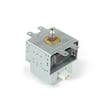
| Runs but does not heat | High-voltage system | Microwave magnetron OM75P-21-ESGN |
| Door shuts but unit will not start | Door safety circuit | Microwave door interlock switch 3405-001034 |
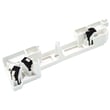
| Turntable not turning | Drive components | Microwave turntable motor coupler DE67-00236A |
What to check before paying for a repair call
These quick checks can prevent unnecessary parts replacement.
- Confirm the outlet has power (try a small appliance on the same outlet).
- Check that the door closes firmly and the latch area is not obstructed.
- Test with a cup of water for 60 seconds (to confirm a true “no heat” condition).
- Listen for abnormal sounds (loud hum can point to high-voltage issues).
- Verify the vent fan and surface light operate normally.
Why it matters
Microwave/hood combos like the Samsung SMH1816W combine cooking, ventilation, and safety interlocks. Accurate symptom matching helps you avoid replacing expensive high-voltage parts when the real issue is a door switch, thermostat, or airflow-related overheat condition.
If you decide to move forward, you can order SMH1816W replacement parts from the parts list for this model, or search by model number on Sears PartsDirect.
Last updated: February 2026
What are common Samsung microwave problems?
Common problems we see with the Samsung SMH1816W microwave/hood combo include not heating, not powering on, a turntable that will not rotate, sparking or burning smells, loud buzzing or grinding noises, and vent or light issues. Many symptoms start with simple power, settings, or door-switch problems; heating failures often involve high-voltage parts.
Quick checks we recommend first
- Confirm the outlet has power (try a small lamp) and reset the kitchen breaker if needed.
- Make sure the door closes firmly and latches cleanly; a misaligned door can stop cooking.
- Test a 1-cup water heat test for 60 seconds to confirm a true “no heat” condition.
- Listen for changes: runs quietly but does not heat often points to a heating circuit issue.
- Stop using the microwave if you see arcing (sparks) or smell burning; inspect the waveguide cover area and interior for damage.
For model-specific operating details and settings, follow the steps in the SMH1816W owner's manual.
Most common symptoms and likely causes
| Symptom | What it usually means | Parts often involved |
|---|---|---|
| Runs but does not heat | Heating circuit is not producing microwave energy | Magnetron, high-voltage diode, high-voltage capacitor |
| Dead, no display | Power supply interruption or open safety device | Power cord, fuse, door switches |
| Starts then stops | Door interlock or overheating protection opening | Door interlock switch, thermostat, thermal cut-off |
| Turntable not spinning | Drive issue under the tray | Turntable motor, coupler |
| Loud hum/buzz while trying to heat | High-voltage component strain or failure | Magnetron, transformer, capacitor |
Parts that commonly fix these problems (when diagnosis confirms)
High-voltage components can retain dangerous charge even when unplugged; we recommend a qualified technician for internal electrical diagnosis and replacement.
- Microwave magnetron OM75P-21-ESGN (common for “runs but no heat”)
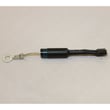
- Microwave high-voltage diode DE91-70063D (can cause no heat or weak heat)
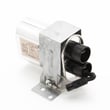
- Microwave high-voltage capacitor DE96-00269A (can cause no heat, humming, or blowing fuses)
- Microwave door interlock switch 3405-001034 (can prevent starting or cause stopping)
- Microwave turntable motor DE31-10172C and microwave turntable motor coupler DE67-00236A (for no rotation)
Why it matters
A microwave that does not heat wastes time and can mask a high-voltage failure; sparking or burning smells can quickly damage the cavity. Catching door-switch and airflow issues early also helps prevent nuisance shutdowns and overheating.
Ordering the right replacement part
We recommend matching parts to the SMH1816W parts list for your exact configuration; you can also search by model number on Sears PartsDirect.
Last updated: February 2026


