 Owner’s manual
 Error Codes




How to find Kenmore Range model number?
You can find the model number for your Kenmore range on the rating label, which is typically located in the oven door jamb (around the frame when you open the oven door) or behind the storage/warming drawer. For Kenmore model 9119114190, confirm the full number exactly as printed in the owner's manual.
- Oven door jamb (open the oven door and look along the frame)
- Behind the bottom drawer (pull the drawer out and look on the frame)
- Back panel of the range (you may need a flashlight)
- Side panel near the lower front area
- Under the cooktop lip on some coil-element designs
The label usually includes a few key fields. Write them down exactly (including dashes or extra digits).
| Label item | Why it matters for parts and service |
|---|---|
| Model number | Ensures diagrams and parts match your exact range |
| Serial number | Helps identify production run and compatible revisions |
| Electrical rating | Confirms correct power cord/terminal block setup |
- Match every character of the model number (for example, 9119114190, not a partial).
- If the label is worn, take a clear photo and zoom in to read it.
- Use the model number to cross-check parts by function (bake, broil, surface element, door hinge).
Kenmore ranges often have multiple versions that look similar. Using the exact model number is what ties your appliance to the correct parts list, wiring diagram, and troubleshooting steps.
Last updated: February 2026
Who makes Kenmore 9119114190?
Kenmore is a brand name, and the Kenmore 9119114190 electric range was manufactured for Kenmore by another appliance maker. For this model, the parts lineup and documentation indicate it is built on a G.E. (GE) design platform.
We match the “design platform” by looking at the parts used on the range and how they are labeled.
Common signs include:
- OEM-style part numbering used on key components (for example, WB44K5012)
- Part descriptions that reference the platform (for example, “G.E. Range Bake Element”)
- Control and heating-system parts that align with a specific manufacturer’s architecture
- Wiring and service layout shown in the owner's manual
Even though the badge says Kenmore, ordering by the full model number is what ensures fit.
Use this approach:
- Always search and shop parts by 9119114190 (not just “Kenmore range”)
- Match the part by function and location (bake, broil, surface element, door)
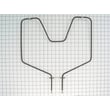
- Replace heating parts with the exact listed item, such as the g.e. range bake element WB44K5012
- If you are troubleshooting power issues, inspect the cord connection area and consider the terminal block assembly 330031 when terminals are burned or loose
| Symptom | Likely area | Example part on this model |
|---|---|---|
| Oven not baking | Bake circuit | Bake element (WB44K5012) |
| Intermittent power, burning smell at back | Power connection | Terminal block assembly (330031) |
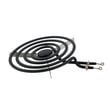
| Surface element not heating | Cooktop control | Surface element control switch (varies by burner) |
Kenmore ranges can be built by different manufacturers across different model series. Knowing that 9119114190 aligns to a GE platform helps you recognize the correct part-number family and avoid ordering a look-alike part that will not mount or wire correctly.
Last updated: February 2026
What is the F1 code on a Kenmore oven?
On a Kenmore range like model 9119114190, an F1 error code usually points to a problem in the oven’s electronic control system, most often the control board or a stuck key/short in the control circuit. It can also be triggered by a temperature sensor or wiring issue.
- Reset power: turn the range breaker OFF for 1 minute, then ON; see if F1 returns.
- Stop using the oven if the code returns immediately, especially if the oven heats unexpectedly.
- Check for obvious heat damage: look for melted insulation, discoloration, or a burnt smell near the backguard area.
- Confirm the oven is not overheating: if the oven seems hotter than the knob setting, suspect a control or sensor problem.
- Review the troubleshooting section in the owner's manual for common “oven does not heat” and control-setting checks.
| Likely cause | What you may notice | Typical fix |
|---|---|---|
| Control board fault or stuck input | F1 appears with beeping, may come back after reset | Control repair or replacement (often the control) |
| Oven temperature sensor or wiring issue | Erratic temps, long preheat, uneven baking | Inspect wiring, test sensor circuit |
| Wiring short/loose connection | Code appears when oven is bumped or heats up | Repair wiring/terminals, tighten connections |
If you find heat-related wiring damage or intermittent power to the range, these parts on our parts list are commonly relevant:
- Terminal block assembly 330031 (power connection point where cord wires land)
- Range oven control thermostat WB20K5027 (temperature control component on some configurations)
An F1 code is not just a “nuisance” alert; it can indicate a control fault that affects temperature regulation. That can lead to inaccurate baking temperatures or, in some cases, unsafe heating behavior.
Last updated: February 2026
How do I reset my Kenmore oven control board?
For Kenmore range model 9119114190, the most reliable “reset” is a power reset: turn the range power OFF at the breaker for 5 minutes, then restore power. This clears many display glitches and temporary control lockups; if the problem returns, troubleshooting the thermostat or heating circuit is the next step (see the owner's manual).
- Turn the oven control knob to OFF.
- Switch the range circuit breaker OFF (or unplug the range if it is accessible).
- Wait 5 minutes.
- Restore power.
- Set Bake and confirm the oven heats.
The manual’s troubleshooting points for “oven does not heat” focus on power and control settings. Work through these checks in order:
- Verify the household breaker or fuse is not tripped.
- Confirm the oven control is set correctly (Bake temperature selected, not OFF).
- If your model uses plug-in elements, re-seat the element connection firmly.
- Preheat for about 10 minutes before judging temperature.
- Avoid lining the oven bottom with foil (it can affect heating and airflow).
| What you see | What it usually means | What to do next |
|---|---|---|
| Display comes back and oven works | Temporary control glitch or brief power issue | Keep using; monitor for repeat issues |
| Cooktop works but oven stays cold | Oven heating circuit issue (element, thermostat, wiring) | Inspect and test components |
| Oven heats unevenly or runs hot/cold | Thermostat calibration or airflow/pan placement | Review rack placement and calibration guidance |
If the oven is not heating, these model-listed parts are frequent fixes depending on symptoms and test results:
- G.e. range bake element WB44K5012 (bake heat)
- Range oven control thermostat WB20K5027 (temperature regulation)
A power reset is safe and fast, but it only clears electronic hiccups. If the oven repeatedly fails to heat, focusing on the bake element, thermostat, and wiring connections gets you to a lasting fix faster.
Last updated: February 2026




