
Can I use a dado blade on DW744?
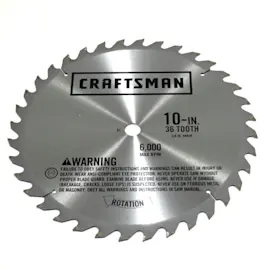
We do not recommend using a dado blade set on the Dewalt DW744 table saw. Most dado stacks require a longer arbor and a wider throat opening than compact/jobsite saws are designed for, and forcing the setup can create unsafe operation and poor cut control.
What to use instead (safe alternatives)
If you need a wider groove or rabbet, these options typically work better on a DW744-STYLE saw:
- Use a standard 10-inch blade and make multiple passes to widen the cut
- Use a router with a straight bit for dados and rabbets (best control for wide grooves)
- Use a circular saw with a guide for partial-depth grooves (when appropriate)
- Use a sacrificial fence and multiple passes for rabbets
Quick fit check (what usually blocks dado use)
Even when a blade “fits” the diameter, a dado stack often fails one of these requirements:
| Requirement | What to look for | Why it matters |
|---|---|---|
| Arbor length | Enough threaded arbor to fully engage the nut | Prevents the blade stack from loosening |
| Throat clearance | Insert opening wide enough for the stack | Prevents binding and kickback risk |
| Guarding | Ability to use proper guarding/riving knife setup | Helps reduce kickback and contact risk |
| Motor load | Dado stack cuts more material per pass | Avoids bogging down and overheating |
If you already tried a dado stack
- Unplug the saw before changing blades or inserts
- Reinstall the standard blade, throat plate, and blade guard
- Verify the arbor nut fully tightens with full thread engagement
- Test-cut in scrap wood and confirm the blade reaches full speed without slowing
Why it matters
A dado stack increases cutting width and load; if the arbor, insert, or guarding is not designed for it, the saw can bind, cut inaccurately, or become unsafe.
For more help with blade setup and safe blade changes, use our guide: how to replace a table saw blade.
Last updated: February 2026
What are the key features of DW744?
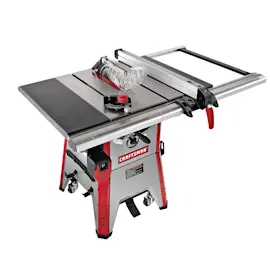
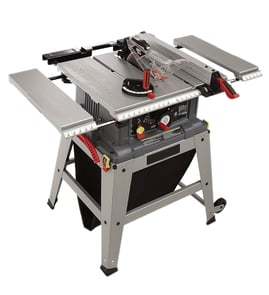
The Dewalt DW744 (TYPE 3) table saw is built as a portable jobsite saw with a high-power motor, fast blade speed, and features that help keep cuts consistent under load. It is designed for ripping common jobsite materials like hardwoods and pressure-treated lumber.
Key features you can expect on the DW744
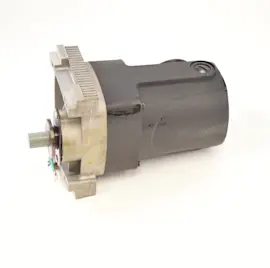
- 15-amp, high-torque motor for demanding cuts
- 3650 RPM no-load speed for efficient ripping and crosscutting
- Electronic feedback to help maintain blade speed during tougher cuts
- Soft start to bring the blade up to speed smoothly
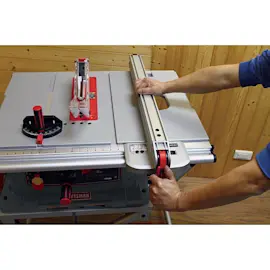
- Telescoping fence system for wider rip capacity (commonly listed around 24-1/2 in.)
What these features do for real-world cutting
These features work together to reduce bogging, improve cut quality, and make the saw easier to control:
| Feature | What it helps with | What you’ll notice |
|---|---|---|
| Electronic feedback | Maintaining RPM in dense stock | Less slowing and burning in hardwood |
| Soft start | Smoother startup | Less “jerk” at power-on |
| Telescoping fence | Wider rip cuts | Easier setup for sheet goods and trim |
| High RPM (no-load) | Cleaner cutting action | Smoother edges with a sharp blade |
Why it matters
On a jobsite table saw like the DW744, consistent blade speed and a stable fence are the difference between accurate, repeatable rips and cuts that wander, burn, or bind.
Related DIY help
- If your cuts are not lining up as expected, use our guide on table saw bad angle cuts.
- For safe blade changes and better cut quality, follow how to replace a table saw blade.
Last updated: February 2026
How serious is the DW744 code?
On a Dewalt DW744 table saw, there is no “DW744 code” system like a vehicle OBD-II trouble code. If you’re seeing a code on a tool, it’s usually coming from a separate device (battery/charger, a plug-in power monitor, or a diagnostic app), not the saw itself.
What to check first (fast, practical triage)
- Unplug the DW744 and wait 60 seconds; then plug it back in and try again.
- Confirm the outlet is delivering steady power (try a different circuit if possible).
- Inspect the power cord and plug for cuts, heat damage, or loose prongs.
- Make sure the switch moves normally and is not sticking.
- Spin the blade by hand (unplugged) to confirm it turns freely and does not rub.
- If the motor hums but the blade does not reach speed, stop and troubleshoot before cutting.
If you meant an automotive code (like P0744)
P0744 is a transmission-related OBD-II code (torque converter clutch circuit intermittent). That is serious for a vehicle and should be addressed promptly, but it is not related to the DW744 table saw.
| What you’re seeing | Where it usually comes from | What it means |
|---|---|---|
| “P0xxx” code (example: P0744) | Vehicle OBD-II scanner | Automotive powertrain fault code |
| Tool “error” or flashing lights | Battery/charger electronics or smart tool | Power/overload/thermal or electronics status |
| No code, just symptoms | The saw itself | Mechanical, alignment, switch, or motor issue |
Why it matters
Treating a table saw symptom like an automotive fault code can send you down the wrong path. With the DW744, the safest approach is to diagnose the actual symptom (won’t start, slow blade, bad cuts, height won’t adjust) and correct the mechanical or electrical cause.
Helpful DIY troubleshooting
Use these symptom-based guides to match what your DW744 is doing:
- Table saw won't start
- Table saw blade spins too slow
- Table saw bad cuts
- Table saw can't adjust the blade height
Last updated: February 2026
Which DeWALT table saw is best?
For most people, the “best” Dewalt table saw comes down to how you’ll use it: jobsite portability, rip capacity, and fence accuracy matter more than the nameplate. If you already own the Dewalt DW744 table saw, it’s a strong jobsite-style saw when it’s tuned and maintained for straight, repeatable cuts.
Quick picks by use case
- Best all-around jobsite saw: 10-inch saw with a rolling stand and a large rip capacity (great for sheet goods)
- Best for small shops and tight storage: compact jobsite saw (lighter, smaller footprint)
- Best for cordless convenience: battery-powered jobsite saw (ideal where power is limited)
- Best for finish accuracy: prioritize a rigid fence, a flat table, and a blade that matches the material
What to compare (the features that actually change results)
These are the specs and design details that most directly affect cut quality and day-to-day usability:
- Rip capacity (how wide you can cut); larger helps with plywood and shelving
- Fence system (rack-and-pinion style fences are popular for repeatable settings)
- Motor power and speed under load (important for hardwoods and thick stock)
- Stand and stability (rolling stands help on jobsites; stable bases reduce vibration)
- Dust collection (helps visibility and keeps the motor area cleaner)
| If you mostly do this… | Prioritize this… | Why it matters |
|---|---|---|
| Break down plywood | Large rip capacity, stable stand | Safer handling and fewer binding issues |
| Trim and small parts | Fence accuracy, good blade | Cleaner edges and less rework |
| Remodel/jobsite work | Portability, rolling stand | Faster setup and easier transport |
| No easy outlet access | Cordless platform | Work flexibility without extension cords |
How to get “best” performance from your DW744
A well-set-up DW744 often outperforms a newer saw that’s out of alignment.
- Confirm the blade is parallel to the miter slot
- Verify the fence is parallel to the blade (or set per your preferred toe-out)
- Use a sharp, correct-tooth-count blade for the material
- Keep the blade height and bevel mechanisms clean and moving freely
For step-by-step help, use our DIY guides like how to adjust a table saw blade and how to maintain a table saw.
Why it matters
Choosing the right table saw is really about matching capacity and accuracy to your projects. The right fence setup, blade choice, and basic maintenance reduce burning, kickback risk, and wasted material.
Last updated: February 2026