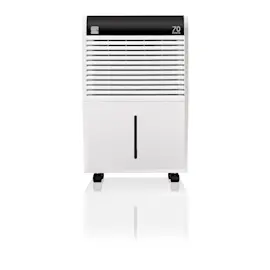
Owner’s manual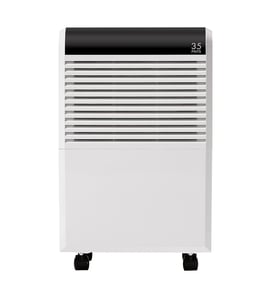

Is it worth repairing a dehumidifier?
For a Frigidaire FFAP5033W10 dehumidifier, repair is worth it when the issue is simple (bucket switch, airflow blockage, dirty grille, or a loose connection). If the problem points to sealed-system or compressor trouble, replacement is typically the better value.
Quick way to decide (cost vs. benefit)
Use this checklist first; it helps separate easy fixes from expensive failures:
- Start with basics: confirm the unit is powered on and the bucket is seated correctly.
- Check indicators: a “BUCKET FULL” light often means the bucket is missing or not installed properly.
- Verify the room setup: the unit works best in an enclosed area with doors and windows closed.
- Confirm operating conditions: performance drops in cold spaces; most units do not dehumidify well below 41°F (5°C).
- Look for airflow restrictions: a dirty intake grille or blocked outlet can make it “run” but not dry.
- Listen for normal behavior: a brief change in sound after starting can be normal as refrigerant equalizes.
What we recommend troubleshooting first
These are the most common, low-cost issues that make a dehumidifier seem “broken”:
| Symptom | Most likely cause | What to do next |
|---|---|---|
| Won’t start | Bucket not seated, “BUCKET FULL” condition | Reseat bucket; empty and reinstall correctly |
| Runs but room stays damp | Humidity setting too high, doors/windows open | Lower setpoint or use continuous mode; close the space |
| Runs a lot | Airflow blocked, grille dirty | Clear intake/outlet; vacuum grille with a brush attachment |
| Frost on coils | Room too cold | Warm the space; allow up to ~60 minutes for frost to clear |
For model-specific operating steps and control settings, follow the owner's manual.
When repair usually is not worth it
A dehumidifier is usually not a good repair candidate when symptoms suggest a major refrigeration-system problem (for example, persistent poor moisture removal despite correct setup and airflow, or repeated shutdowns tied to compressor operation). Those repairs tend to be labor-heavy and cost more than the unit’s remaining value.
Why it matters
Dehumidifiers depend on airflow, temperature, and correct humidity settings to remove moisture. Fixing a setup or airflow issue can restore performance immediately, while compressor-related problems rarely pay off.
Last updated: February 2026
How long is the Frigidaire dehumidifier warranty?
For the Frigidaire FFAP5033W10 dehumidifier, the exact warranty length and coverage details are listed in the “Major Appliance Limited Warranty” section of the owner's manual. Use that section to confirm the start date rules, what parts are covered, and what conditions can limit coverage.
Where to find the warranty details
In the FFAP5033W10 documentation, look for:
- “Major Appliance Limited Warranty” in the table of contents
- Coverage terms for parts and labor (if included)
- What proof of purchase is required
- Exclusions (for example: misuse, improper installation, or non-household use)
- Any special notes for Canada vs. USA
What you should check before assuming you are covered
Warranty coverage depends on how and where the dehumidifier is used, and whether it has been operated within normal conditions.
- Confirm the purchase date and keep your receipt
- Verify the unit is used in an enclosed area for normal operation
- Make sure the bucket/tank is seated correctly (some models will not run if it is not)
- Operate within the typical temperature range listed for this model (41 °F to 89 °F)
- Avoid electrical issues; use a properly grounded outlet
Quick reference: what the warranty section usually tells you
| Item to confirm | Where it’s stated | Why it matters |
|---|---|---|
| Warranty length | Warranty section | Determines if you are still in the coverage window |
| Coverage scope | Warranty section | Clarifies what is covered (and what is not) |
| Requirements | Warranty section | Proof of purchase and proper use can affect eligibility |
Why it matters
Knowing the exact warranty term for your FFAP5033W10 helps you decide whether to troubleshoot, replace a part, or contact Sears PartsDirect support for next steps, before spending time and money on an out-of-warranty repair.
Last updated: February 2026
Can I look up Frigidaire parts by model number?
Yes. For your Frigidaire dehumidifier model FFAP5033W10, the most accurate way to find compatible replacement parts is to search by the full model number; it matches you to the correct parts breakdown and documentation for that exact unit.
How to look up parts by model number
- Use the complete model number: FFAP5033W10 (include all letters and numbers).
- Match the model number on the rating label to avoid ordering the wrong part.
- Use the parts list and diagrams for the model to identify the exact item name you need.
- Cross-check the symptom with the troubleshooting section in the FFAP5033W10 owner's manual.
- If you are diagnosing an electrical issue, use safe test methods and the right tools.
Where to find the model number on a dehumidifier
Most dehumidifiers place the model and serial label in one of these spots:
| Common label location | What to look for |
|---|---|
| Back panel | Model and serial sticker/plate |
| Side panel | Rating label with electrical info |
| Behind the bucket area | Label near the water bucket opening |
| Inside the cabinet opening | Sticker visible when the bucket is removed |
For a quick walkthrough, use how to find your appliance model number (and what it means for parts).
Why it matters
Dehumidifier parts can vary by revision even within the same brand. Searching by FFAP5033W10 helps ensure the part you choose fits your control system, bucket/pump setup, and airflow design.
Helpful tip while you are in the manual
The FFAP5033W10 owner's manual notes the Filter reset light comes on after 250 hours of operation; cleaning the filter and pressing the reset helps maintain airflow and performance.
Last updated: February 2026
How long will a Frigidaire dehumidifier last?
A Frigidaire dehumidifier like model FFAP5033W10 typically lasts 5 to 10 years with normal residential use and regular cleaning. Lifespan depends most on airflow (clean filter and coils), operating temperature, and how often the unit runs in high-humidity conditions.
What affects dehumidifier lifespan the most
- Operating conditions: FFAP5033W10 is designed to run between 41°F (5°C) and 89°F (32°C); running outside that range reduces performance and increases strain.
- Airflow and cleanliness: A dirty grill or restricted airflow makes the unit run longer and hotter.
- Humidity load: Very damp basements or continuous operation increase run time and wear.
- Bucket and shutoff use: If the bucket is not seated correctly, the unit may not run; frequent on/off cycling can be hard on components.
- Power cycling habits: This model uses an automatic 3-minute compressor delay after quick off/on cycles to help prevent overheating.
Maintenance that helps you reach the 5 to 10 year range
Use these habits to reduce compressor and fan wear:
- Vacuum the intake/outlet grill to keep airflow open.
- Keep the unit in an enclosed area (doors and windows closed) so it dries faster and runs less.
- Maintain clearance so air can flow into the rear coil and out the front louvers.
- Empty and reinstall the bucket fully; confirm the “bucket full” condition clears.
- Avoid placing it where room temperature drops below 41°F.
Quick expectations by usage level
| Usage pattern | Typical run time | What it means for lifespan |
|---|---|---|
| Seasonal, moderate humidity | Lower | Often reaches the upper end of the range |
| Basement, high humidity | Higher | More wear; maintenance matters more |
| Continuous mode most days | Highest | Shorter lifespan unless kept very clean |
Why it matters
A dehumidifier’s most expensive wear items are the compressor and fan motor. Keeping airflow clear and operating within the recommended temperature range helps the unit remove moisture efficiently, so it runs fewer hours and lasts longer. For model-specific operating and care details, follow the owner's manual.
Last updated: February 2026
Is a Frigidaire 50-Pint Dehumidifier good?
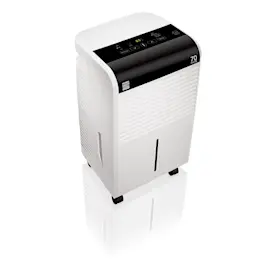
Yes; the Frigidaire FFAP5033W10 50-pint dehumidifier is a solid choice for many homes because it is designed to pull moisture-laden air across dehumidifying coils and collect water in a front bucket, with options like humidity setpoint control and continuous operation for maximum dryness (see the FFAP5033W10 owner's manual).
What “good” looks like for this model
A dehumidifier performs well when it removes moisture steadily and the space feels less damp without running nonstop.
Common signs it is working as intended:
- The fan runs and you feel warm, dry air coming from the outlet louvers
- Water collects in the front bucket (or drains continuously if set up that way)
- The room humidity drops after several hours (faster in smaller, enclosed rooms)
- Normal fan noise is present (air moving through the unit)
- Any brief frost on coils clears within about an hour after startup
How to get the best results (most issues are setup related)
Placement and room conditions matter as much as the pint rating.
Do these basics first:
- Run it in an enclosed area; close doors and windows to limit new humid air
- Keep the air intake and outlet clear; do not block the rear coil or front grill
- Clean a dirty grill with a vacuum brush attachment to restore airflow
- Set a lower humidity target, or use CONTINUOUS for maximum dryness
- Use it only in spaces above 41°F (5°C) for satisfactory operation
Quick expectations table
| Situation | What you should expect | What to adjust |
|---|---|---|
| Just started or restarted | Longer run time at first | Give it time; moisture level drives runtime |
| Room not drying enough | Unit runs but humidity stays high | Lower humidity setting or use CONTINUOUS |
| Basement + adjacent closet | Closet may stay damp | Improve air circulation or use a second unit |
| “Bucket full” light on | Unit will not run | Empty and reinstall bucket correctly |
Why it matters
A 50-pint dehumidifier can be “good” on paper, but real-world performance depends on airflow, room size, and temperature. Correct location, clear airflow, and the right humidity setting prevent “runs too much” complaints and help the FFAP5033W10 dry the space efficiently.
Last updated: February 2026