Owner’s manual
 View engine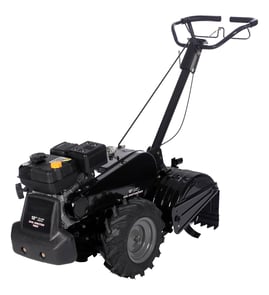



How often should I change the oil in my tiller?
For the Craftsman 917293340 9.0-hp rear-tine tiller, we change the engine oil after every 50 hours of operation or at least once a year (whichever comes first). We also check the oil level before starting and after each 5 hours of continuous use; this helps prevent engine damage.
Recommended oil-change schedule (917293340)
- Change engine oil: every 50 hours or once per year
- Check oil level: before each use
- Re-check during long jobs: after each 5 hours of continuous use
- Change more often: when operating under heavy load, high temperatures, or dusty/dirty conditions
How to change the oil (high-level steps)
Follow the procedure in the 917293340 owner's manual. In general, we:
- Warm the engine briefly so oil drains more freely
- Park the tiller on a level surface
- Drain oil into a suitable container (avoid getting dirt into the engine)
- Reinstall and tighten the drain plug securely
- Refill through the oil fill tube, then recheck the level
Oil type and viscosity basics
Your manual specifies using a high-quality detergent oil meeting API SF, SG, or SH, and selecting the SAE viscosity based on expected temperatures.
| Condition | What we do | Why |
|---|---|---|
| Normal seasonal use | Change at 50 hours or yearly | Keeps lubrication effective and reduces wear |
| Hot weather or heavy load | Shorten the interval | Oil breaks down faster |
| Dusty/dirty soil | Shorten the interval | Contamination increases engine wear |
Why it matters
Clean oil is the engine’s primary protection against heat and friction. Sticking to the 50-hour or annual interval, plus frequent level checks, helps your Craftsman tiller start easier, run smoother, and last longer.
Last updated: January 2026
What are common tiller problems?
Common problems on the Craftsman 917293340 9.0-hp rear-tine tiller include hard shifting, excessive bouncing, soil clumping, overheating, and the engine running but the tiller not moving. Many issues trace back to soil conditions, control settings, or drive components; use the Craftsman 917293340 owner's manual troubleshooting chart to match symptoms to fixes.
Most common symptoms (and what they usually mean)
- Engine overheats: low or dirty oil, dirty air screen, dirty engine, plugged muffler, carburetor out of adjustment.
- Excessive bounce or difficult handling: ground too dry and hard (moisten soil before tilling).
- Soil balls up or clumps: ground too wet (wait until it dries out).
- Engine runs but tiller will not move: tine control not engaged, V-belt out of adjustment, belt off pulleys.
- Engine runs but labors when tilling: tilling too deep, throttle not set correctly, carburetor needs adjustment.
- Hard to shift into gear: gears not timed, shift lever between positions, or tines jammed.
Quick checks we recommend before replacing parts
- Stop the engine and disconnect the spark plug wire before inspecting anything near moving parts.
- Confirm the shift lever is fully in a gear or in neutral (not between positions).
- Set throttle correctly (avoid lugging the engine when tilling).
- Match your soil to the job:
- Best tilling depth is typically 4 to 6 inches.
- Dry, hard soil causes bounce; overly wet soil clumps.
- If the engine runs but the unit will not move, inspect the drive system; a worn or misrouted belt is common. If you’re servicing the drive, the v-belt 532138399 is the model-matched belt listed for this tiller.
Symptom-to-cause cheat sheet
| Symptom | Most likely cause | Best first action |
|---|---|---|
| Bounces, hard to control | Soil too dry/hard | Lightly moisten soil; reduce depth |
| Soil clumps | Soil too wet | Wait to dry; till shallower |
| Runs but won’t move | Belt/control issue | Verify tine control; check belt routing |
| Overheats | Oil/airflow/muffler | Check oil; clean screens and engine |
Why it matters
Catching issues early helps prevent damage to the transmission, tine shaft, and belt drive, and it also improves safety. The manual also stresses stopping the engine and disengaging tines before leaving the operator position.
Last updated: January 2026
What is the bar on the back of a tiller for?
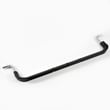
On the Craftsman 917293340 rear-tine tiller, the bar at the back is the depth stake (often called a drag bar). It sets how deep the tines dig, helps keep the tiller from “running away” in hard soil, and makes transport easier when raised.
What the depth stake does
- Controls digging depth: lower stake equals deeper tilling; higher stake equals shallower cultivating.
- Stabilizes the tiller: adds drag so the tines do not pull the machine forward too aggressively.
- Helps with transport: lowering it to a transport position helps prevent the tines from scuffing the ground.
- Improves consistency: keeps your furrow depth more even across a pass.
How to adjust it (basic steps)
Follow the adjustment procedure shown in the 917293340 owner's manual. In general, you will:
- Stop the engine and let moving parts fully stop.
- Pull the depth stake pin.
- Slide the depth stake up or down to the hole that matches the depth you want.
- Reinsert the pin fully so the stake locks in place.
Quick depth guide
| Goal | Typical depth stake setting | What you will notice |
|---|---|---|
| Cultivating, weeding | Higher (shallower) | Less bite, easier control |
| Breaking new ground | Lower (deeper) | More bite, more resistance |
| Moving around the yard | Transport position | Tines stay off the ground |
Why it matters
Depth control is one of the biggest factors in tiller performance. Setting the depth stake correctly reduces bouncing, improves traction and control, and helps protect plants and nearby areas from being disturbed.
Last updated: January 2026
Where is the model number on a Craftsman rear tine tiller?
On the Craftsman rear-tine tiller model 917293340, the model number is printed on the tiller’s identification label (data tag). You’ll typically find that label on the tine shield/tine guard area or on the front section of the frame.
Where to look on the tiller
Check these common spots first (wipe dirt off so the tag is readable):
- On the tine shield (tine guard) near the tines
- On the main frame rail, often on the left side
- On the front of the frame, facing forward
- Near the depth stake bracket area
- Near the engine mounting area on the frame (not on the engine itself)
For the model identification format (often shown with a dot as 917.293340) and parts diagrams, use the 917293340 owner's manual.
What to write down from the tag
Record the full information exactly as shown so we can match the correct Craftsman parts and diagrams:
- Model number (example format: 917.293340)
- Serial number (often on the same tag)
- Any product number or code listed on the tag
Quick ID guide
| Item you find | What we use it for |
|---|---|
| Model number | Matches the correct parts diagrams for the tiller |
| Serial number | Helps confirm version changes across production runs |
| Engine model (on engine label) | Used for engine-only parts (carburetor, spark plug, air filter) |
Why it matters
Craftsman rear-tine tillers share many similar-looking shields, tines, and fasteners across different models. Using the exact model number prevents ordering the wrong parts and helps us match the correct assemblies.
If you’re inspecting the tine area, keep hands clear of sharp edges. If you’re servicing the tine assembly, a common related component is the tine, left 532101194.
Last updated: January 2026