 Owner’s manual
 Error Codes

Is it worth buying a Bosch washing machine?
Yes. A Bosch washer like model WAP24201UC is worth buying if you want strong long-term reliability, efficient water and energy use, and high-spin performance that helps reduce drying time. For the best ownership experience, follow the care, loading, and installation guidance in the WAP24201UC owner's manual.
- Efficient operation designed to reduce water, energy, and detergent use.
- High spin speeds for better water removal (shorter dryer time).
- Solid build quality that holds up well with regular household use.
- Clear operating guidance and maintenance routines to keep performance consistent.
Bosch is typically a great value when you prioritize performance and longevity over the lowest upfront price.
| Best fit for Bosch | Consider another option if you want |
|---|---|
| Quiet, efficient front-load washing | Lowest purchase price above all else |
| Strong spin and good fabric care | Simplest controls with minimal features |
| Long-term ownership and fewer replacements | A basic washer for occasional use |
A washer is only “worth it” if it is installed correctly and maintained. For this Bosch model, we recommend:
- Install on a solid, level floor to prevent movement and excessive vibration during spin.
- Level the washer as low as possible so it stays stable.
- Remove shipping bolts before use (a common cause of severe vibration).
- Run a maintenance cycle before your first load.
- Avoid overdosing detergent; it can cause residue and odors over time.
Most washer complaints come from installation issues (vibration, noise, walking) or maintenance issues (odor, residue, poor rinsing). Bosch designs this washer to be efficient and high-performing, but correct leveling, proper detergent use, and routine care are what keep it running like it should.
Last updated: February 2026
What is the lifespan of a Bosch washing machine?
A Bosch washing machine typically lasts 10 to 15 years. For your Bosch WAP24201UC, consistent care (running maintenance cycles, using the right detergent amount, and keeping the washer level on a solid floor) helps you reach the longer end of that range; see the WAP24201UC owner's manual.
- Load size and frequency: daily heavy-family use wears bearings, shocks, and the motor faster.
- Installation quality: a solid, level floor reduces vibration and stress during high-speed spin.
- Routine maintenance: running the washer’s maintenance cycle and keeping the door seal clean helps prevent odor and residue.
- Water quality: hard water can increase scale buildup in valves and internal passages.
- Detergent habits: too much detergent can cause oversudsing and residue that strains draining and rinsing.
| Use pattern | What we typically see | Practical expectation |
|---|---|---|
| Light (1 to 3 loads/week) | Less mechanical wear | Closer to 15 years |
| Average (4 to 7 loads/week) | Normal wear on suspension and seals | 10 to 15 years |
| Heavy (multiple loads/day) | Faster wear on moving parts | Closer to 10 years |
- Run the washer’s maintenance cycle periodically (and before the first load if the unit is new or recently moved).
- Keep the washer level and as stable as possible to limit vibration.
- Wipe the door boot and leave the door slightly open between loads to dry.
- Use HE detergent and measure carefully.
- Check fill and drain hoses for kinks, rubbing, or slow leaks.
Washer lifespan is mostly about controlling vibration, moisture, and residue. High spin speeds improve water removal, but they also make proper leveling and a firm floor important for long-term reliability.
Last updated: February 2026
What is the most common problem with a Bosch washing machine?
The most common Bosch washer issue is a drain problem: the washer will not drain fully, drains slowly, or stops mid-cycle because the drain pump filter or drain path is restricted. On the Bosch WAP24201UC, this often shows up as no-spin or reduced-spin behavior because the machine limits spinning for safety; use the WAP24201UC owner's manual troubleshooting guidance to confirm the symptom and the correct checks.
- Water left in the drum after the cycle ends
- The washer pauses or ends early before the final spin
- Spin speed is reduced or the load is not spun out
- Gurgling sounds during drain, or a humming pump
- A musty odor from standing water
- Power reset: Unplug for 1 minute, then restart a Drain/Spin type cycle.
- Load and suds check: Use HE detergent and avoid overdosing; excess suds can mimic a drain fault.
- Drain hose setup: Make sure the drain hose is not kinked, crushed, or pushed too far down the standpipe.
- Installation basics: Confirm the washer is on a solid, level floor to reduce vibration and spin interruptions.
Drain and fill complaints are the most common service drivers. These parts are frequent suspects on front-load washers:
| Symptom | Most likely area | Example model-specific part to check |
|---|---|---|
| Won’t drain or drains slowly | Drain hose or drain path restriction | Hose 00656689 |
| Won’t fill or fills very slowly | Water supply screens or inlet valve | Washer water inlet valve 00611702 |
| Stops and won’t start a cycle | Door seal/lock issues, control sensing | Follow manual diagnostics |
A restricted drain path can prevent proper spinning, leave water in the tub, and contribute to odor and residue. Fixing the drain setup early also helps protect components like the motor and sensors from unnecessary strain.
Last updated: February 2026
How to reset Bosch error code?
To reset an error code on your Bosch WAP24201UC washer, turn the machine off, wait 5 seconds, then turn it back on. If the same code returns after the reset, follow the troubleshooting steps for that code in the WAP24201UC owner's manual.
- Press Power to turn the washer off.
- Wait 5 seconds (this clears many temporary control faults).
- Turn the washer back on.
- Re-select your cycle and press Start.
- If the code reappears, stop the cycle and troubleshoot the specific code.
Some codes point to a condition you can correct (not just a control glitch). Common examples from Bosch front-load washers include:
| What you see | What it often means | What to check first |
|---|---|---|
| E:18 | Drain/pump blockage | Drain hose routing, drain pipe, pump filter/obstruction |
| Water pressure too low | Fill problem | House valves fully open, inlet screens, fill hose kinks |
| Suds/too much detergent | Oversudsing | Switch to HE detergent, reduce dose |
Resetting clears the display, but it does not fix the underlying cause. If the washer is still over-sudsing, not draining, or not filling correctly, the error will return and the washer may stop mid-cycle to prevent leaks, overheating, or poor wash performance.
If troubleshooting points to a failed component (not a clog or installation issue), these model-matched parts are commonly involved:
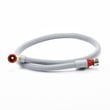
- Fill hose 00265958 (water supply to the washer)
- Hose 00656689 (drain hose)
- Washer water inlet valve 00611702 (controls water entering the washer)
Last updated: February 2026





