




How many hours a day should you run a dehumidifier?
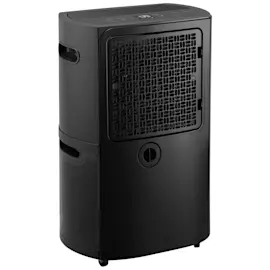
For a GE dehumidifier like model ADHL22LAQ2, we typically run it 6 to 12 hours per day for normal humidity control; in very damp spaces or after a leak, it often needs to run nearly continuously for the first 24 to 48 hours, then cycle on and off to hold your target humidity.
Best daily runtime targets (what we recommend)
- Maintenance / everyday comfort: 6 to 12 hours/day (unit cycles as needed)
- Basement or persistently damp room: 12 to 20 hours/day
- Initial dry-out after water intrusion: 24 to 48 hours of near-continuous operation
- Goal humidity: 30% to 50% RH (most homes feel best around 40% to 50%)
What changes how long it runs
- Room size and airflow (closed doors, blocked vents, clutter)
- Outdoor humidity and season (summer and rainy periods increase runtime)
- Temperature (cool rooms can reduce moisture removal and increase frost risk)
- Drain method (bucket fill stops the unit; continuous drain can run longer)
- Filter condition (a dirty filter restricts airflow and reduces performance; see filter WK85X22282)
Quick setup checklist for efficient drying
- Set humidity to 45% as a starting point
- Keep doors/windows closed while running
- Leave 12 to 18 inches of clearance around the unit
- Clean/replace the air filter regularly (use the correct filter WK85X22282)
- If you are using the bucket, confirm it seats fully and empties easily (inspect water bucket asm WK01X28014)
Common scenarios and what to expect
| Situation | Typical runtime | What you should see |
|---|---|---|
| Mild humidity (musty smell only) | 6 to 10 hrs/day | Bucket fills slowly; RH drops steadily |
| Damp basement | 12 to 20 hrs/day | Regular cycling; less condensation on walls |
| After leak/flood cleanup | 24 to 48 hrs | Fast water collection early, then slows |
Why it matters
Running long enough to reach 30% to 50% RH helps prevent musty odors, condensation, and moisture damage. Running longer than needed wastes energy; running too little leaves humidity high so the space never truly dries.
Last updated: February 2026
What is the life expectancy of a GE dehumidifier?
A GE dehumidifier like model ADHL22LAQ2 typically lasts 5 to 9 years, with an overall common range of 3 to 10 years depending on run time, humidity load, and maintenance. Regular cleaning and correct drainage habits are the biggest factors that extend service life.
Typical lifespan ranges (what to expect)
Most residential dehumidifiers fall into these real-world buckets:
- 3 to 5 years: heavy, continuous operation in very damp spaces; frequent clogs or poor airflow
- 5 to 9 years: typical home use with routine cleaning and stable room temperatures
- Up to 10 years: lighter seasonal use, clean airflow path, and consistent drainage
| Usage pattern | What it looks like | Typical outcome |
|---|---|---|
| Heavy duty | Runs most of the day in a basement | Shorter lifespan |
| Normal | Cycles on/off to hold a set humidity | Average lifespan |
| Light/seasonal | Used only during humid months | Longer lifespan |
Maintenance that most improves longevity
These steps reduce compressor strain, icing, and water leaks:
- Clean the air intake and keep the unit several inches from walls for airflow
- Wash or replace the air filter on schedule; use the exact filter WK85X22282
- Empty and rinse the bucket regularly; replace a cracked or warped bucket with water bucket asm WK01X28014
- Keep the drain path clear (bucket port or hose connection) so water cannot back up
- Run it in a warm-enough space; cold rooms increase frost risk and run time
Why it matters
Dehumidifiers fail early most often from restricted airflow, dirty coils, and drainage problems. Those conditions force longer run times, raise internal temperatures, and can lead to icing or leaks that shorten the life of the compressor and fan motor.
When to repair vs. replace
Use this quick check:
- Repair makes sense: bucket is damaged, filter is missing, unit leaks due to drainage issues
- Replacement makes sense: poor moisture removal after cleaning, repeated icing, or loud compressor noise
For symptom-based troubleshooting, use how to clean a dehumidifier and dehumidifier doesn't remove moisture.
Last updated: February 2026
Can a GE dehumidifier be repaired?
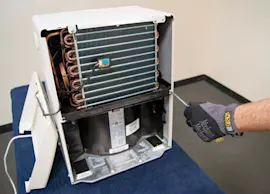
Yes. We repair GE dehumidifiers like model ADHL22LAQ2 by troubleshooting the symptom first (not running, not collecting water, leaking, noisy), then replacing the failed part such as the air filter or water bucket assembly when needed. Many common issues are straightforward DIY fixes.
What we check first (fast troubleshooting)
- Confirm the bucket is fully seated and the “bucket full” switch is being pressed.
- Clean or replace a clogged air filter; restricted airflow reduces moisture removal.
- Make sure the room temperature is above about 65°F; cold rooms can cause coil frost and poor performance.
- Verify the humidity setting is below the room’s current humidity.
- Check for a kinked or blocked drain hose if you use continuous drain.
Common repairs and the parts that usually solve them
| Symptom | Most common cause | Typical fix |
|---|---|---|
| Not collecting water | Dirty filter, low room temp, airflow blocked | Clean unit, replace filter, improve airflow |
| Leaks on the floor | Bucket not seated, cracked bucket, drain issue | Reseat bucket, replace bucket, clear drain path |
| Not draining (hose) | Clogged fitting or hose routing | Clear blockage, correct slope |
| Noisy | Unit not level, loose panels, worn fan area | Level unit, tighten, inspect fan area |
If your bucket is damaged or not triggering the shutoff correctly, replacing the water bucket asm WK01X28014 is a common, reliable fix. If performance is weak, start with the filter WK85X22282.
DIY help we recommend
- Use dehumidifier doesn't remove moisture when the unit runs but humidity stays high.
- Use dehumidifier leaks water if you see puddles or water around the base.
- Follow how to clean a dehumidifier for routine cleaning that prevents repeat failures.
Why it matters
A dehumidifier that cannot move air freely or cannot sense and drain water correctly will short-cycle, frost up, or shut off early. Fixing airflow and water handling restores normal moisture removal and helps protect floors and walls.
Last updated: February 2026
Can you replace a sensor on a dehumidifier?
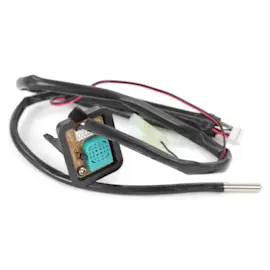
Yes. On a GE dehumidifier like model ADHL22LAQ2, a humidity/temperature sensor is typically a replaceable component; swapping it can restore accurate humidity readings and normal compressor run time when the unit short-cycles, runs constantly, or shows incorrect room humidity.
When replacing the sensor makes sense
- The display humidity is clearly wrong compared to a separate hygrometer
- The dehumidifier runs but removes little moisture
- The unit shuts off too soon even though the room feels damp
- You see an error code related to sensing (varies by design)
- The unit behaves normally after a power reset, then acts up again
What to check before you replace parts
- Clean the air filter; restricted airflow can mimic sensor problems. For this model, start with the filter WK85X22282.
- Confirm the bucket is seated fully; a mis-seated bucket can stop operation and look like a control issue. Inspect the water bucket asm WK01X28014.
- Place the unit in a warmer area (most dehumidifiers struggle in cool basements); frost on the coil can reduce moisture removal.
Typical replacement overview (general)
| Step | What we do | Why it matters |
|---|---|---|
| Unplug power | Remove electrical risk | Protects you and the control board |
| Access sensor area | Remove front/top cover as needed | Prevents wire damage |
| Swap sensor and reconnect | Match connector orientation | Restores accurate readings |
| Test run | Verify humidity changes and cycling | Confirms the fix |
Why it matters
A bad sensor can cause poor humidity control, extra wear on the compressor, and water collection problems that look like a drainage or bucket issue. If you want a step-by-step approach, follow how to replace a dehumidifier sensor assembly.
Last updated: February 2026
How long is the warranty on a GE dehumidifier?
GE dehumidifiers are covered by a one-year limited warranty from the original purchase date for defects in materials or workmanship. For your GE ADHL22LAQ2 dehumidifier, keep your proof of purchase and the model and serial information for any warranty claim.
What the 1-year limited warranty covers
- Defects in materials or workmanship during normal household use
- Replacement of the product if it fails due to a covered defect
- A replacement unit that may be new or refurbished
Before you request warranty service
- Confirm the purchase date (coverage runs 1 year from that date)
- Locate the model and serial number on the unit
- Check for common issues that look like a failure (bucket, filter, airflow)
- If the unit is not collecting water, use the steps in dehumidifier doesnt collect water
Quick troubleshooting checklist (often mistaken for a defect)
- Bucket not seated: Remove and reinstall the bucket so the “bucket full” switch closes
- Dirty air filter: Clean or replace the filter; for this model, use filter WK85X22282
- Room conditions: Low temperature can reduce moisture removal and may cause coil frost
- Drain setup: If using a hose, check for kinks and confirm the unit is level
- Airflow: Keep intake and exhaust clear of dust, curtains, and furniture
Warranty vs. parts replacement
| Situation | Best next step |
|---|---|
| Within 1 year and a defect is suspected | Use the GE warranty process with proof of purchase |
| Runs but performance is poor | Clean the filter, verify airflow and room conditions |
| Bucket is cracked or missing | Replace the bucket assembly |
If you need a replacement bucket for ADHL22LAQ2, match by model to avoid fit issues; use water bucket asm WK01X28014.
Why it matters
Warranty coverage is time-based; having the purchase date and model information ready speeds up service. Basic maintenance (especially filter care) prevents symptoms that can be mistaken for a failed dehumidifier.
Last updated: February 2026