 Installation guide
 Owner’s manual
 Error Codes




Why does my dryer suddenly have no power?
If your Speed Queen dryer model ADE4BRGS176TW01 suddenly has no power, the most common causes are a tripped breaker or blown/loose house fuse, a loose plug/outlet issue, or a door or start-control condition that prevents the dryer from starting. Follow the electrical checks in the installation guide first.
Quick checks we recommend (in order)
- Fully reset the laundry room breaker(s); switch OFF then ON (some panels look “on” when tripped).
- If your home uses fuses, check for a blown or loose fuse.
- Confirm the power cord is plugged in all the way and the receptacle is properly grounded.
- Make sure the loading door is fully closed.
- Push the timer knob in to start (if your control uses a push-to-start timer).
- Wait 10 minutes and try again; the motor overload protector can trip and reset after cooling.
Electrical supply requirements to verify
Your installation instructions call for a properly grounded, polarized 3-slot receptacle and a separately fused 15-amp circuit (no extension cords or adapters). A wiring/polarity problem at the receptacle can make the dryer appear “dead.”
| What to check | What “good” looks like | What it points to if not OK |
|---|---|---|
| Breaker/fuse | Not tripped; fuse tight | House power issue |
| Outlet grounding/polarity | Correctly grounded and polarized | Outlet wiring problem |
| Shared circuit load | Dryer on its own circuit | Voltage drop, nuisance trips |
If the dryer has power but still will not start
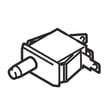
If the drum light or indicators work but the dryer will not run, a failed switch can be a likely next step after the basic checks above. For this model, a commonly listed control-related part is the switch D512973.
Why it matters
A “no power” symptom is usually a supply problem (breaker, fuse, outlet, cord) rather than an internal dryer fuse; the manual notes the dryer itself does not have an electrical fuse. Correcting the power source first prevents unnecessary parts replacement.
For replacement parts for ADE4BRGS176TW01, order from the parts list for this model or search by model number on Sears PartsDirect.
Last updated: February 2026
When I press the start button on my dryer, nothing happens.?
If your Speed Queen dryer model ADE4BRGS176TW01 won’t do anything when you press START, the most common causes are no power to the dryer, the door not fully closed (door safety switch open), the timer not set correctly, or the motor overload protector needing time to reset. Use the ADE4BRGS176TW01 owner's manual steps below to narrow it down safely.
Quick checks (do these first)
- Confirm the power cord is fully plugged in.
- Make sure the loading door is fully closed; the dryer will not run with the door open.
- Set a timed cycle and press START (or push in the timer knob, depending on your control style).
- Check the home’s dryer circuit breakers or fuses; electric dryers commonly need two legs of power.
- If the dryer was running and stopped, wait 10 minutes for the motor overload protector to reset, then try again.
What to test next (common “no start” parts)
If the basics check out, a failed switch can stop power from reaching the motor.
- Door switch: if it doesn’t “click” when the door closes, it may not be closing the circuit.
- Start switch: if it feels loose or doesn’t actuate consistently, it can prevent starting.
- Timer/control contacts: worn contacts can keep the motor circuit open.
A common replacement in the start circuit is the switch D512973 (match by model and wiring layout).
Electric vs. gas: what changes?
The “nothing happens” symptom is usually a start circuit or power issue on both types. Gas adds ignition and gas supply checks, but those matter after the drum starts turning.
| Symptom | Most likely area | What you’ll notice |
|---|---|---|
| No lights, no sound, no movement | House power supply | Breaker/fuse issue, loose plug |
| Clicks but won’t run | Door/start switch, timer | Intermittent start, door must be slammed |
| Runs but no heat | Heating system/airflow | Drum turns, clothes stay cool |
Why it matters
A dryer that won’t start is often a simple door-closure or power issue, but repeated start attempts with poor airflow or an overheating motor can trip the overload protector and keep the dryer down until it cools. Keeping the venting and lint areas clean helps prevent nuisance shutdowns.
For cleaning and efficiency tips that also help prevent overheating-related shutdowns, see how to keep a dryer clean and economical.
If you need to order parts for ADE4BRGS176TW01, use the parts list for this model or search by model number on Sears PartsDirect.
Last updated: February 2026
What are common problems with Speed Queen dryers?
Common problems we see with Speed Queen dryer model ADE4BRGS176TW01 are long dry times from restricted venting, no heat from an electrical heating failure, unusual noises from worn drum support parts, and a no-start condition from a failed switch. Start with the safety and troubleshooting steps in the ADE4BRGS176TW01 owner's manual.
Most common symptoms and what usually causes them
- Takes too long to dry: plugged or kinked venting, lint buildup inside the cabinet, overloaded drum
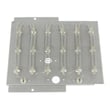
- No heat or weak heat (electric models): failed heater, thermostat, or other heat circuit issue
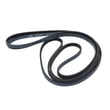
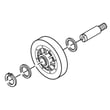
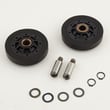
- Squealing, thumping, or rumbling: worn belt, idler wheel, or drum rollers
- Won’t start: door switch or start switch issue, power supply problem
- Cycle seems to advance slowly: auto-sensing cycles run longer with wetter or larger loads
Quick checks we recommend first
- Clean the lint screen and confirm strong airflow at the outside vent hood.
- Inspect the vent run for kinks, crushed sections, or heavy lint restriction.
- Verify load size and cycle selection (auto-sensing can run longer with bulky items).
- Listen for mechanical noise (squeal often points to belt or idler wear).
- If you smell gas: do not operate the dryer; follow the gas safety steps in the installation guide.
Parts that commonly solve these problems
If your diagnosis points to a worn drive system or a heat failure, these model-matched parts are common fixes:
| Symptom | Common part involved | Example part for this model |
|---|---|---|
| Squealing or drum not turning | Drum belt | Speed queen commercial dryer drum belt D511255P |
| Squealing or belt slipping | Idler wheel/tensioner | Speed queen idler wheel and bearing assembly D510142P |
| Thumping/rumbling | Drum support roller | Speed queen cylinder roller D510708P |
| No heat (electric) | Heating element | Speed queen dryer heating element D510329P |
Why it matters
Restricted venting and lint buildup can cause long dry times, overheating, and repeated shutdowns. Worn drum support parts can damage the belt or motor over time. Fixing airflow and early wear items keeps drying performance consistent and helps prevent bigger repairs.
Ordering the right replacement part
We recommend matching parts by the full model number ADE4BRGS176TW01 and comparing the part description to your symptom. You can order parts from the list for this model, or search by model number on Sears PartsDirect.
Last updated: February 2026





