 Owner’s manual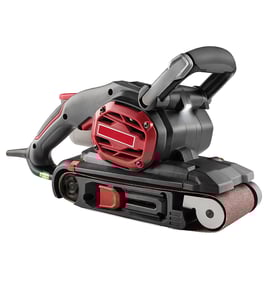

Where can I buy Craftsman replacement parts?
You can buy replacement parts for your Craftsman sander model 315279570 through the parts listing for this model and by using the exploded view and parts list in the owner's manual. Ordering by model number helps you match the correct components (like the top cover or brush assembly).
Best ways to get the right part
- Confirm the model number 315279570 on the plate attached to the motor housing.
- Use the exploded view to identify the exact part name and key number.
- Match the part number from the parts list before ordering.
- For serviceable items, stick to parts shown in the customer parts list.
- Use only identical Craftsman replacement parts to avoid fit and safety issues.
What you can replace yourself (and what you should not)
The manual notes that only the parts shown on the parts list are intended to be repaired or replaced by the customer; other internal components are part of the double-insulation system and should be serviced by a qualified technician.
| Task type | Typical examples | Recommended approach |
|---|---|---|
| Customer-replaceable | Top cover, brush assembly, screws, clamps (as listed) | Identify in exploded view, then order the matching part |
| Service-level repair | Internal double-insulation components | Have a qualified technician perform service |
Why it matters
Power sanders rely on correct-fit parts for safe operation. Using the correct model-specific parts helps maintain double insulation, reduces the risk of damage, and keeps performance consistent.
Last updated: February 2026
Can you replace the pad on a sander?
Yes. On the Craftsman 315279570 random-orbit sander, you can replace the sanding interface by removing and reapplying the conversion pad (for hook-and-loop discs) or by switching to fresh pressure-sensitive adhesive (PSA) sanding discs on the backing pad. The key is unplugging the tool and aligning the dust holes.
What “pad” means on model 315279570
This sander uses two layers that people often call “the pad”:
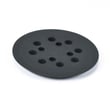
- Backing pad: the base pad on the tool that supports the disc and has dust-extraction holes
- Conversion pad: an adhesive-backed pad that lets you use hook-and-loop (Velcro type) sanding discs
- Sanding disc: the abrasive disc itself (PSA or hook-and-loop)
For diagrams and the exact attachment method, use the owner's manual.
How to replace or refresh the sanding surface
If you use PSA (stick-on) sanding discs
- Unplug the sander before changing anything
- Peel off the old sanding disc soon after sanding (heat can “set” the adhesive)
- Brush dust off the backing pad so the next disc sticks flat
- Align the disc holes with the backing pad holes for dust collection
If you use hook-and-loop discs
- Unplug the sander
- Apply a new conversion pad by peeling the paper backing and pressing it firmly onto the backing pad
- Align holes carefully so dustless sanding still works
- Keep the conversion pad and disc backing clean for best grip
Quick checks before you buy anything
- Disc size: this model uses a 5-inch sanding disc
- Hole alignment: mismatched holes reduce dust pickup and can cause uneven sanding
- Surface condition: if discs will not stick or keep slipping, clean the pad surface first
- Vibration: a pad that is not seated flat can increase vibration and swirl marks
Why it matters
A clean, flat pad surface keeps the disc centered and the random-orbit motion smooth. It also keeps the dustless sanding feature working by pulling dust through the disc holes into the dust bag.
| Sanding setup | What you replace | Best for |
|---|---|---|
| PSA discs | The sanding disc (stick-on) | Quick changes, general sanding |
| Hook-and-loop discs | The sanding disc; replace the conversion pad when worn | Reusable discs, frequent grit changes |
Last updated: February 2026
What are the parts of a sander?
A sander is built from a drive system (motor and bearings), a sanding interface (backing pad and sanding disc), and control and dust-collection parts. On the Craftsman 315279570 random-orbit sander, key user-facing parts include the on-off slide switch, variable-speed dial, backing pad, sanding disc, and dust bag assembly (see the owner's manual).
Common sander parts (and what they do)
- Motor: provides power to move the pad
- Bearings: support the rotating/oscillating shaft for smoother operation
- Backing pad: holds the sanding disc; transfers motion to the work surface
- Sanding disc: the abrasive that removes material (PSA or hook-and-loop types)
- Switches and speed control: on-off switch; variable-speed control on some models
- Dust collection: dust bag, port, and internal passages to capture dust
- Housing and grip: palm grip and covers that protect internal parts and improve control
Parts you will handle most on model 315279570
The 315279570 ships assembled except for a few items you install or swap during normal use.
- Dust bag assembly
- Sanding disc
- Conversion pad (for hook-and-loop style discs)
Quick reference table
| Part or assembly | What you use it for | Common symptom when it needs attention |
|---|---|---|
| Backing pad | Supports the disc and keeps sanding even | Uneven sanding, poor disc hold, wobble feel |
| Sanding disc | Material removal and finishing | Slow sanding, swirl marks, clogging |
| Dust bag assembly | Captures dust | Excess dust, reduced suction, dust leaking |
| On-off slide switch | Starts and stops the tool | Intermittent power, won’t start |
| Variable-speed dial | Adjusts speed (315279570) | Speed stuck high/low, inconsistent finish |
Why it matters
Knowing the main parts helps you troubleshoot faster. For example, a rough finish often points to the sanding disc grit or a worn backing pad, while heavy dust points to the dust bag assembly or airflow being blocked.
Last updated: February 2026