 Owner’s manual
 Error Codes
What is the average lifespan of a GE dishwasher?
A GE dishwasher typically lasts 10 to 12 years. For your GE GSD5560G02SS, regular cleaning, correct detergent use, and fixing small issues early (like draining or filling problems) are the biggest factors that help it reach or exceed that range. See the GSD5560G02SS owner's manual for care and operating guidance.
- Water quality: hard water speeds up mineral buildup in valves and spray components.
- Detergent choice: use automatic dishwasher detergent to prevent excessive suds.
- Loading habits: overloading can reduce cleaning and strain the wash system.
- Drain performance: slow draining can leave standing water and residue.
- Small leaks: even minor seepage can damage components over time.
- Run hot water at the sink before starting a cycle so the dishwasher fills with hotter water.
- Use rinse aid if drying is poor; keep the dispenser filled.
- Clean out visible debris in the tub bottom area and check for drain restrictions.
- If you have hard water, use the right detergent amount and consider a water softener.
- Address symptoms early (not filling, not draining, not cleaning) instead of continuing to run cycles.
| Symptom | Often related system | Example model-matched part to check |
|---|---|---|
| Not draining well | Drain path, hose routing, sink/disposer connection | Dishwasher drain hose WD24X10014 |
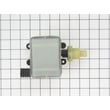
| Not filling or fills slowly | Water supply, inlet valve, float | Dishwasher water inlet valve WD15X10003 |
| Loud grinding or weak wash | Pump and motor area | GE dishwasher pump and motor assembly WD26X10013 |
Most dishwasher “end of life” decisions happen after repeated poor cleaning, draining issues, or leaks. Keeping the wash system moving water correctly and using the right detergent helps protect the pump, valves, and seals so the dishwasher reaches its normal service life.
Last updated: January 2026
What is the most common problem with GE dishwashers?
The most common problems we see with GE dishwashers like model GSD5560G02SS are draining issues (water left in the tub), not starting because the door is not fully latched, and performance problems caused by detergent or rinse-aid setup. The quickest wins are checking the drain path and confirming the door latches firmly per the GSD5560G02SS owner's manual.
- Not draining: standing water after the cycle, gurgling, or a slow drain.
- Won’t start or stops: cycle won’t begin unless the door is closed and locked; some models beep if the door is left open during a cycle.
- Not drying well: dishes come out wet; often improved by using rinse aid and selecting heated drying options.
- Poor cleaning: food residue remains; often tied to loading, wash selection, or wash system restrictions.
- Leaks or overflow risk: can be related to water valve issues or oversudsing from the wrong detergent type.
- Confirm the door is fully closed and latched before selecting a cycle; the dishwasher must be closed and locked to run.
- Use only dishwasher detergent (never hand soap); the wrong detergent can cause heavy suds and interruptions.
- Use rinse aid correctly; a full dispenser typically lasts about a month and helps drying and spotting.
- If water remains, inspect the drain hose routing and look for kinks; replace a damaged hose with the dishwasher drain hose WD24X10014.
- If the unit won’t fill, the inlet valve can be a common failure point; consider the dishwasher water inlet valve WD15X10003.
| Symptom | Most common cause | What to do next |
|---|---|---|
| Water left in bottom | Drain restriction or hose issue | Check hose routing; clear restrictions; replace hose if split or soft |
| Won’t start | Door not latched, control lock, or power issue | Re-latch door firmly; review control settings in the manual |
| Wet dishes | Rinse aid low or dry option not selected | Fill rinse aid; select heated dry options |
| Suds/foam | Wrong detergent | Switch to dishwasher detergent only; run rinse/drain to clear |
Drain and door-latch problems stop the dishwasher from completing the wash cycle, and detergent or rinse-aid mistakes can make a good dishwasher seem “broken” when it only needs a setup correction. Catching these early also helps prevent water issues and repeat wash cycles.
Last updated: January 2026
Can a clogged drain cause an FTD error?
Yes. On the GE GSD5560G02SS dishwasher, an FTD (fail to drain) condition commonly happens when water cannot leave the tub due to a clog in the drain path, such as the air gap, sink/disposer connection, drain hose, or sump area. See the GSD5560G02SS owner's manual for drain and reset guidance.
- Press START/RESET and allow up to 90 seconds for the dishwasher to drain and reset.
- Check the kitchen sink drain; if the sink drains slowly, the dishwasher often will not drain well.
- If your setup has an air gap, remove the cover and clean out debris.
- If the dishwasher drains through a garbage disposer, run the disposer to clear the drain path.
- Inspect the drain hose for kinks, crushing, or a blockage.
A clog is most common, but if the drain path is clear and the dishwasher still will not pump out, a failed component in the drain system can also create an FTD-style drain failure.
| Symptom | Most likely cause | What to do next |
|---|---|---|
| Water standing in the tub after a cycle | Drain path restriction (air gap, disposer, hose) | Clear the restriction and retry a drain/reset |
| Humming but little or no draining | Debris at the pump/impeller area | Check for obstructions in the sump area |
| Hose leaks or won’t move water well | Split or restricted hose | Replace the dishwasher drain hose WD24X10014 |
A clogged drain can leave water in the tub, cause poor cleaning, create odors, and prevent the control from completing a cycle normally. Clearing the drain path restores proper pump-out and helps prevent repeat drain errors.
If the drain path is clear (air gap, disposer, hose) and the unit still will not drain after a reset, the circulation/drain system may need service. For model-specific steps and safety notes, follow the GSD5560G02SS owner's manual.
Last updated: January 2026
How to reset a portable GE dishwasher?
To reset a GE portable dishwasher like model GSD5560G02SS, press START/RESET to cancel the current cycle; after the dishwasher pumps out and the motor stops, you can select a new cycle and restart. This reset process typically takes about 90 seconds (see the GSD5560G02SS owner's manual).
- Press START/RESET once to cancel the cycle.
- Wait while the dishwasher pumps out and the motor stops (about 90 seconds).
- Select your new wash cycle and any options.
- Close the door fully and latch it.
- Press START/RESET again to start.
These checks solve most “has power but won’t run” complaints on GE dishwashers.
- Make sure the door is closed and latched; many models beep if the door is left open.
- Check the home circuit breaker or fuse and reset/replace if needed.
- Touch pads within about 30 seconds of each other; otherwise the control can “time out” and go dark.
- If the dishwasher responds to buttons but never fills, the door latch may not be seated.
- If you suspect a fill problem, inspect the water supply and consider the dishwasher water inlet valve WD15X10003 if the valve is not opening.
| Reset action | What it accomplishes | What it will not fix |
|---|---|---|
| Pressing START/RESET | Cancels the cycle and lets you reprogram | A failed latch, no water supply, or a bad motor/pump |
| Power cycling at breaker (1 minute off) | Reboots the control if it is glitchy | Clogs, leaks, or mechanical failures |
Resetting correctly prevents interrupted cycles, standing water, and false “won’t start” symptoms. It also helps you confirm whether the issue is a control reset need or a real problem like a door latch, fill issue, or circulation problem.
Last updated: January 2026





