Owner’s manual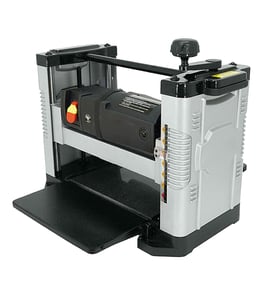

Can you run a 2x4 through a planer?
Yes. You can run a 2x4 through a Delta 22-540 12" portable planer; it will make the two faces parallel, not automatically straight, flat, or square. If the board is twisted or bowed, true one face first and take light passes (see the owner's manual).
A thickness planer references the board off the bed and feed rollers; it does not create a flat reference face by itself.
- Cross-cut the 2x4 to manageable length.
- True one face on a jointer first (best results).
- No jointer: use a planer sled with shims to support twist, then flatten one face.
- Flip the board and plane the opposite face to final thickness.
- Take thin cuts; multiple light passes reduce taper and snipe.
- Support long stock at infeed and outfeed to prevent droop.
The manual emphasizes stable mounting and safe operating habits.
- Secure the planer to a stable bench so it cannot tip, slide, or “walk”.
- Clear the table before switching ON.
- Keep hands away from the cutterhead and chip exhaust.
- Keep knives sharp and free of pitch.
- Make adjustments with power OFF; disconnect power for repairs.
| What you see after planing | Most common cause | What to do next |
|---|---|---|
| Smooth but still twisted | No flat reference face | Joint one face or use a sled |
| Trapezoid shape | Edge not 90 degrees to a face | Joint an edge or rip on a table saw |
| Taper or uneven thickness | Heavy cut or poor support | Lighter passes; add support |
A 2x4 is often cupped, bowed, or twisted. Planing without first establishing a flat face can make it smoother but also lock in distortion, making accurate joinery harder.
You can look up replacement parts by model number on the parts list for Delta 22-540, or search by model on Sears PartsDirect.
Last updated: February 2026
How big is a Delta 22-540 planer?
The Delta 22-540 is a 12-inch portable planer; its planing capacity is 12 inches wide and up to 6 inches thick, with a maximum 3/16-inch depth of cut. For exact overall footprint and height (especially if mounted on a stand), use the dimensions section in the owner's manual.
When customers ask about size, it usually refers to one of these:
- Cutting capacity (what lumber size it can plane)
- Overall dimensions (bench space it takes)
- Working height (bench height plus planer height, or a dedicated stand)
- Infeed/outfeed clearance (space needed for long boards)
These are the key size limits that matter for boards and projects:
- Maximum planing width: 12 in (305 mm)
- Maximum planing thickness: 6 in (152 mm)
- Maximum depth of cut: 3/16 in (5 mm)
- Minimum stock limits (for safe planing): 10 in long, 3/4 in wide, 3/16 in thick
Even without exact cabinet dimensions, we use these rules to help you plan your shop layout:
- Allow extra table length if you use the folding infeed/outfeed extensions.
- Plan for board support; long stock needs roller stands or a long bench.
- Leave room for a dust chute and hose routing.
- Secure the planer to a stable surface if it tends to tip, slide, or “walk” under load.
| What you’re measuring | What to include |
|---|---|
| Footprint on bench | Planer base plus clearance for controls |
| Working length | Board length plus infeed/outfeed support |
| Height | Bench/stand height plus planer height |
Matching the Delta 22-540’s 12-inch capacity to your lumber sizes prevents jams, snipe, and unsafe cuts; planning the shop footprint avoids instability and makes feeding boards smoother.
For replacement parts and diagrams for your Delta 22-540, start with the model parts list, or search by model number on Sears PartsDirect.
Last updated: February 2026
What are the common problems with planers?
Common problems with the Delta 22-540 12" portable planer include snipe at board ends, uneven thickness, tearout or chipout, chatter marks, poor feeding, and chips not clearing. These usually come from dull knives, poor stock support, vibration, or a dirty table; follow the owner's manual for safe checks.
- Snipe: long stock not supported level at infeed and outfeed
- Uneven thickness: board not flat going in, heavy cuts, inconsistent support
- Tearout or chipout: planing against the grain, dull or nicked knives
- Chatter (ripples): vibration, unsecured planer, dull knives
- Poor feeding/slipping: dirty table, pitch buildup, warped stock
- Chips not clearing: restricted chip exhaust, chip deflector installed incorrectly
- Unplug the planer before inspection or adjustment.
- Clear the table of tools and scraps before turning it on.
- Keep knives sharp and free of rust and pitch.
- Keep the planer table clean; wax it occasionally to reduce friction.
- Support long boards with auxiliary tables or rollers at table height.
| Symptom | First thing to do | Next check |
|---|---|---|
| Snipe | Add level infeed/outfeed support | Take lighter passes |
| Tearout | Plane with the grain | Check knife condition |
| Chatter | Secure planer to a stable surface | Reduce depth of cut |
| Feeding issues | Clean and wax the table | Check stock for twist/bow |
Fixing these issues improves thickness accuracy and surface finish, and it reduces safety risks from kickback and flying debris. For parts and model lookups, search by model number on Sears PartsDirect.
Last updated: February 2026