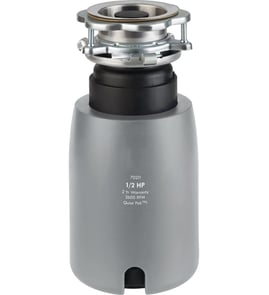





Is the reset button on the bottom of a garbage disposal?
Yes. On most garbage disposals, including the GE GFC501F-01, the reset button is on the bottom of the unit (the underside of the disposal body under the sink). If the disposal overheats or jams, that button can pop out and stop the motor until it’s pressed back in.
- Turn the disposal switch off.
- Unplug the disposal (or turn off the circuit breaker).
- Look on the bottom of the disposal for a small reset button (often red).
- If it’s popped out, press it in until it seats.
- Restore power and test with a quick on/off.
A reset that trips repeatedly usually means the motor is overheating or the grinding plate is binding.
- Clear the jam (never put your hand in the grind chamber)
- Run cold water before and during operation
- Avoid fibrous foods (celery, corn husks) and hard items (bones, fruit pits)
- Check for a slow drain that can load the motor
- Inspect the sink opening seal and mounting for leaks or misalignment
| Symptom | What it usually means | What to try first |
|---|---|---|
| Hums but won’t grind | Jammed impellers/flywheel | Power off; clear obstruction; then reset |
| Completely dead | Tripped reset or no power | Reset; then check breaker/GFCI |
| Runs but leaks at sink | Mounting or seal issue | Inspect mounting hardware and seals |
The reset button is a built-in motor protection feature. Using it correctly can get your GE GFC501F-01 running again quickly and helps prevent repeated overheating that can shorten disposal life.
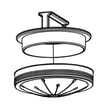
If you’re also dealing with water backing up in the sink, replacing a worn drain stopper can help you control standing water while you troubleshoot; use the exact-fit stopper WC11X20163.
Last updated: February 2026
How to fix a garbage disposal?
For a GE GFC501F-01 garbage disposal, most “fixes” come down to clearing a jam, restoring power (reset or breaker), or stopping a leak at the sink flange or drain connection. Start with safe jam-clearing steps, then move to electrical checks and common seal points.
- Turn the disposal switch OFF.
- Shut OFF power at the breaker if you will put hands or tools near the grinding chamber.
- Never reach into the disposal; use tongs or pliers.
- If you smell burning or see smoke, keep power off and inspect wiring and the unit.
- Hums but won’t spin (jammed): Remove the stopper, look for a foreign object, and clear it with tongs.
- Won’t turn on at all: Press the red reset button on the bottom of the unit; then check the breaker or GFCI outlet.
- Drains slowly: Run cold water and clear the trap and drain line; avoid fibrous foods.
- Leaks at the sink opening: The sink flange mounting hardware or gasket is usually the culprit.
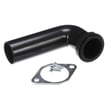
- Leaks at the discharge elbow: The elbow seal or gasket is usually the culprit.
- Remove the stopper WC11X20163 and shine a flashlight into the chamber.
- Pull out any debris with tongs.
- Use the manual turn feature (hex/Allen at the bottom of many disposals) to rotate the motor back and forth until it spins freely.
- Press reset, restore power, and test with cold water running.
| Leak location | Most likely cause | Part to check for GE GFC501F-01 |
|---|---|---|
| Sink flange/top mount | Loose mount or worn seal | Mounting ring WC15X20161 or gasket WC03X10008 |
| Discharge elbow | Worn elbow seal | Seal drive elbow WC14X20160 |
A jammed disposal can trip the internal overload, and a small leak can damage the cabinet floor and wiring. Fixing the root cause (jam, reset, or sealing surface) prevents repeat failures.
Last updated: February 2026
How to unjam a GE garbage disposal?
To unjam a GE garbage disposal (including model GFC501F-01), we shut off power first, free the jam by manually turning the motor from the bottom, remove the obstruction, then restore power and test with cold water. This clears most impeller jams safely and quickly.
- Turn the disposal switch off.
- Shut off the breaker to the disposal circuit.
- Never put your hand into the grind chamber.
- Use tongs or pliers for retrieval, not fingers.
- If the unit is hardwired and you are unsure about power isolation, stop and use a qualified technician.
- Press the reset button on the bottom of the disposal (typically a small red button). If it clicks, it was tripped.
- From underneath, insert a 1/4-inch Allen wrench into the hex socket in the center of the bottom.
- Work the wrench back and forth until it turns freely (this frees stuck impellers).
- Look down the sink opening with a flashlight; remove any visible debris using tongs.
- Restore power at the breaker.
- Run cold water, then turn the disposal on for 10 to 20 seconds.
| Symptom | Most likely cause | What we do next |
|---|---|---|
| Hums but won’t spin | Jammed impellers | Use Allen wrench, remove debris |
| Completely dead | Tripped reset, no power | Press reset, check breaker/switch |
| Runs but drains slowly | Partial blockage at outlet | Check elbow, gasket, and drain path |
| Leaks at sink flange | Mounting/seal issue | Inspect mounting hardware and seals |
A hard jam can stress seals and mounting components. If you see leaking or looseness afterward, these model-matched parts are the right place to start:
- Seal drive elbow WC14X20160 (outlet connection seal)
- Gasket WC03X10008 (sealing surface to prevent drips)
- Mounting ring WC15X20161 (sink flange mounting hardware)
Running a jammed disposal can overheat the motor and trip the reset repeatedly. Clearing the obstruction and confirming smooth rotation helps prevent repeat shutdowns, leaks at the sink flange, and drain backups.
Last updated: February 2026
Why is my garbage disposal turning on but not spinning?
If your GE GFC501F-01 garbage disposal turns on (hums) but will not spin, the grind plate is usually jammed by debris or the motor is stalled. Clearing the jam and resetting the overload typically restores normal operation.
- Turn off power at the switch and the breaker; never reach into the chamber.
- Remove any visible obstruction with tongs or pliers (bones, fruit pits, utensils).
- Use the bottom hex socket with an Allen wrench to rock the motor shaft back and forth until it moves freely.
- Press the red overload reset button on the bottom of the disposal (if equipped).
- Restore power and test with a steady stream of cold water.
| What you notice | Most likely cause | What we recommend |
|---|---|---|
| Hums, then shuts off | Overload tripping from a hard jam | Clear jam again, reset, then run cold water while testing |
| Hums continuously, no movement | Stalled motor or seized grind plate | Free the shaft from the bottom hex; remove debris from inside |
| Spins slowly or intermittently | Partial blockage or drag | Check for trapped debris; verify the drain path is clear |
| Leaks at the sink opening | Worn or mis-seated mounting components | Inspect the sink flange and mounting hardware |
A jam is the most common reason for humming without spinning, but if you are also seeing leaks or looseness while troubleshooting, these model-matched parts are worth inspecting:
- Stopper WC11X20163 (helps control water flow and can reduce accidental drop-ins)
- Mounting ring WC15X20161 (supports the disposer at the sink flange)
- Gasket WC03X10008 (seals connections to help prevent leaks)
A disposal that hums but does not spin is drawing power without doing work; that heat can trip the overload and shorten motor life. Clearing the jam quickly and running cold water during operation helps prevent repeat stalls.
Last updated: February 2026