 Installation guide
 Owner’s manual
 Error Codes



Where is Kenmore's model number?
On Kenmore gas range model 66572023102, the model and serial number label is typically on the range frame in an area you can see when you open the oven door or pull out the storage drawer. Use the label to record the full model and serial number for parts and service.
Most common places to check on a Kenmore gas range
Look for a paper or metal tag on the range frame (not on removable parts).
- Open the oven door and check the front frame around the oven opening
- Pull out the storage drawer (or warming drawer) and check the frame behind it
- Check the lower front area near the kick plate or toe panel
- Check the back of the range near the gas inlet area (often near other identification markings)
Quick steps to find it fast
- Turn on a bright light and open the oven door.
- Scan the left and right front frame rails around the oven opening.
- If you do not see it, pull the storage drawer straight out and look on the frame behind the drawer cavity.
- Write down the full model number and serial number exactly as shown.
What the label usually includes
| Label item | What it’s used for | Example format |
|---|---|---|
| Model number | Matching the correct parts diagrams and parts | 665.XXXXXXXXX |
| Serial number | Identifying production run details for service | Letters and numbers |
| Gas type info | Confirming Natural gas vs LP conversion needs | NG or LP |
Why it matters
We use the complete model number to match the correct Kenmore parts list for your exact range configuration (burners, ignition system, and oven components). It also helps you reference the correct procedures in the 66572023102 owner’s manual.
Last updated: January 2026
What kind of Kenmore range do I have?
If your range is Kenmore model 66572023102, you have a Kenmore gas range. The quickest way to confirm the exact model is to locate the model and serial number plate on the range, then match the full model number to your parts list and 66572023102 owner's manual.
Where to find the model number on 66572023102
On this Kenmore gas range, the model and serial number plate is located behind the left side of the storage drawer on the frame.
- Pull the storage drawer out fully (remove it if needed)
- Look on the frame behind the left side of the drawer opening
- Find the plate that lists Model and Serial
- Write the model number exactly as shown (including all digits)
- Use that model number when ordering parts like an igniter, oven sensor, or door gasket
What the model number tells you
Your model number identifies the exact gas range design so you get the right parts and instructions.
| What you need | Where it’s used | Why it matters |
|---|---|---|
| Model number (example: 66572023102) | Parts lookup and diagrams | Ensures correct fit and compatibility |
| Serial number | Service history and production info | Helps match revisions and service bulletins |
Quick checks to confirm it’s a gas range
These features are typical for this Kenmore gas range design:
- Sealed surface burners on the cooktop
- Burner grates and a burner grate system
- An oven vent and gas oven operation
- A storage drawer or warming drawer (varies by configuration)
Why it matters
Kenmore ranges can look similar across model families, but parts like a range oven igniter WP8054129 or oven sensor WPW10181986 must match the exact model to avoid ignition problems, temperature issues, or installation mismatches.
Last updated: January 2026
How to use warm and hold?
On Kenmore gas range model 66572023102, you can use Serve Warm to hold cooked food at serving temperature, or use the Warm & Ready warming drawer (HI, MED, LO) to keep foods warm. Serve Warm starts from the oven control panel; the warming drawer uses its own selector switch.
Use Serve Warm (oven control)
- Press SERVE WARM.
- Set temperature (optional): use TEMP up/down to adjust in 5°F steps.
- Press START/ENTER.
- Press OFF/CANCEL when finished.
Temperature range: 100°F to 200°F (default is 150°F).
Add warm-hold to the end of a timed bake
Use this when you want the oven to switch into warm automatically after cooking.
- Press BAKE.
- Set bake temperature (optional).
- Press COOK TIME.
- Set the cook time with the HOUR/MIN up/down pads.
- Press SERVE WARM (a 1-hour warm time is set automatically).
- Set warm temperature (optional), then press START/ENTER.
Use the Warm & Ready warming drawer (if your range has it)
- Position the rack (optional).
- Turn the WARM & READY selector to HI, MED, or LO.
- Preheat the drawer for 10 minutes.
- Place food in an oven-safe container; cover with a lid or foil.
- Turn the selector to OFF when done.
Quick comparison
| Feature | Where you set it | Typical use |
|---|---|---|
| Serve Warm | Oven control panel | Hold hot cooked foods after baking |
| Warm & Ready drawer | Drawer selector switch | Keep multiple dishes warm, warm breads/pastries |
Why it matters
Warm-hold features help keep food safe and enjoyable while you finish other dishes. For best results, start with food already at serving temperature and avoid holding longer than about 1 hour.
For button names and exact steps for your control style, follow the 66572023102 owner's manual.
Last updated: January 2026
Why is my Kenmore oven not igniting?
If your Kenmore gas range model 66572023102 oven is not igniting, the most common causes are a power supply issue (the igniters need electricity), air in the gas line (especially after installation), a weak oven igniter, or a gas supply/regulator shutoff that is not fully on. Use the steps in the 66572023102 installation guide to confirm normal ignition behavior and basic checks.
Quick checks we recommend first
- Confirm the range is plugged into a grounded outlet; the electronic ignition system will not spark without power.
- If this is the first use (or gas was recently shut off), turn a surface burner to LITE briefly to help purge air from the gas line.
- Set BAKE and press START; normal ignition is a series of sparks and the burner should light quickly.
- Verify the gas supply is on; if the oven does not light, confirm the pressure regulator shutoff valve is in the ON position.
- If the oven lights and then goes out, press OFF/CANCEL, wait 1 minute, then try again.
What the ignition symptoms usually mean
| What you see/hear | What it often points to | What to do next |
|---|---|---|
| No spark/clicking at all | No power, control issue | Check outlet, breaker/fuse, then re-test BAKE |
| Clicking/sparking but no flame | Gas not reaching burner, air in line | Confirm gas ON, purge air using a surface burner |
| Lights, then goes out after about a minute | Flame sensing/ignition reliability issue | Retry after 1 minute; if repeat, inspect igniter and wiring |
| Yellow/noisy flame once lit | Air-gas mixture issue | Check air shutter adjustment procedure in the guide |
Parts that commonly fix “won’t ignite” on this model
If power and gas supply are correct, a weak igniter is a frequent cause of delayed ignition or no ignition.
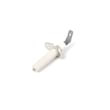
- Range oven igniter WP8054129 (common for oven/broil ignition problems)
- Check wiring connections for heat damage or looseness before replacing parts
- If the oven temperature seems erratic along with ignition issues, the sensor can be involved: oven sensor WPW10181986
Why it matters
A gas oven that does not ignite can allow gas to flow briefly without lighting, and a weak igniter can also cause long preheat times and inconsistent baking. Restoring reliable ignition helps the burner light quickly and cycle normally.
Last updated: January 2026







