Owner’s manual
 View engine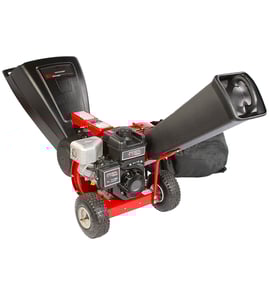


What can you not put in a wood chipper?
For the Craftsman chipper/shredder model 247776050, only feed normal yard debris and wood within the machine’s limits; never feed foreign objects (like metal or rocks) or anything that is not wood/yard debris because it can damage the impeller and blades and can be thrown back toward the operator. See the owner's manual for the approved materials and safe feeding steps.
Materials you should never feed
- Metal of any kind (nails, screws, wire, fencing)
- Rocks, gravel, dirt, or sand (including root balls packed with soil)
- Glass, bottles, cans, or plastic
- Rubber and other non-wood debris
- Anything larger than the rated size: branches over 3 inches in the chipper chute
- Fibrous, stringy plants when fresh (tomato vines, palm fronds); these wrap around the impeller and flails
What this model is designed to handle
This unit has two feed areas with different limits:
| Feed area | What to feed | Max size guideline |
|---|---|---|
| Chipper chute | Branches and wood only | Up to 3 in. diameter |
| Hopper assembly | Leaves, twigs, pinecones, small yard debris | Up to 1/2 in. diameter |
Safe feeding and jam prevention tips
- Inspect material first and remove all foreign objects before shredding.
- Feed one branch at a time into the chipper chute.
- Use intermittent pressure on larger branches to prevent bogging.
- Do not overload the hopper; let material pull in and shred before adding more.
- If you must push material, use a small-diameter stick (not hands or feet).
- If you hear unusual noise or vibration, shut the engine off and let all moving parts stop before checking for damage.
Why it matters
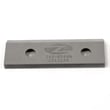
Foreign objects and oversized material can chip or bend chipper blades, damage the impeller, clog the discharge, and increase kickback risk. Keeping debris clean and within size limits protects key wear parts like the chipper/shredder blade.
Last updated: February 2026
Are homeowner wood chippers worth it?
Yes, a homeowner wood chipper can be worth it when you do regular yard cleanup and want to turn branches and brush into manageable chips or mulch without repeated rentals. For the Craftsman 247776050 chipper/shredder, it is most worthwhile if your typical material fits its feed limits (up to 3-inch branches in the chipper chute).
When a homeowner chipper is a good buy
A chipper/shredder pays off fastest when you use it often and stay within the machine’s intended capacity.
- You prune trees or clear brush several times per season
- You want to reduce yard-waste volume for easier hauling or composting
- You prefer making your own mulch from branches and twigs
- You have storage space and can handle routine maintenance (blade checks, fastener checks)
- Your typical branches are 3 inches diameter or smaller for chipping
When renting (or skipping) makes more sense
If your use is occasional or your material is consistently oversized, ownership is less practical.
- You only chip once a year (storm cleanup only)
- Most of your debris is larger than 3 inches diameter
- You need high throughput for big piles in a short time
- You do not want to maintain blades, screens, and hardware
Craftsman 247776050 capability check (quick guide)
Use this as a simple “fit test” for your yard.
| Yard material | Best feed area | Practical limit (typical) |
|---|---|---|
| Twigs and small branches | Chipper chute | Up to 3 inches diameter |
| Leaves and small branchy debris | Hopper assembly | Up to 1/2 inch diameter |
For operating and safety details (including feeding technique and bag attachment), follow the owner's manual.
Why it matters
Staying within the chipper chute and hopper limits prevents clogs, stalling, and premature wear on the impeller and cutting components. Sharp blades also directly affect performance; when output drops, replacing the chipper blade is a normal maintenance step.
Last updated: February 2026
What is the difference between a chipper shredder and a chipper shredder?
On the Craftsman 247776050, “chipper” and “shredder” refer to two different ways the same machine processes yard debris: the chipper chute is intended for woody branches and makes chips, while the hopper is intended for lighter material and makes finer shredded output. For the exact feed limits and safety rules, use the owner's manual.
What “chipper” vs “shredder” means on this model
- Chipper chute (small chute): feeds twigs and small branches into the impeller for chipping.
- Hopper assembly (large hopper): feeds leaves and smaller material for shredding (and light chipping).
- Discharge chute/deflector: directs the processed chips and shredded debris out of the machine.
- Feeding tools: use the tamper plug as directed to keep hands away from moving blades.
Quick comparison
| Function | Where you feed material | Best for | Typical result |
|---|---|---|---|
| Chipping | Small chipper chute | Woody twigs and branches | Coarser chips (mulch-like) |
| Shredding | Large hopper assembly | Leaves and light yard debris | Finer pieces (compost-friendly) |
Why it matters
Using the correct opening improves performance and reduces jams and kickback. It also helps protect wear parts such as the chipper/shredder blade and the shredder screen.
If it clogs or performance drops
- Shut off the engine and wait for all moving parts to stop before clearing a jam.
- Keep shields and guards in place; wear eye protection.
- Inspect cutting parts for wear; a dull blade commonly causes poor chipping and frequent clogging.
- Replace worn cutting parts when needed, such as the mtd chipper/shredder blade 942-0571 or chipper/shredder blade 942-0544B.
Last updated: February 2026
What are the common problems with chipper machines?
Common problems on the Craftsman 247776050 chipper/shredder include clogged discharge areas (screen or chute deflector), poor chipping from dull blades, engine starting or running issues (fuel, choke, spark plug, air cleaner), and excessive vibration from loose parts or a damaged impeller. Our owner's manual covers safe clearing and maintenance steps.
Most common symptoms and what usually causes them
- Clogs or no discharge: material added too fast; clogged chute deflector; clogged flail screen
- Slow discharge or poor chip quality: low engine RPM; dull chipper blade
- Engine will not start: choke not set correctly; spark plug wire disconnected; stale fuel; faulty spark plug
- Engine runs rough or lacks power: dirty air cleaner; water or dirt in fuel; running on CHOKE
- Excessive vibration: loose fasteners; damaged impeller; foreign object lodged in the impeller area
Quick checks we recommend first
- Shut the engine off and let all moving parts stop; disconnect and ground the spark plug wire before clearing debris.
- Confirm correct feeding: branches (wood) only in the chipper chute, and feed one branch at a time.
- Stay within the model’s capacity: follow the maximum branch diameter and operating limits listed in the owner's manual.
- Run at full throttle for best chipping performance; low RPM reduces discharge and increases clogging.
- Inspect wear and restriction points: check blade sharpness and clean the screen and discharge path.
Parts that commonly solve performance problems
| Problem you see | Likely fix | Example part for this model |
|---|---|---|
| Poor chipping, more tearing than cutting | Replace dull chipper blade | Mtd chipper/shredder blade 942-0571 |
| Frequent clogging, restricted discharge | Clean or replace screen | Mtd chipper/shredder screen 781-0457-0637 |
| Heavy vibration or banging | Inspect impeller and mounting hardware | Mtd chipper/shredder impeller assembly 681-04095 |
Why it matters
Clogging, slow discharge, and vibration usually start as maintenance or operating issues; if you keep feeding material, they quickly turn into damage to the chipper blades, flails, or impeller. Keeping the blade sharp and the discharge area clear prevents most breakdowns.
Last updated: February 2026