Owner’s manual
 Error Codes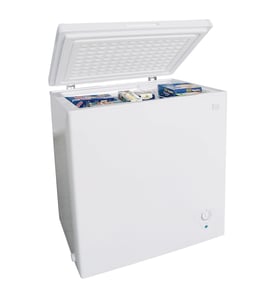



How big is a Kenmore chest freezer model 2539155110?
Kenmore chest freezer model 2539155110 measures 35 inches wide x 33.1 inches deep x 33.3 inches high (approximate exterior cabinet dimensions). For the exact spec listing and any clearance notes, use the 2539155110 owner's manual.
Dimensions and what they mean
Use these measurements for space planning and doorways:
- Width: 35 in (side to side)
- Depth: 33.1 in (front to back)
- Height: 33.3 in (floor to top of closed lid)
- Plan for airflow: leave space around the cabinet for ventilation
| Measurement | Size (inches) | Best use |
|---|---|---|
| Width | 35 | Fit between walls/cabinets |
| Depth | 33.1 | Fit in alcoves; check lid hinge area |
| Height | 33.3 | Under counters or shelves |
How we recommend measuring at home
Even with published dimensions, we recommend confirming your actual unit before moving it:
- Measure the widest cabinet point (ignore minor lid overhang unless it affects your space).
- Measure depth including hinges if the back sits close to a wall.
- Measure height with the lid closed; then confirm you have room for the lid to open.
- Keep the freezer level so the lid seals correctly.
Why it matters
Correct dimensions prevent installation problems, protect airflow for efficient cooling, and help avoid lid clearance issues that can damage hinges or reduce access to stored food.
Last updated: February 2026
How do you reset a Kenmore freezer?
For Kenmore chest freezer model 2539155110, a true “reset” is done by turning the temperature control OFF, unplugging the freezer for about 5 minutes, then plugging it back in and setting the control to your normal setting. Use the 2539155110 owner's manual for the exact control location and feature buttons.
Quick reset steps (works for most chest freezers)
- Turn the temperature control to OFF.
- Unplug the power cord from the outlet.
- Wait 5 minutes (this lets the control and compressor protection reset).
- Plug the freezer back in.
- Set the temperature control back to your normal setting.
- Allow about 4 hours for the freezer to cool down after being off or disconnected.
If you are trying to reset an alarm (not the freezer)
This model uses a Temp Alarm feature. If the alarm is sounding, you can silence it by pressing the Temp Alarm OFF button; the indicator light can keep blinking until safe temperatures return.
- If you just installed the freezer or had an extended power outage, a blinking red light can be normal until temperatures recover.
- Turn the Temp Alarm back on after the freezer reaches freezing temperatures.
What to check if it still will not run after a reset
- Make sure the temperature control is not set to OFF.
- Confirm the plug is fully seated in the outlet.
- Check the house circuit breaker or fuse.
- If the freezer was recently unplugged, give it time; cooling down can take about 4 hours.
- Keep the lid closed as much as possible so the freezer can pull down temperature.
Reset vs. what it does (at a glance)
| What you do | What it resets | What it does not fix |
|---|---|---|
| Unplug 5 minutes, then restart | Control logic and compressor restart delay | Sealed-system issues, refrigerant leaks |
| Press Temp Alarm OFF | Silences the alarm buzzer | Warm freezer condition |
Why it matters
A chest freezer can have a built-in compressor protection delay; unplugging briefly and restarting prevents rapid cycling and helps you confirm whether the issue is power/control related or a cooling-system problem.
Last updated: February 2026
Why is my Kenmore chest freezer beeping?
On Kenmore chest freezer model 2539155110, beeping is typically the Temp Alarm warning that the freezer temperature is in an unsafe range (common after initial setup, a door left slightly open, or an extended power outage). Use the steps in the owner's manual to silence the alarm and correct the cause.
What the beeping (Temp Alarm) is telling you
When the Temp Alarm is ON, the freezer sounds a buzzer if the storage compartment temperature rises too warm for safe long-term food storage. The red Temp Alarm light can keep blinking until the freezer returns to safe freezing temperatures.
Temp Alarm light and buzzer quick guide
| Indicator light | Buzzer | What it usually means |
|---|---|---|
| Off | Silent | Normal operation |
| Blinking red | Silent | Warm temp from initial installation or power outage |
| Blinking red | Sounding | Warm temperature condition (alarm active) |
How to stop the beeping and fix the cause
- Press the Temp Alarm OFF button to silence the buzzer (the light may keep blinking until temps recover).
- Confirm the lid is fully closed and sealing; a slightly open lid can warm the cabinet.
- Reduce lid openings; warm air enters every time the lid is opened.
- If you recently plugged it in or restarted it, allow about 4 hours for the freezer to cool down completely.
- Check the temperature control setting; if it is set too warm, adjust colder and allow several hours to stabilize.
- Look for gasket issues (dirty, cracked, or poorly fitted); air leaks can prevent the freezer from staying cold.
Why it matters
A temperature alarm is a food-safety warning. Addressing the cause quickly helps protect frozen food quality, reduces compressor run time, and prevents repeat alarms.
When to consider a repair
If the freezer is clearly freezing normally but the alarm keeps sounding or the indicator behavior is erratic, an electrical issue (such as a control or wiring problem) can be involved. For wiring checks, we use a meter and follow safe testing practices like those shown in how to use a multimeter to test electrical parts video.
Last updated: February 2026